Source Code Disclosure via Backup Files - PortSwigger
Using Burp Suite's content discovery to locate a backup source code file and retrieve a hard-coded database password.
Overview
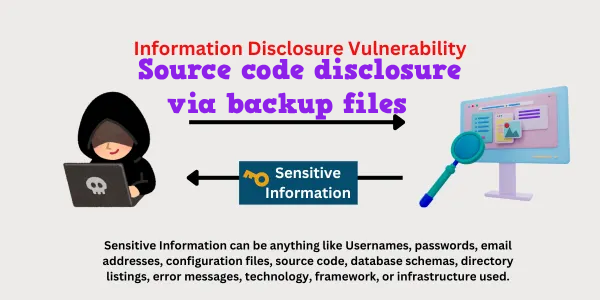
This lab demonstrates how publicly accessible backup files can expose an application’s source code and sensitive credentials. Using Burp Suite’s Discover content feature, I identified a backup directory containing a Java source code backup file. By inspecting the file, I located a hard-coded database password and submitted it to solve the lab.
Question / Lab Objective
The objective was to discover the leaked source code and retrieve the database password hard-coded within it.
Walkthrough
1. Exploring the application
After launching the lab, I accessed the target application and explored its available functionality. The website displayed a list of products, with individual product pages accessible through the interface.

I browsed the application to understand its structure and identify potential entry points for further investigation.
2. Inspecting a product page
I selected one of the products to examine its details.
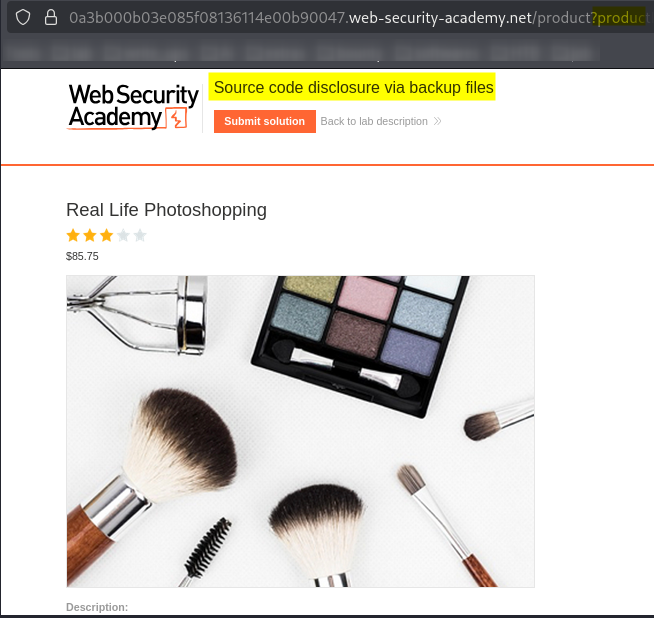
While inspecting the page, I observed that the URL contained a productId parameter used to identify the selected product.
However, the lab’s objective was not to manipulate the product identifier. Instead, I needed to discover a backup file containing the application’s source code and retrieve the database password stored within it.
3. Setting up Burp Suite and discovering content
I opened Burp Suite and used its built-in browser to access the lab. My goal was to discover files and directories that were not directly linked from the application’s interface.
In my previous lab, Information Disclosure on Debug Page, I practised examining Burp Suite’s site map and using its live passive crawl. For this lab, I wanted to practise a different feature: Discover content, which actively checks for potential files and directories using configured wordlists.
Tools such as FFUF and Gobuster can also be used for content discovery. However, I chose Burp Suite to learn how to perform the same type of investigation directly within the proxy tool.
The steps were:
- Open the Proxy tab and locate the request for the application’s home page (
/). - Right-click the relevant URL or request.
- Navigate to Engagement tools → Discover content.
- Open the Config tab and review the available settings.
- Keep the default configuration for this exercise, including the enabled built-in file and directory wordlists and the configured extensions.
- Switch to the Control tab.
- Start the content discovery session using the available control button and confirm the prompt if required.
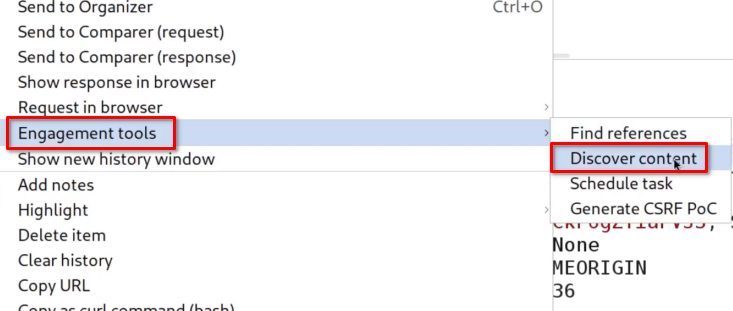
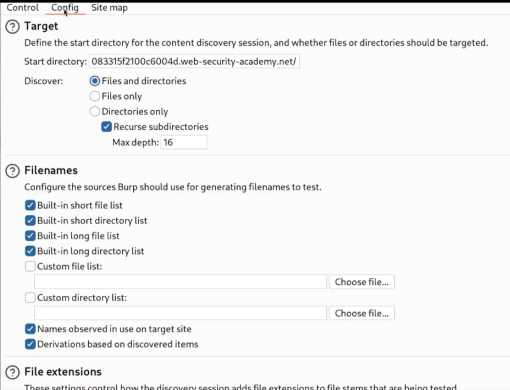
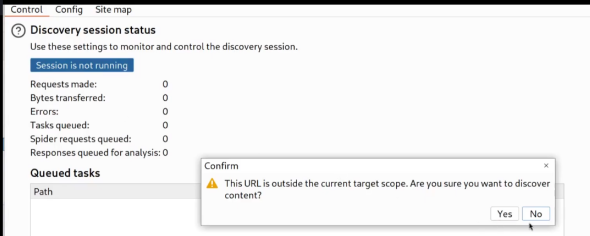
Why this matters: Content discovery tests for commonly named files and directories that may not be linked from the website. Depending on the configured wordlists and extensions, it can identify exposed backups, configuration files, and other potentially sensitive resources.
4. Discovering the backup directory
After running content discovery, I returned to Burp Suite’s Target → Site map view to examine the discovered paths.
I noticed a new directory named /backup in the site’s structure.
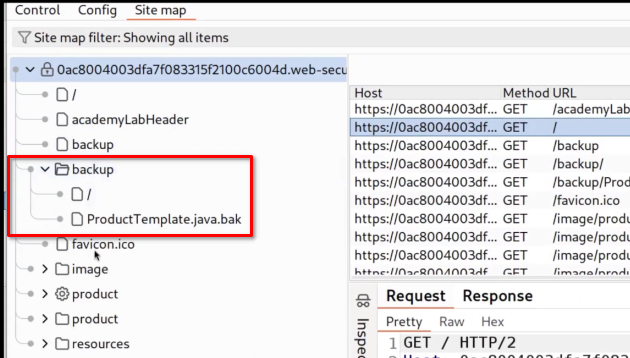
This was an important finding because backup directories can contain older copies of application files. If those files are accessible over HTTP, they may expose source code or information that should remain private.
I decided to investigate the directory further.
5. Inspecting the backup directory
I copied the URL for the discovered /backup directory and opened it in the browser to inspect its contents.
Inside, I found a backup file named:
ProductTemplate.java.bak
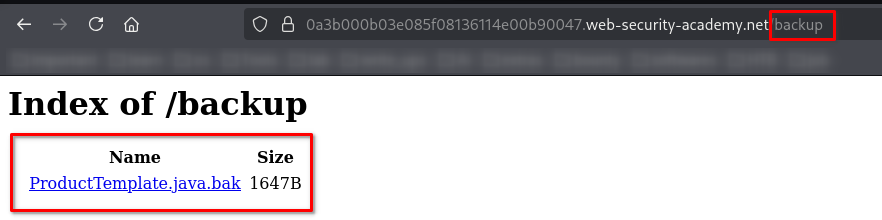
The .java extension indicated that the file contained Java source code, while the .bak suffix suggested that it was a backup copy.
Backup files are often overlooked during deployment. If a web server serves them as ordinary files, anyone who knows or discovers the path may be able to read their contents.
6. Examining the leaked source code
I opened ProductTemplate.java.bak and inspected the source code.
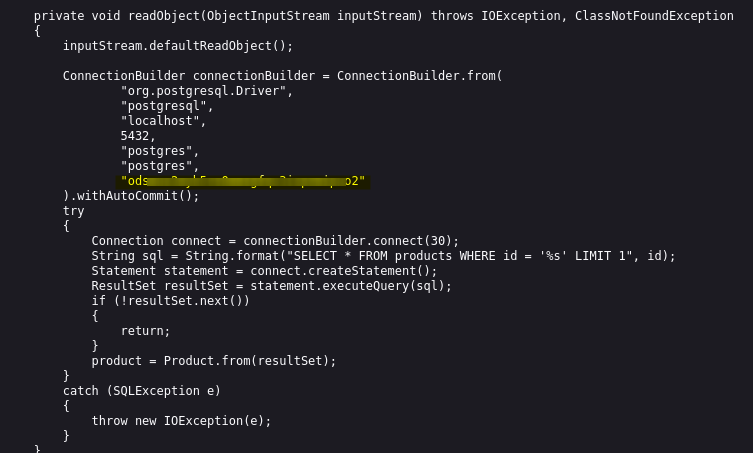
While reviewing the code, I found a ConnectionBuilder component containing database connection configuration. Within this configuration, I identified the hard-coded database password required by the lab.
This confirmed that the exposed backup file was more than an unnecessary leftover: it contained sensitive information that should not have been publicly accessible.
Key observation: The database password was embedded directly in the source code instead of being securely managed outside the application code.
7. Submitting the database password
After locating the database password, I copied its value and submitted it through the lab’s answer field.
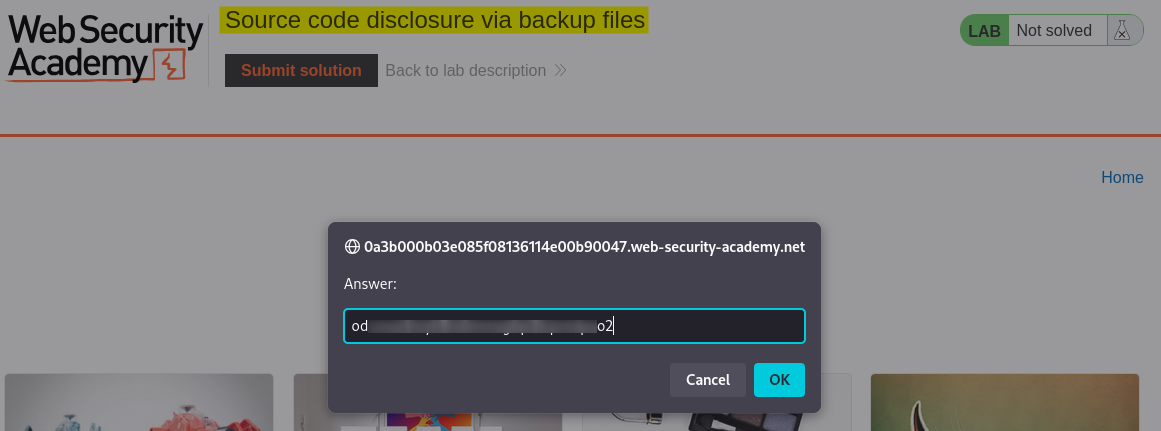
The application accepted the submitted value, confirming that I had successfully retrieved the requested credential.
8. Confirming lab completion
After submitting the correct password, the lab displayed the completion confirmation.

This confirmed that I had successfully exploited the information disclosure caused by the publicly accessible source code backup.
Key Takeaways
- Look beyond the visible application: A website’s main pages do not necessarily reveal all files and directories exposed by the server.
- Understand content discovery: Burp Suite’s Discover content feature can check for hidden paths using configured wordlists and file extensions.
- Inspect backup files: Files ending in extensions such as
.bak,.old, or.backupmay contain source code or configuration data. - Understand source code disclosure: Exposed source code can reveal application logic, internal implementation details, and hard-coded credentials.
- Recognize hard-coded secrets: Database passwords and other credentials should not be embedded directly in source code.
- Verify the actual impact: Identifying a backup file is the discovery step; confirming that it exposes sensitive information establishes the security significance of the finding.
Security Impact
Exposed source code can reveal internal application logic, database connection details, and implementation weaknesses. When a backup file contains hard-coded credentials, the impact may extend beyond information disclosure.
An exposed database password could allow unauthorized database access if the credential is valid, the database is reachable, and appropriate access controls do not prevent its use. Depending on the database privileges, this could lead to unauthorized data access or modification.
In this lab, the source code backup disclosed the database password required to complete the challenge. In a real-world assessment, the credential’s validity and potential impact would need to be assessed within the authorized scope.
Remediation
To prevent source code disclosure through backup files:
- Remove unnecessary backup files: Do not leave source code backups, temporary files, or development artifacts in publicly accessible web directories.
- Restrict access to sensitive directories: Ensure directories used for backups, deployment artifacts, and internal configuration are not exposed through the public web server.
- Avoid hard-coded credentials: Store database passwords and other secrets in an appropriate secrets manager or securely configured environment.
- Rotate exposed credentials: If a database password has been disclosed, assess the exposure and rotate the credential where necessary.
- Review deployment procedures: Include checks for backup files and sensitive artifacts before releasing an application to production.
- Apply least privilege: Limit database accounts to the minimum permissions required by the application.
Conclusion
This lab demonstrated how an overlooked backup file can expose an application’s source code and sensitive credentials. Using Burp Suite’s Discover content feature, I identified the /backup directory, located ProductTemplate.java.bak, and retrieved the hard-coded database password from the leaked Java code.
The main lesson is that information disclosure can result from simple deployment mistakes. Removing unnecessary backup files, protecting sensitive resources, and managing credentials securely can prevent these exposures from becoming more serious security issues.
Thanks for reading!